Guides
AIGC and AI Influencers: How to Create Content, Manage Accounts and Make Money
AIGC and AI Influencers: How to Create Content, Manage Accounts and Make MoneyGuides
Your virtual influencer’s next video is ready. It needs to go live, comments on the previous post are waiting for replies, and a brand has sent revisions for the next sponsored video. AI creates the character’s face and voice, but a team still handles the scripts, advertising and conversations with the audience.
Now imagine managing several of these creators. Each has a different language, personality, set of accounts and brand agreements. You need to keep publishing, track approvals and avoid mixing up conversations.
This guide explains what AIGC means, how to create an AI influencer, how virtual creators make money and where the Undetectable anti-detect browser fits into the workflow.
What is AIGC, and how does it relate to AI influencers?
AIGC stands for AI-generated content. It includes text, images, audio, video and other digital material produced with artificial intelligence. The term describes how content is made, rather than a particular job or business model.
An AI influencer is one application of AIGC: a virtual character whose accounts publish content and interact with an audience. The character can have a recognizable appearance, a consistent voice, a personality, interests and an ongoing story.
Virtual influencers can also be made with 3D graphics. Here, we focus on AI influencers whose images and videos are generated using AI tools.
One good portrait is not enough to build a following. A character needs things to talk about, a personality and a story worth following. That is what creates an audience and opportunities to earn money.
How AI influencers make money
There are several ways to earn money with an AI influencer: sponsored posts, content production for clients, character licensing and your own products. The right choice depends on what you already do well, whether that is attracting viewers, developing characters or making good videos.
Brand partnerships
A brand pays to appear in the virtual creator’s content. This might be a single video, a series of posts or a role in a wider campaign.
Pink-haired Aitana López, created by The Clueless, collaborated with the Llongueras salon chain. Its stylists developed an iced pink bob for her, and Aitana’s team brought the new look into her images. The sponsored post followed a familiar beauty-content storyline: getting a new haircut.
Aitana López in the Llongueras campaign.
Moroccan creator Kenza Layli, the winner of Miss AI 2024, appeared in a Hyundai KONA campaign alongside presenter Hicham Masrar. The campaign featured three chase-themed videos, bringing a real person, an AI character and a car into the same story.
Meliá Hotels went beyond a one-off sponsored post: Alba Renai became the lead character in a summer-long project. Her team produced more than 50 pieces of content covering over 10 destinations. The collaboration also included a giveaway for a trip to Punta Cana. A series like this can keep a creator’s team working for several months.
Alba Renai and Meliá give away a trip to Punta Cana.
Portugal’s Olivia C has a partnership with XPENG. The G6 electric vehicle campaign used Reels, Stories and static posts. An AI character was a fitting choice for a car brand built around technology.
Olivia C, an AI character from Falamusa and an XPENG partner.
To pitch partnerships to brands, put together a media kit: what your account covers, who watches it, how many views your posts receive and what an integration could look like. Agree on the number of videos and revision rounds, deadlines and whether the client can reuse the content in its own advertising. These details affect both the workload and the price.
Producing AI content for businesses
You can start by making content for clients: videos with a virtual presenter, product demonstrations, feature explainers or ads adapted into different languages. You do not need to build your own following first. Clients want to see your portfolio and know whether you can deliver the video they need.
These videos are often called AI UGC. They resemble user-generated content: a character talks to the camera, discusses a product or demonstrates it. Instead of filming a person, the team uses a synthetic character. Your proposal should specify how many videos the client receives, which languages they cover and how many revision rounds are included.
A company can also commission its own recurring presenter. Ecovidrio’s Aràn, for example, talks about glass recycling and environmental issues on Instagram and TikTok. For a production studio, this kind of project starts with character development and can lead to ongoing content work.
Aràn, Ecovidrio’s virtual presenter.
Another option is working with media companies. Alba Renai became the presenter of Supersecretos, an online companion show to the reality series Supervivientes. Episodes like these need writers, editors and specialists who produce the character’s videos.
Licensing a character
You can also license a character’s likeness to brands. ZELU House works this way, creating content and offering licenses for its AI characters. They include Mia Zelu, Ana Zelu and Luka Zelu, who focuses on music.
Mia Zelu, one of ZELU House’s characters.
A license allows a client to use the character in its own material. Agree on the terms upfront: where the character will appear, how long the campaign will run, whether the client can change the character’s appearance and whether other contractors can use the assets.
Affiliate marketing
An AI influencer introduces a product and directs viewers to an affiliate link or promo code. Earnings depend on the program’s terms, such as a commission on a purchase or paid subscription.
The offer should fit the audience. A character who talks about design can naturally introduce image-editing tools. A language tutor can recommend useful learning materials. Track clicks, purchases and commissions alongside video views.
Subscriptions and paid content
Part of the account’s content can sit behind a subscription: extra episodes, a private community or a chance to help shape the character’s story. Fanvue supports AI accounts, for example. The account owner must complete verification and disclose that the character is AI-generated.
Subscribers need a reason to keep paying. Decide what they will receive each month, whether that is a set of episodes, bonus material or access to a private community.
Your own products and platform payouts
A recognizable character can help sell merchandise, courses, digital products or your team’s services. For example, @jeanphilanthrope.co directs viewers to merchandise and masterclasses. Viral videos attract attention, while profile links help turn that interest into purchases.
Jean Phil’s profile promotes merchandise and masterclasses.
Platforms can also pay creators whose accounts meet their program requirements. Endless variations of one video are a weak foundation, though: YouTube can deny monetization to mass-produced, repetitive content. Keep that in mind when planning a series.
How to tell whether a project is profitable
Calculate the full cost of a finished video. Beyond AI subscriptions and credits, you spend time on scripts, failed generations, editing, voiceovers, client messages and revisions. Sometimes repeated attempts consume most of the budget.
Suppose you sell a video package for $1,500. Generation and tools cost $200, editing and audio cost $300, and the team’s work costs $500. That leaves $500 before taxes, client acquisition and other expenses. This is an illustrative example, not a market rate. Set your own prices after a few trial projects, once you know how long the work actually takes.
How to create an AI influencer: step by step
1. Choose an audience and a topic
Start with a question: who would find this character interesting, and why?
Existing AI creators show how different the answers can be. Anne Kerdi talks about Brittany, Seren Ay creates fashion and lifestyle content, and Lalina Launay presents herself as a Parisian fashion enthusiast. Each has a different reason to appear in someone’s feed.
Choose a topic you can imagine making at least ten posts about. For example:
- a virtual stylist who puts together outfits for a small wardrobe;
- a presenter of short language lessons;
- a character in a comedy series about office life;
- a digital creator who reviews design tools.
Before generating the character’s appearance, choose a language, a platform and your first recurring formats. Think about income, too: advertisers, video-production clients and paying subscribers want different things from a project.
2. Write a character guide
Keep the character’s description in one document. It will help when generating new scenes and when another person joins the project.
Describe how the character looks and speaks, what they care about and which jokes suit them. Add a few sample lines and details from their fictional backstory that should stay consistent across posts.
Decide separately what the character can say about products. They can explain an app’s features, but saying “I personally tested it for three months” would present a fictional experience as a real customer testimonial.
This guide helps the writer, designer and person replying to comments maintain a consistent personality.
3. Prepare visual references
A common problem with generation is that the character looks slightly different in the next video. Their face, hairstyle, proportions or even eye color can change.
Start by selecting a few strong images: a portrait, a three-quarter view and a full-body shot. Use them as references for new scenes and compare the results against them.
4. Make a test series
Produce several videos in a row. You will learn how long regular production takes and which scenes you should avoid promising to clients for now.
Try a short explanation, an answer to a question, a brief story and a product demonstration. Record how many attempts each takes and what you need to redo.
In your prompt, separate the details that must stay consistent from those that change in the new scene. For example:
Use the attached character reference. Preserve the facial features, hairstyle and clothing. Vertical medium shot with a neutral background. The character looks at the camera and makes one relaxed hand gesture. The camera stays still. Do not add text or logos.
Watch the entire generated video with sound. A convincing still frame can hide an awkward movement or a voiceover mistake.
Check the face, hands, objects, lip movements, pronunciation and factual claims. Make sure the script still sounds like the character.
How AI influencers join trends
An AI influencer can recreate a popular dance, gesture or funny scene from Reels and TikTok. Viewers recognize the trend but see a new character performing it, such as a deadpan man in a formal suit instead of the usual dancing creator. That contrast can catch attention, spark comments and give people a reason to share the video with friends. Trends can help introduce the character to new audiences and build a following.
You do not have to describe every movement in a prompt. A motion-transfer tool can take a source video and an image of your AI influencer. It uses the video as a reference, transferring movements, gestures and facial expressions to the character. The result can closely match the original’s actions and rhythm.
Choose trends that fit the character’s personality so they remain recognizable from one video to the next. You can record your own version of a trend as a reference or use a video you have permission to adapt. Before posting, check that the character’s face stays consistent and the motion has no obvious errors.
Example: a three-video pilot for a virtual stylist
Suppose you are launching a virtual stylist who helps people build a small everyday wardrobe. The first video introduces the character, the second shows three ways to wear one jacket, and the third answers a question about fit.
Choose a portrait and a full-body image. Prepare key frames, animate the scenes or create a talking avatar, then add the voiceover and edit the video. Save successful prompts and references so you do not start from scratch next time.
If you show a real product, compare it with the original: do the color, shape, details and logo match? A jacket that changes between shots is unlikely to satisfy an advertiser. After publishing, look at where viewers stop watching and what they ask about. Those observations will help you choose the next video’s topic.
How to run an AI influencer account consistently
To publish regularly, agree on how the work moves through the team: who writes the script, who checks the generated content and who approves publication.
A simple starting point is:
idea → script → generation → review → editing → approval → publishing → analysis.
Keep the script, source files, finished video and published link together. Mark the approved version clearly. This saves you from searching through chat threads and accidentally posting a draft.
Plan recurring formats
A few regular formats make it easier to decide what to publish next. A virtual stylist can alternate between outfit ideas, common mistakes and answers to questions. A regional travel character can cover places, local stories and routes.
Keep the presentation familiar while changing the substance. In Alba’s travel series, viewers can recognize the same character while discovering a new place each time. If only the background changes, they quickly run out of reasons to come back.
Turn comments into new topics
Read comments for more than questions to answer. If people keep asking about the same detail, it may deserve a video of its own. A confusing moment in one video is a reason to explain it differently in the next.
Agree on how the character speaks to viewers and which questions go to a human. Simple questions can use prepared information. Sponsorship offers, complaints and payment questions are better handled personally.
Platform rules to consider
Check each platform’s rules before launching. Being allowed to post an AI video does not automatically make it eligible for payouts: monetization programs have separate requirements.
Instagram: labeling a virtual character
Instagram offers an AI-generated profile label for accounts featuring a realistic AI character. It helps viewers recognize that the person on screen is fictional.
An account’s reach may be restricted if it does not use the required label. Simply editing a photo of a real person with AI, however, does not by itself turn the account into an AI-character profile.
TikTok: realistic AI content and payout requirements
TikTok requires labels for realistic AI-generated images, audio and video. The label itself does not reduce distribution if the content follows the rules. It also does not make otherwise prohibited content acceptable.
If you plan to earn through Creator Rewards, focus on original, high-quality videos longer than one minute. Sponsored posts are not eligible for this program, so count brand fees and TikTok payouts separately.
YouTube: AI disclosure and originality
YouTube requires AI disclosure when you generate a realistic scene or significantly alter what happens on screen. Using AI for scripts, ideas or subtitles does not, by itself, require the same label.
An AI label alone does not reduce a video’s reach or make it ineligible for monetization. But originality requirements still apply: a stream of nearly identical videos can prevent you from earning money.
Advertising also needs a commercial disclosure. On TikTok, this is a separate setting. An AI label does not replace it.
Why AI influencers use an anti-detect browser
With one character, you can focus mainly on content. A second or third brings more account work: switching logins, keeping sessions, checking posts and giving colleagues access.
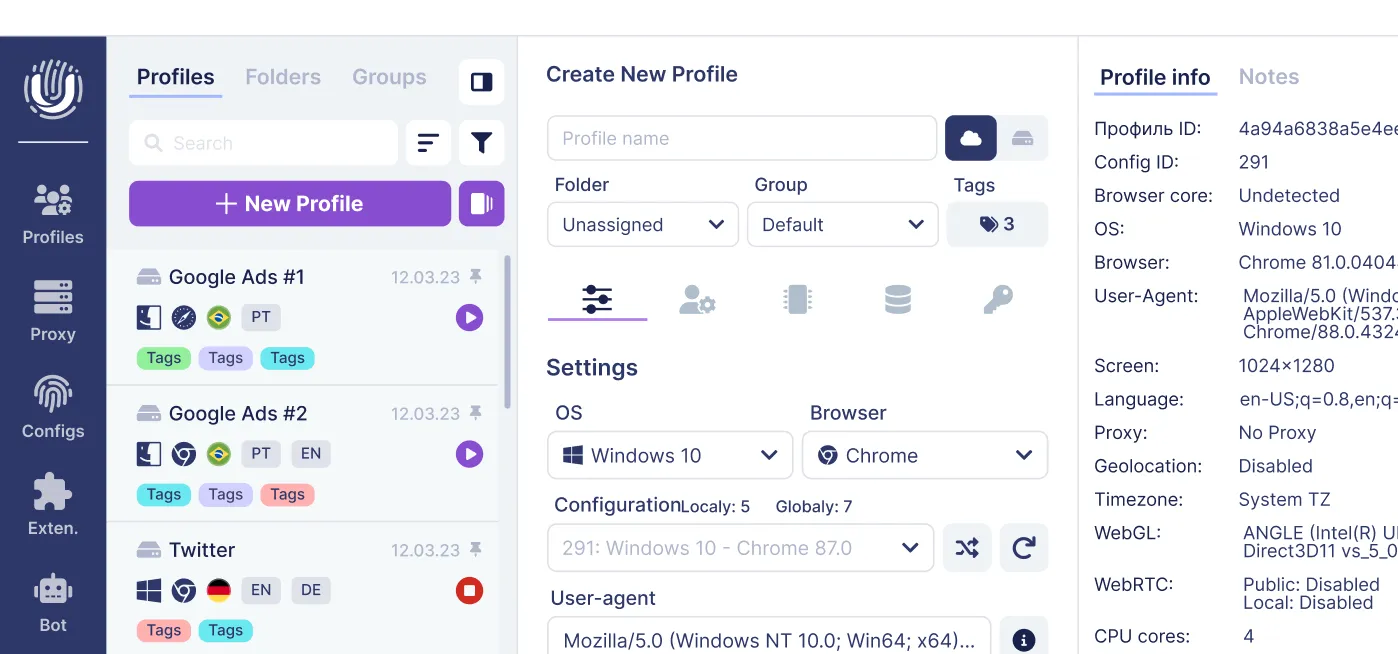
Undetectable lets you create a separate browser environment for each project. You keep making images and videos in your preferred AI tools while managing each character’s accounts in dedicated profiles.
A separate profile for each character
Start by creating a dedicated browser profile for each character.
For example, Mira_EN can hold the accounts of your English-speaking virtual stylist, while Luna_PT is for a Portuguese-language travel creator. Each profile keeps its own cookies, sessions and account settings.
Give profiles clear names and add folders or tags by client, language or launch stage.
Before publishing, it becomes easier to check that you are in the right account, replying as the right character and viewing the correct analytics.
Browser fingerprint settings
An ordinary browser can separate cookies and sessions too. Undetectable adds control over the browser fingerprint: the characteristics of the browser environment that websites can see.
You can choose different settings for different projects. This does not guarantee that a platform can never link the accounts. Its rules on account ownership, content and automation still apply.
Proxies and different locations
You can assign a proxy to a specific profile. Proxy Manager lets you add connections, check them and distribute them across projects.
A proxy in a particular country does not guarantee that people there will see your videos, and it does not automatically give you access to local monetization programs.
For example, TikTok considers viewer interactions, information about the video and user information. For many viewers, watch time carries more weight than other signals.
To reach a new audience, adapt the language, topics and presentation, then see which videos actually resonate.
Working as a team
When the writer, designer and account manager are different people, agree on responsibilities and access in advance.
Teamwork in Undetectable includes cloud profiles, groups, roles and permissions. The available features depend on your plan and settings.
Assign someone to approve each final video. Everyone else should know where to find the approved file and whether it is ready to publish.
Using an AI agent and MCP to manage accounts
The Undetectable MCP server lets you connect an AI agent to the browser and delegate some recurring tasks.
For the Mira_EN profile, for example, a comment workflow could look like this:
- Open the character’s browser profile.
- Check the selected account.
- Collect available comments.
- Draft replies using the project’s guidelines.
- Carry out approved actions.
- Save the results for review.
Specify what the agent can do on its own and where it must wait for a person. It can draft an answer about clothing sizes using catalog information, while sponsorship negotiations go to a manager.
Ask the agent to collect recurring questions and topics that interest viewers, too. You will have a list of ideas from the comments ready for the next video.
FAQ
Does AIGC mean running AI influencer accounts?
AIGC covers all content created with AI, including text, images, audio and video. A virtual character’s social account is one way to use it. Running that account also involves publishing, talking to viewers and working with advertisers.
Can I create an AI influencer without coding?
Yes. Many tools work through a standard interface: upload references, enter a prompt or script and review the result. At the start, learning to keep the character’s appearance consistent and make engaging videos matters more than programming.
Can I make money without a large audience?
Yes, by producing content for clients. You can start with a portfolio and a few strong sample projects. Sponsorships on your own account, affiliate offers and subscriptions require an audience interested in what you offer.
Do I need an anti-detect browser?
You do not need one to test a single character. Undetectable becomes useful when you manage several projects. Its profile tools help you manage many AI identities across different markets while keeping their browser environments organized and separate.
Can Undetectable hide the fact that content is AI-generated?
No. Undetectable manages browser environments and account sessions. It does not change how a video was created or replace AI-content labels.
Can an AI agent run the account?
Undetectable’s MCP integration lets you connect an AI agent to automate account tasks such as publishing, replying to comments, analyzing available statistics and collecting data. How complex the workflow can be depends on the connected AI model. Set approval rules for actions that need human review.
Start with one character and a clear workflow
One character and a few good videos are enough to begin. Test whether you can keep their appearance consistent, how long production takes and which topics interest viewers. Then choose how to earn: pitch advertisers, take content-production orders or build your own product.
As you add characters, give each one a dedicated Undetectable profile. Save sessions and settings, assign access and agree on a publishing process. You can then add projects without mixing up accounts or conversations.
Try Undetectable for free — the free plan includes 5 cloud profiles. Unlimited local profiles are available on every paid plan.
Related posts
View all articlesJoin 450,000+ users who chose Undetectable
- Advanced anti-detection technology
- Unlimited local profiles from $49
- The perfect solution for multi-accounting