Chrome proxy: complete guide to manual settings, PAC scripts, and extensions
Chrome proxy: complete guide to manual settings, PAC scripts, and extensionsReviews
Every request your Chrome browser makes - HTTP, HTTPS, WebSocket - can be routed through an intermediary before reaching its destination. Configuring that intermediary at the browser level is what most people mean when they talk about a chrome proxy. This guide covers every layer of proxy configuration available in Chrome in 2026, from basic OS-level setup to advanced PAC scripts and anti-detect profile management.
What is a Chrome proxy and why it matters in 2026
A proxy server acts as an intermediary between your computer and the internet.When a proxy is configured through a Chrome extension, command-line option, or an isolated anti-detect profile, it can affect only that browser profile. However, proxy settings opened through Chrome's standard interface on Windows or macOS are usually system-level and may also affect other applications that use the operating system's proxy configuration.
This distinction matters because proxies enhance privacy by hiding the user's IP address from websites. They can also help bypass geo-restrictions and censorship, making them essential for ad arbitrage on Meta and TikTok, e-commerce account farming on Amazon, SEO monitoring across regions, sneaker reselling, and general privacy protection. Proxies are not the same as VPNs, as they usually do not encrypt all traffic end-to-end by default, and choosing among the best proxy services for professional use is critical if you rely on them for work.
Aspect
Chrome Proxy
System Proxy
VPN
Affects only browser traffic
✅
❌ (all apps)
❌ (all apps)
Per-profile granularity
✅ (via anti-detect)
❌
❌
Built-in encryption
Depends on type
Depends
Always
Setup complexity
Low–moderate
Low
Low
Key benefits of a browser-level proxy:
Isolate traffic per browser profile without touching other apps
Flexible geo-targeting for campaigns and research
Easier rotation and credential management
Reduced detection risk when combined with fingerprint isolation
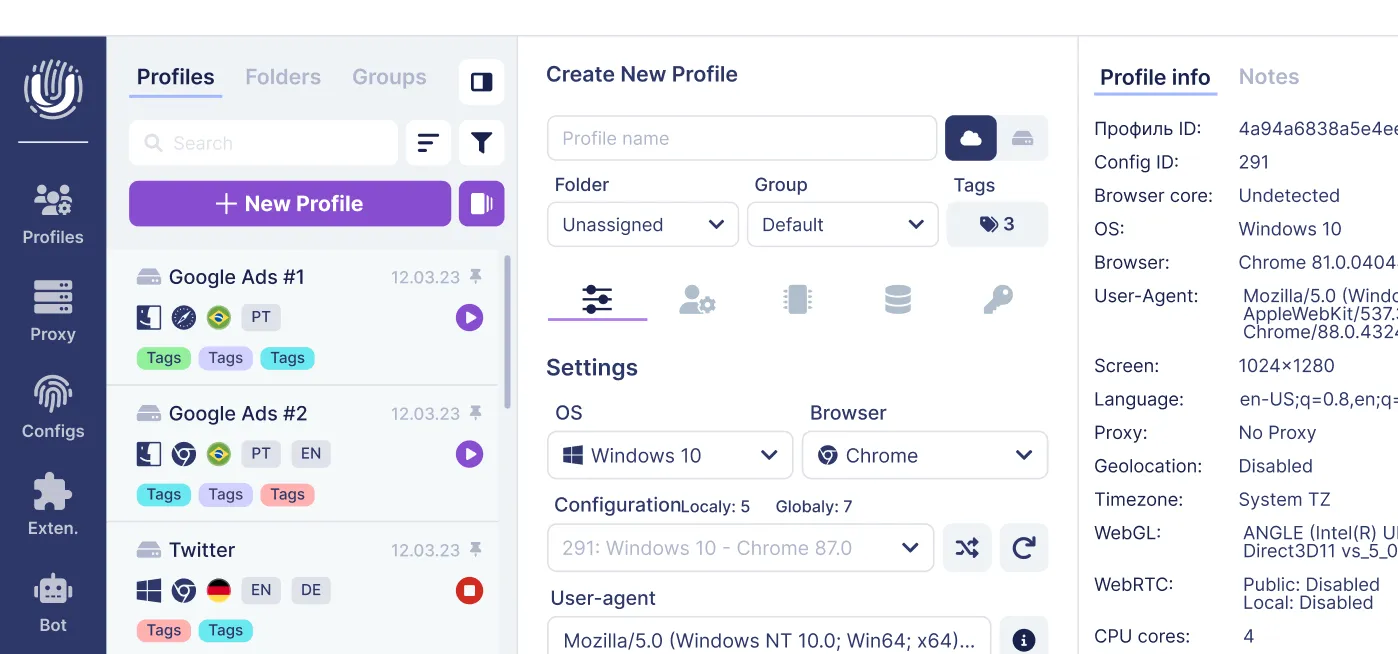
Undetectable.io anti-detect browser takes this concept further by running a Chromium-based engine where each profile gets its own fingerprint, cookies, storage, and dedicated proxy - all without affecting system settings.
How Chrome proxy configuration works under the hood
When Chrome processes a URL request, it runs through a proxy resolution sequence: determine the active proxy mode, evaluate bypass rules, select a proxy (or go direct), attempt the connection, and fall back if the proxy fails.
Chrome recognizes several configuration sources, each with its own precedence. The effective proxy configuration depends on the active Chrome policies and configuration source. Managed policies can override or disable command-line, extension, and user-controlled proxy settings. Without managed policies, Chrome may obtain proxy settings from command-line flags, extensions, or the operating system. You can inspect the effective proxy settings via chrome://net-internals/#proxy.
Chrome only works with an explicit proxy - one you consciously configure. Transparent proxies inserted by ISPs or networks are invisible to the browser and cannot be managed through Chrome's proxy settings.
The three main methods at a glance:
Manual proxy settings: fixed host, port, and bypass list - simplest approach
PAC scripts: JavaScript-driven logic for routing decisions per URL
Auto-detect (WPAD): network-based discovery of a PAC file, common in corporate environments
Most advanced control comes through a chrome extension using the proxy api (Manifest V3) or through enterprise policies, while casual users rely on OS dialog boxes.
Manual proxy settings in Chrome (Windows, macOS, Linux)
Chrome's UI defers to your operating system for proxy configuration. When you change system proxy settings, Chrome inherits them. For a detailed walkthrough, see our guide on how to add proxy to Chrome browser. Manual proxy settings allow specifying a list of proxy server identifiers for each protocol.
Windows 11 (mid-2026):
Open Settings → Network & internet → Proxy
Under Manual proxy setup, toggle Use a proxy server on
Enter the ip address and port number provided by your proxy provider
Add any bypass rules in the exceptions field
Save and restart Chrome
macOS 14/15:
Open System Settings → Network → your active interface → Details → Proxies
Enable Web Proxy (HTTP), Secure Web Proxy (HTTPS), or SOCKS Proxy
Enter the server address and port
If your provider requires credentials, check "Proxy server requires password" and fill in the fields
Click OK and apply
Proxy providers typically supply credentials in formats like ip:port, ip:port:username:password, or login:password@ip:port. Chrome handles proxy authentication through the HTTP 407 challenge - it does not parse embedded credentials from the proxy string itself.
Proxy settings can be configured globally or per network in ChromeOS, giving Chromebook users additional flexibility.
When using Undetectable.io, configure proxies per profile inside the app rather than at the OS level. This prevents all system traffic from routing through the proxy and keeps each profile isolated.
Common mistakes to avoid:
Entering a SOCKS port in the HTTP proxy field
Using an ip literal with incorrect format (e.g., missing brackets for IPv6)
Forgetting to save and restart the browser after changes
Chrome's proxy schemes and what they mean (HTTP, HTTPS, SOCKS4, SOCKS5, DIRECT)
Chrome supports HTTP, HTTPS, SOCKSv4, and SOCKSv5 proxy schemes, each with distinct behavior for how traffic is routed and secured.
DIRECT is a pseudo-scheme meaning no proxy: the DIRECT proxy scheme sends requests directly to the target server. It appears in bypass rules, PAC output, and fallback chains.
HTTP proxy is the most common type. HTTP proxies can proxy http://, https://, ws://, and wss:// URLs. For HTTPS destinations, Chrome uses the CONNECT method to create a tunnel - the proxy sees the target hostname but cannot read encrypted payload.
HTTPS proxy wraps the connection between Chrome and the proxy itself in TLS. This hides even the CONNECT hostname from on-path observers like ISPs or Wi-Fi operators. Useful on untrusted networks but requires explicit proxy configuration rather than legacy OS dialogs.
SOCKSv4 is limited: IPv4 only, no proxy authentication, client-side DNS. SOCKSv5 is more capable - SOCKSv5 allows for proxy-side name resolution and handles IPv6. However, Chrome's native SOCKS5 implementation does not support username/password auth directly; commercial tools like Undetectable.io and proxy extensions handle authentication at the application layer.
Which scheme should you pick?
HTTP proxy: standard web scraping, ad account management, general browsing
HTTPS proxy: public Wi-Fi, sensitive operations where you need encryption to the proxy
SOCKS5: geo-rotation, remote DNS, IPv6 support, or when HTTP proxy support is limited on your provider
Manual proxy is the simplest mode: a static list of proxy host and port per scheme, plus a bypass list. It works well for individual users, simple Chrome proxy extensions, and fixed setups.
PAC script mode uses a .pac file containing a JavaScript function findproxyforurl(url, host) that returns routing instructions like "HTTPS proxy.example.com:443; DIRECT". PAC scripts can route requests by domain, URL scheme, port, IP range, and other available signals. Path-based routing should not be relied on, because Chrome strips paths and query parameters from HTTPS URLs before passing them to FindProxyForURL(). PAC scripts define proxy resolution using JavaScript programs, giving organizations fine-grained control.
Auto-detect (WPAD) tells Chrome to discover a PAC file via DHCP or DNS lookup for a wpad host. This is common in corporate networks but carries security concerns: DNS-based WPAD on untrusted networks can be spoofed, potentially routing your traffic through a malicious proxy.
An enterprise might host a PAC file at https://proxy.company.com/proxy.pac and push it via policy so all Chrome instances on managed devices route external traffic through a secure proxy while accessing internal resources directly.
Undetectable.io users typically avoid WPAD entirely, preferring manual or API-configured proxies per profile to prevent unexpected routing.
When to use which:
Corporate employee: WPAD or PAC via IT policy - minimal choice
Solo affiliate marketer: manual proxy or extension-based switching
Growth team with dozens of accounts: per-profile manual via anti-detect browser, combined with bypass rules for latency optimization
Proxy rules, bypass list, and URL patterns
Chrome builds proxy rules that map url patterns to specific proxies, then applies bypass rules - also called a bypass list - that send matching traffic direct. Proxy bypass rules determine URLs that skip proxy usage in Chrome.
The bypass list supports customizable patterns including wildcards, domain suffixes, ip address literals, IPv4/IPv6 CIDR ranges, and special tokens. The <local> token matches simple hostnames without dots (like printer01 or intranet). The <-loopback> token overrides Chrome's implicit localhost bypass, forcing even loopback traffic through the proxy - rarely needed outside testing.
Chrome's bypass matching applies to the URL as written. If you add an IP range like 10.0.0.0/8 to the bypass list, it only applies when the URL itself uses an ip literal in that given range - not when a hostname happens to resolve to an address in that range.
For multi-account workflows, bypass rules let you route social media and e-commerce traffic through proxies while keeping access to certain websites like internal CRMs or payment gateways direct, reducing latency and avoiding double authentication.
Practical bypass patterns:
*.google.com - direct connections to Google services to reduce latency
10.0.0.0/8 - private LAN subnet, direct access to local devices
192.168.1.1 - specific ip literal for router admin panel
[::1] - IPv6 loopback, ip literal canonicalization for local testing
<local> - all simple hostnames (internal machines without dots)
*.internal.company.com - specific internal domain bypass
Chrome proxy authentication and credentials handling
Many proxies require authentication, such as a username and password. When Chrome encounters a proxy demanding credentials, the proxy server responds with HTTP 407 (Proxy Authentication Required). Chrome then prompts the user unless credentials are already cached for that authentication realm.
Chrome does not support embedding clear-text proxy credentials in the manual proxy string. Writing http://user:pass@ip:port in the OS proxy dialog will be silently ignored - Chrome uses the 407 challenge-response flow exclusively, a deliberate security decision to prevent credential exposure in logs and configuration files.
Proxy credentials are cached per session and per realm. Opening an incognito window may trigger a fresh prompt. Proxy providers typically offer credentials in several formats: login:password@ip:port, separate fields, or IP-based authentication where your whitelisted ip address replaces the need for a username.
Chrome proxy extensions like proxy switchyomega, FoxyProxy, and proxy helper manage authentication by intercepting 407 challenges or pre-configuring credentials through the proxy api, so the prompt never appears.
Undetectable.io stores proxy credentials securely inside each proxy profile, supporting both login/password and IP-whitelist methods. Each profile's credentials are fully isolated - one profile's proxy data never leaks to another.
Security best practices:
Never reuse proxy passwords across unrelated accounts
Avoid sharing raw credentials in screenshots or team chats
Use IP whitelisting when your provider supports it
Prefer HTTPS or SOCKS5 proxy types to protect credentials in transit
Rotate credentials periodically, especially on shared infrastructure
Using Chrome proxy extensions for easier control
Many users prefer a proxy extension over changing OS-level network settings. Extensions offer one-click switching, per-domain routing, and zero impact on non-browser apps - making them ideal for anyone who needs to switch between multiple proxies frequently.
Extensions use the chrome proxy api and the "proxy" permission in their manifest to read and set proxy configuration, including proxy rules, pac urls, and bypass rules. In 2026, all major extensions run on Manifest V3.
Extension categories and examples:
Simple switchers: proxy helper, Simple Proxy Switcher - basic on/off toggle with host and port fields
Advanced managers: Proxy SwitchyOmega 3 has 800,000 users and 4.8 stars on Chrome, making it the most popular; FoxyProxy has 500,000 users and 3.8 stars on Chrome, offering solid rule engines and profile support
Provider-specific: Oxy Proxy Manager allows adding unlimited proxies with one click; Proxidize Proxy Extension supports bulk proxy management and testing tools
Enterprise: internal-only extensions for compliance and traffic logging
Typical feature set to look for: multiple ips and profiles, bulk import via CSV or static list, automatic rotation, smart routing per domain, WebRTC leak protection, and built-in IP verification.
For beginners, a proxy switcher like proxy helper or Simple Proxy Switcher works fine. Power users and arbitrage teams should consider SwitchyOmega or SmartProxy for their rule engines.
Teams doing serious multi-accounting often outgrow extensions entirely. Undetectable.io functions as a standalone proxy management and profile manager with flexible Undetectable.io pricing plans, where each browser instance runs its own Chromium-engine fingerprint and proxy configuration - no extension dependency required. You can create profiles in bulk and assign proxies via UI or API.
Advanced Chrome proxy configuration: PAC scripts and enterprise rules
A pac script file contains a JavaScript function FindProxyForURL(url, host) that Chrome executes for every request. Chrome sanitizes the URL input to scheme://host:port/ format - stripping path and query - to prevent information leakage.
Key PAC helpers available in Chrome include dnsResolve(host), myIpAddress(), and myIpAddressEx(). These have limitations: dnsResolve runs synchronously and can cause delays; myIpAddressEx() may return multiple ips on multi-homed hosts. Chrome imposes constraints on these functions for privacy and performance.
Example PAC logic (pseudo-code):
function FindProxyForURL(url, host) {
if (shExpMatch(host, "*.facebook.com") || shExpMatch(host, "*.instagram.com"))
return "HTTPS proxy-a.example.com:443; DIRECT";
if (isInNet(dnsResolve(host), "192.0.2.0", "255.255.255.0"))
PAC files are fetched directly (not through an existing proxy), must return HTTP status 200, and are limited to roughly 1 MB uncompressed. Chrome manages its own freshness logic - it does not rely on standard HTTP caching for PAC fetches.
Organizations use proxies for web filtering and content control through enterprise proxy policies like ProxySettings, ProxyPacUrl, and the newer ProxyOverrideRules in Chrome Enterprise v144+. When these policies are active, the user UI for Chrome's proxy settings is greyed out.
Undetectable.io is typically used outside corporate PAC environments, but power users may chain profiles through residential PAC-configured proxies to test ad delivery or preview regional content experiences.
PAC best practices:
Keep logic simple - avoid heavy loops or excessive dnsResolve calls
Test scripts via chrome://net-internals/#proxy before deploying
Host PAC files on HTTPS and version them for change tracking
Use domain matching over IP-heavy logic wherever possible
The most common chrome proxy problems include ERR_PROXY_CONNECTION_FAILED when the proxy server is unreachable, repeated authentication prompts from incorrect proxy credentials, sites loading with the wrong geo or ip address, CAPTCHAs from reused IPs, and unexpected direct connections when the proxy is silently bypassed. The behavior of websites may change when accessed through a proxy, so verifying your exit IP is always a critical first step.
Debugging steps:
Check effective proxy settings at chrome://net-internals/#proxy to see what rules are active
Export a Net Log via chrome://net-export, load it into Net Log Viewer, and examine the Proxy overview tab plus events filtered by PROXY_ and PAC_ prefixes
Verify your external IP with sites like ipinfo.io or ifconfig.me
Test whether the issue persists with a different proxy from your proxy list
Troubleshooting checklist:
Verify proxy ip address and port number are correct
Disable conflicting Chrome extensions temporarily
Test direct connection vs proxy to isolate the problem
Reset bypass rules to default
Check provider dashboard for proxy uptime and failed resources
Rotate IP if your current one is blocked or flagged
Android and ChromeOS may behave differently - Android uses an in-process PAC resolver while ChromeOS has its own proxy components. Keep this in mind if mobile tests diverge from desktop results.
Undetectable.io users can quickly clone a profile with the same fingerprint but a different proxy, run an IP check, and use the cookies robot to warm up sessions after switching - reducing the chance of bans from cold starts on new IPs.
Chrome proxy for anonymity, multi-accounting, and anti-detect work
Running 20+ Google Ads accounts, 50+ TikTok shops, or multiple Amazon seller profiles without triggering platform linkages requires more than just changing an ip address. Using a proxy masks your real IP address and location, but platforms in 2026 aggressively cross-reference browser fingerprints - canvas rendering, WebGL hashes, font lists, User-Agent strings, timezone, and WebRTC data - to detect related accounts.
Anti-detect browsers like Undetectable.io solve this by giving each profile a unique fingerprint on a Chrome-compatible Chromium engine, plus isolated cookies, local storage, and a dedicated proxy or proxy pool. You can learn how to create multiple Google accounts safely using this approach.
Practical examples:
A marketer assigns a static residential proxy subnet in Germany to a cluster of Facebook profiles targeting the German market, ensuring consistent geo signals
Another user runs rotating mobile proxies for bulk airdrop participation while keeping high-value e-commerce accounts on static datacenter IPs for stability
Undetectable.io advantages over simple extensions: unlimited local profiles on paid plans (limited only by disk space), local profile storage with no centralized leak risk, mass profile creation, proxy import/export, and API-driven automation for ad arbitrage or marketplace farming.
Best practices for multi-account teams:
Never reuse the same proxy across unrelated personas
Align proxy geo with account address, locale, and payment method
Warm up fresh proxies using the cookies robot before critical actions
Test for IP leaks (DNS, WebRTC) in every new profile
Maintain a documented mapping of profiles to proxies and their purpose
Discard compromised proxies immediately rather than risking account chains
Security, privacy, and limitations of Chrome proxy setups
A chrome proxy hides your real location and IP from the websites you access, and may encrypt traffic between your device and the proxy (if using HTTPS or SOCKS5 with TLS). However, it does not encrypt traffic between the proxy and the destination if that destination uses plain HTTP. Proxies can cache web content to speed up access to frequently visited sites, but this caching can also expose browsing patterns.
Proxies do not provide inherent end-to-end anonymity. Your proxy provider sees your real IP. Sites can still fingerprint your browser and link accounts based on behavior, cookies, and hardware signals. Free public proxies may be unreliable and pose privacy risks - logging traffic, injecting ads, or exposing credentials.
Privacy pitfalls to watch for: DNS leaks when name resolution occurs outside the proxy channel, WebRTC leaks that reveal local IPs, and Chrome features like Secure DNS (DoH) that may route DNS queries outside the proxy if misconfigured.
Using proxies for fraud, platform abuse, or violating terms of service carries real legal risk. Legitimate use cases - ad testing, SEO analytics, privacy protection, competitive research - are well-served by a proper private browser and proxy setup.
Do / Don't summary:
Do: use trusted proxy providers, prefer HTTPS or SOCKS5, disable WebRTC leaks, align proxy geo with account data
Do: configure proxies per profile rather than system-wide, test for DNS leaks regularly
Don't: rely solely on IP changes for anonymity, accept WPAD on untrusted networks, share raw proxy credentials
Don't: use free public proxies for anything sensitive, ignore platform ToS
Quick start: safe Chrome proxy setup with Undetectable.io
Here is a fast path to a working chrome proxy environment using Undetectable.io in 2026:
Create a browser profile - set a realistic fingerprint matching your target persona: OS, language, timezone, screen resolution. Enable WebRTC leak protection
Add a proxy - choose your proxy type (HTTP, HTTPS, or SOCKS5), enter the host, port, and credentials from your proxy provider. Use the built-in proxy checker to verify it is alive and in the expected geo
Launch and verify - start the profile, visit an IP-checking site to confirm your exit IP, and run a leak test to ensure DNS and WebRTC are clean
Clone and scale - duplicate the profile with different proxies per persona. Use mass profile creation and proxy import to configure proxies for entire campaigns at once
The resulting browser behaves like an isolated Chrome instance with its own proxy configuration, fingerprint, cookies, and storage. You can set custom bypass rules per profile and automate everything through the local API.
With unlimited local profiles on paid plans, secure per-profile proxy storage, a cookies robot for warming accounts, and full API access for automation, Undetectable.io turns the chrome proxy concept into a complete anti-detect stack. Start for free, experiment with a few profiles and proxies, and scale your workflow from there.