Guides
Private browser: how to really stay private in 2026 (beyond Incognito mode)
Private browser: how to really stay private in 2026 (beyond Incognito mode)Guides
A private browser in 2026 means far more than opening an incognito window and hoping for the best. With forensic researchers recovering browsing artifacts from RAM, platforms fingerprinting users across sessions, and a multibillion-dollar lawsuit proving that even Google's own private mode tracked people, the gap between perceived privacy and actual privacy has never been wider. This guide breaks down what private browsing really does, where it falls short, and how tools like anti-detect browsers fill the gaps.
What is a private browser (and how it differs from Incognito)?
The term "private browser" covers two very different things, and confusing them is the most common privacy mistake users make.
Private browsing mode (also called incognito mode) is a temporary session available in browsers like Google Chrome, Firefox, Safari, and Microsoft Edge. It controls what is stored locally: no saved browsing history, cookies from private browsing sessions are automatically deleted when the session ends, and there is no form autofill. Private browsing helps protect privacy on shared computers or public devices, and it allows users to log into personal accounts on shared devices without saving credentials. Private browsing mode helps to prevent autofill accidents on shared devices. Private browsing is available across most modern web browsers.
A private browser, by contrast, is an entire application designed to limit tracking, fingerprinting, and logging at the browser and network level - not just on your device. Examples include Tor Browser, Brave, and anti-detect solutions like Undetectable.io.
What private browsing mode does not do:
- Hide your IP address from websites, your internet service provider, or network administrators
- Prevent employers or school networks from logging your requests
- Stop logged-in accounts (Google, Facebook, Amazon) from linking online activity to your identity
Private browsing does not provide full anonymity online. Users often confuse "no history on this device" with "I'm anonymous," which leads to overtrusting incognito windows for sensitive tasks.
How private browsing modes work in popular browsers
Nearly every mainstream browser ships its own version of private browsing, but the core behavior is similar. The names and minor extras differ by platform.
- Google Chrome: "Incognito mode" on Windows, macOS, Linux, Android, iOS
- Mozilla Firefox: "Private Browsing" on desktop and mobile
- Apple Safari: "Private" windows on macOS and iOS
- Microsoft Edge: "InPrivate" browsing
- Opera: "Private window" with an optional VPN toggle
Private browsing can be activated in most browsers via specific keyboard shortcuts (Ctrl+Shift+N in Chrome, Ctrl+Shift+P in Firefox). When you open chrome or any other browser in private mode, it creates a separate session container. Cookies and cache are isolated, visited URLs are not written to standard browsing history, and all temporary data is cleared when you close the browser window. Private browsing sessions do not share cookies with regular browsing sessions.
Some browsers add extra protections: Firefox applies Enhanced Tracking Protection with tracker blocking in private windows, Safari uses Intelligent Tracking Prevention, and Opera includes a built-in VPN. Outside the European Union, third-party browsers on iOS generally have to use Apple's WebKit engine, which can limit how far privacy enhancements go compared with desktop versions. In the EU, Apple permits approved browsers to use alternative engines.
One important caveat: extensions and add ons can still leak data in private modes unless explicitly restricted. Misconfigured extensions are a common privacy hole that undermines even good default settings.
Incognito mode only clears local browsing history and only limits local data storage. It is a privacy convenience feature, not a full anonymity solution.
Limitations and risks of Incognito / private browsing mode
Private browsing reduces local traces but does not make you invisible. Forensic tools, trackers, and your own operating system can still see more than you think.
A 2026 study from Sheffield Hallam University tested Chrome Incognito, Edge InPrivate, and Firefox Private on Windows 11. After closing private sessions, researchers recovered marker strings from RAM: 404 hits in Chrome, 77 in Edge, and 1,518 in Firefox. Edge also leaked markers through Windows Defender SmartScreen telemetry buffers. Private browsing modes can still leave traces of activity, even when the browser claims everything has been cleared.
Websites can still track users in private browsing mode. Incognito mode does not prevent tracking by ISPs or websites, and private browsing does not encrypt internet traffic. Your real IP address, device fingerprint, and any corporate or school network logs remain fully visible. Private browsing does not prevent tracking by ISPs.
Other risks worth knowing:
- Files downloaded during private browsing remain on the device unless you manually delete them
- Private browsing does not eliminate malware or phishing risks
- Private browsing does not prevent websites from tracking users or analyzing their location
- Private browsing does not prevent manual tracking if users are logged into accounts - if you browse YouTube signed in, Google still collects that data
- Browser extensions and sync features can bypass private mode by sending URLs or telemetry to cloud services
In December 2023, Google agreed in principle to settle a class-action lawsuit alleging that its services continued collecting data while users browsed in private modes. The detailed settlement was presented in 2024. Incognito mode only prevents local history storage - it was never designed to make you anonymous on the web.
What makes a browser truly private in 2026?
True privacy browsers aim to prevent tracking by design, not just clean up traces afterward. Private browsers offer broader privacy protections than incognito mode, and private browsers offer broader protections than incognito modes by addressing fingerprinting, network exposure, and telemetry.
Core requirements for a genuinely private browser in 2026:
- Default blocking of third-party trackers, cookies, and invasive scripts - private browsers block third-party trackers by default
- Built-in protection against browser fingerprinting: randomized or standardized fingerprints, canvas and WebGL defenses. Private browsers resist fingerprinting techniques used for tracking, and private browsers resist fingerprinting and block trackers
- Strict HTTPS-only or automatic upgrade to encrypted connections
- Minimal telemetry and no business model based on profiling or ad targeting
Brave blocks third-party ads and trackers by default. Brave is built on the open-source Chromium Web core and blocks ads and trackers, enhancing privacy and speed. Firefox (version 145+) expanded its fingerprinting defenses in private and strict ETP modes. Private browsers like Tor encrypt web traffic for anonymity: Tor routes traffic through multiple relays for anonymity, and Tor routes traffic through multiple nodes for anonymity, though at the cost of browsing speed.
Private search integration matters too. DuckDuckGo transmits searches over HTTPS and states that it does not save users' search histories or build personal search profiles. Search engines connected to advertising ecosystems may use account, device, and activity data for personalization, depending on the user's settings.
For professionals - marketers, arbitrage specialists, social media managers - protection for one identity is not enough. They need hundreds of isolated browser profiles. This is where anti-detect browsers enter as an advanced category of privacy browsers, focused on resisting modern browser fingerprinting and account-linking across platforms. A user wanting fewer ads benefits from Brave; a team managing 200 ad accounts needs purpose-built tooling.
Anti-detect private browsers and Undetectable.io
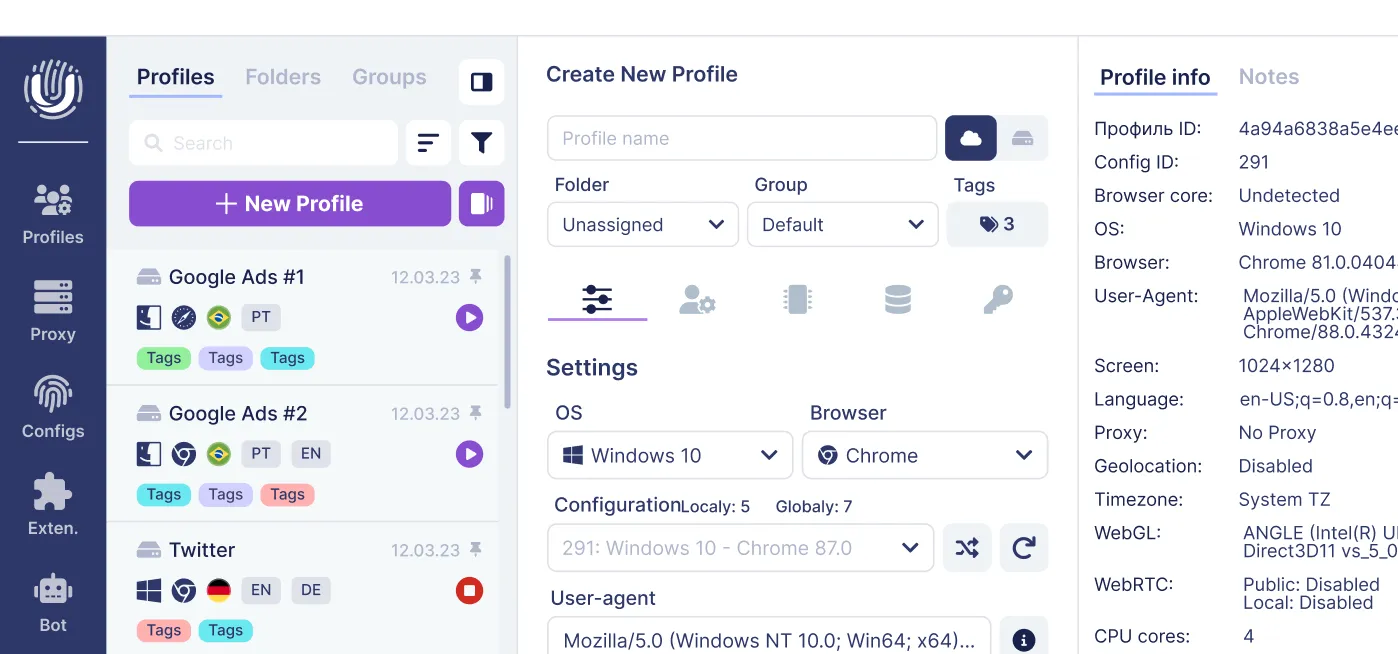
Anti-detect (antidetect) browsers generate and manage many isolated browser profiles, each with unique fingerprints, cookies, and proxy settings, so platforms see them as separate devices and users on the same device.
This matters in 2026 because major ad networks (Google Ads, Meta, TikTok), marketplaces (Amazon, eBay), and crypto/airdrop platforms aggressively correlate browser fingerprints, IPs, and cookies to detect multi-accounting and automation. A single shared fingerprint across profiles is a red flag that triggers bans.
Undetectable.io is a dedicated anti-detect browser for Windows 64-bit and macOS 12+ (Intel and Apple Silicon), designed for digital marketers, affiliate and traffic arbitrage pros, SMM managers, e-commerce sellers, and teams running many accounts safely.
Signature features:
- Unlimited local profiles on any paid plan, constrained only by disk space - create profiles in bulk for campaigns or clients
- Local profile storage by default: your data stays private on your device instead of third-party clouds, reducing the risk of leaks
- Fine-grained browser fingerprint control: User-Agent, canvas, WebGL, fonts, time zone, languages, and hardware parameters
- Deep proxy management per profile with support for residential, mobile data, and datacenter proxies with IP rotation
- Mass creation, bulk editing, and profile groups
- A cookies robot that warms up fresh profiles by automatically visiting other websites, building realistic browsing history and cookies so profiles don't look suspiciously empty
Undetectable.io offers free and paid plans. All include core profile creation, while higher tiers unlock more cloud profiles, automation API, import/export workflows, and private cloud storage. Check current pricing to compare tiers.
Use cases: when you need more than basic private browsing
For casual tasks - "don't save this search on my laptop" - opening an incognito window is enough. But many 2026 scenarios demand stronger tools than basic private modes.
Personal use:
- Shopping for gifts on a shared computer without leaking browsing history or bookmarks to other users
- Comparing flight prices without dynamic pricing locking you in based on cookies. Private browsing is useful for avoiding personalized ads by clearing cookies automatically
- Avoiding aggressive retargeting and seeing fewer ads around sensitive searches like health or finances. Private browsing helps users perform searches without affecting future personalized search results
Professional use:
- Running dozens or hundreds of ad accounts across Google Ads, Meta Ads, and TikTok Ads without bans for "suspicious activity"
- Managing multiple storefronts on Amazon, Etsy, eBay, or Shopify with distinct browser profiles, IPs, and cookies
- Operating social media farms or influencer networks where each profile needs its own persistent, believable environment
- Participating in Web3 crypto airdrops, NFT mints, and DeFi platforms where sybil-resistance systems flag duplicate identities
A practical example workflow: a small marketing agency uses Undetectable.io profiles grouped by client. Each profile has its own proxy, fingerprint, and cookies warm-up. Team members sync allowed profiles through the cloud, and the use cases page documents similar setups across industries.
Ethical note: these tools support legitimate uses like compliance testing, geo-targeting, and protection from abusive tracking. Always respect platform terms of service and local laws.
Private browsers vs VPNs, proxies, and fingerprinting defenses
Many users hear about VPNs, proxies, and private browsing but don't understand how they stack or combine. Here is a practical breakdown.
Private browsers affect traffic inside the browser only. They control cookies, trackers, scripts, and fingerprint surfaces. They often include private search and tracker blocking to deliver fewer ads and reduce profiling. They do not protect apps outside the browser or encrypt traffic at the network level on the entire device.
VPNs encrypt all internet traffic on the device and route it through a remote server. They hide your real IP from websites and your internet service provider, though the VPN provider itself can see traffic. Using virtual private networks can enhance privacy beyond private browsing. However, VPNs do not block cookies or browser fingerprinting - combining a VPN with a private browser is stronger.
Proxies are typically per-application, or per-profile in anti-detect browsers like Undetectable.io. They are used heavily for geo-targeting, scraping, and multi-accounting. Proxies offer IP rotation and location flexibility but usually no encryption beyond HTTPS.
Browser fingerprinting defenses address how sites read fonts, canvas, hardware, screen size, time zone, and more to build unique IDs. Private browsing mode alone does not change these traits. Anti-detect tools randomize or normalize fingerprints to prevent linking sessions across profiles.
A simple decision framework: for casual privacy, use a privacy browser. For network-level privacy, add a reputable VPN. For multi-account and anti-detection work, use an anti-detect browser like Undetectable.io with high-quality proxies.
How to choose and start using a private browser today
The "best" private browser depends on your goal: basic online privacy, fewer ads, or industrial-grade anonymity and multi-accounting.
Selection criteria to consider:
- Threat model: are you hiding from ad networks, employers, platforms, or governments?
- Required features: ad/tracker blocking, fingerprint protection, built-in VPN, multi-profile management, automation
- Platform support: Windows, macOS (including Apple Silicon), Linux, Android, iOS
- Business model: avoid an old browser or any browser funded by behavioral ads and profiling. Look for privacy features that don't compromise your security
Suggested choices:
- Everyday privacy with fewer ads and trackers: a privacy-first Chromium or Firefox-based browser with built-in blocking, or ungoogled chromium for users who want Chrome without Google telemetry
- Maximum anonymity for single-identity sessions: Tor Browser from the tor project for critical tasks where speed is secondary
- Multi-accounting and professional work: Undetectable.io as an anti-detect private browser with unlimited local profiles, strong fingerprint control, and advanced proxy management
Getting started with Undetectable.io takes minutes. Visit the site and click "Start for free." Download and install the client for Windows 64-bit or macOS 12+. Create your first browser profile, configure its fingerprint and proxy in the profile settings, and then launch it as an isolated browser window. Then experiment with the cookies robot to warm up new profiles gradually before running real campaigns.
In 2026, relying only on incognito mode is like locking your front door but leaving every window open. Combine a secure private browser with strong settings, and when your workflow demands it, use a purpose-built tool like Undetectable.io to stay private where it actually counts.
Related posts
View all articlesJoin 450,000+ users who chose Undetectable
- Advanced anti-detection technology
- Unlimited local profiles from $49
- The perfect solution for multi-accounting