Guides
Website Anonymous: How to Truly Browse Privately in 2026
Website Anonymous: How to Truly Browse Privately in 2026Guides
Website Anonymous: How to Truly Browse Privately in 2026
Staying anonymous on the internet has never been more difficult - or more important. Between aggressive data collection, persistent browser fingerprints, and cross-device profiling, the average user leaves a detailed trace across every site they visit. This guide walks you through what it actually takes to browse privately, the tools that matter, and how to build habits that keep your identity online protected over time.
Key Takeaways
- "Website anonymous" browsing means hiding your IP address, browser fingerprint, and login data so websites cannot tie your activity back to you personally.
- Incognito mode does not hide your IP address - it only clears local browsing history and site data after the session ends.
- Complete online anonymity is challenging to achieve, but a layered approach (VPN or proxy + tor browser or anti-detect browser + private search + strict cookie controls) gets you close.
- Undetectable.io serves as a specialized anti-detect browser for users who need strong anonymity and multi-accounting beyond what standard tools and VPNs offer.
What "Website Anonymous" Really Means
An anonymous website conceals the identity and location of its operator and visitors. When you browse anonymously, websites cannot reliably connect your sessions to a real-world name, device fingerprint, or long-term behavioral profile.
Privacy and anonymity are related but different. Privacy allows you to keep information to yourself by choice - like an encrypted banking session that protects transaction details. Anonymity conceals your identity while online activities remain visible - like a whistleblower publishing documents without attribution. Privacy is a fundamental human right that requires effort to maintain, and anonymity is one method of exercising it.
Websites and ad networks collect several data points to build profiles:
- Your IP address, which reveals approximate location
- Cookies and local storage that persist across visits
- Browser fingerprint (fonts, screen resolution, canvas output, timezone, plugins)
- Search history, referrer URLs, and login credentials
Consider the difference: a normal Chrome session with a logged-in Google account, persistent cookies, and a stable fingerprint creates a rich, traceable profile. A hardened setup - tor browser with rotating proxies, isolated cookies, and spoofed fingerprint - makes that trace nearly impossible. Research shows that roughly 83.6% of browser fingerprints are unique, meaning most users are identifiable even without cookies. Complete anonymity against all adversaries remains extremely hard, but practical near-anonymous browsing is realistic with discipline and the right tools.
Why Anonymous Website Browsing Matters in 2026
By mid-2026, data brokers and ad networks correlate site data, shopping behavior, and cross-device activity to maintain long-term profiles - even when users clear cookies. Anonymous websites are often associated with privacy advocacy, journalism, and secure communication, but the need extends far beyond those groups.
Concrete risks include:
- Price discrimination: e-commerce sites adjusting prices based on perceived wealth or location
- Account bans: overlapping fingerprints triggering fraud detection for multi-accounting
- Targeted phishing: leaked search history enabling personalized attacks
- Reputation damage: data breaches exposing browsing habits
Anonymous browsing reduces visibility to cybercriminals by limiting the data available to exploit. Regulatory frameworks like GDPR and CCPA help, but they do not fully prevent fingerprinting or real-time tracking on most websites. Common risks for anonymous websites include being targeted for illegal content and potential hacking, and high-level investigations can uncover the identities of anonymous website operators despite anonymity methods. These realities affect journalists, activists, competitive researchers, affiliate marketers, and social media managers running dozens of brand accounts.
Limitations of Incognito Mode and "Private" Tabs
Chrome, Edge, Safari, and Firefox all offer incognito mode or private browsing tabs. These modes prevent local storage of browsing history, cookies, and cache after the session closes. That is useful - but limited.
Incognito mode does not hide your IP address or online activity. Your ISP, employer, or school network can still log every domain you visit, along with timestamps and connection metadata. Third party trackers embedded in pages still execute during the session. Your browser fingerprint remains identical to your normal browsing sessions.
Incognito mode is like not saving receipts at home. A VPN or tor changes the address printed on every receipt and who can read it.
Firefox's 2025 anti-fingerprinting updates reduced user tracking by approximately 70%, but some techniques remain unmitigated. Incognito is one layer - it must be paired with IP masking, tracker blocking, and regular routines to clear cookies for meaningful protection.
Core Tools to Make Any Website Visit More Anonymous
No single tool is enough. Anonymity comes from layering defenses that address different data leaks. Effective anonymous browsing tools vary in speed, convenience, and level of anonymity they provide.
VPNs and proxies. A VPN encrypts your online traffic for privacy and hides your IP address from websites, making it harder for sites and local observers to trace your connection. VPNs protect data on public Wi-Fi networks where surveillance is common. However, using a VPN does not guarantee complete anonymity - your fingerprint and login data still identify you.
Tor Browser. Tor browser encrypts traffic three times through its network, routing it through multiple relays so no single node knows both origin and destination. Onion sites are accessed through the Tor network and provide high-level anonymity. Tor browser clears cookies automatically after browsing sessions, which prevents persistent tracking. The trade-off: slower speeds and some websites blocking tor exit nodes with CAPTCHAs.
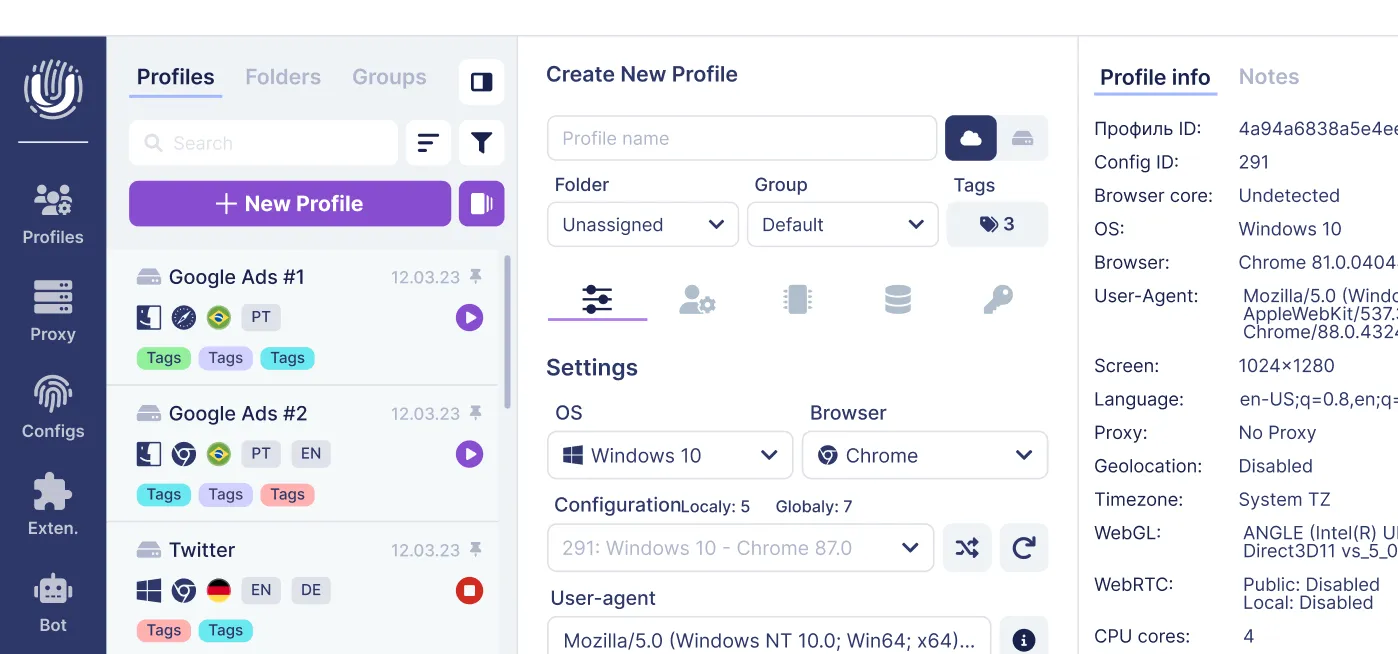
Anti-detect browsers. Tools like Undetectable.io create multiple isolated browser profiles, each with distinct fingerprints, separate cookies, and individual proxy assignments - ideal for managing many accounts across web pages without cross-linking.
Supporting tools. Privacy-focused search engines reduce tracking of user queries. Startpage does not track or store personal information, similarly making it a strong alternative to Google. Additional tools that help achieve anonymity include Tails OS, proxy servers, and disposable email services. DNS over HTTPS, link-cleaning extensions, and apps that block third party cookies further reduce your trace.
Beyond Incognito: Practical Steps to Browse Websites Anonymously
This section is a step-by-step recipe you can follow to improve anonymity without becoming a security expert. By following the steps outlined below, you build a practical defense against profiling and surveillance.
- First, choose a reputable VPN or residential proxy provider and enable a kill switch to prevent IP leaks. Choose a VPN with a no-logs policy for better privacy, and confirm they do not sell traffic data. A VPN hides your original IP address from destination websites and encrypts traffic between your device and the VPN server. Your ISP can still see your connection and that you are communicating with a VPN server, but normally cannot see the specific websites accessed through the encrypted tunnel.
- Second, decide between tor browser for maximum anonymity or an anti-detect browser profile for flexible daily work. Each serves different needs depending on whether you prioritize speed or protection.
- Third, configure browser settings to block trackers, force HTTPS, and disable third party cookies. Use extensions that block third party cookies and strip tracking parameters like utm_campaign from urls.
Regularly clear cookies and site data - or configure auto-clear on exit. Persistent cookies can rebuild profiles even behind a VPN, undoing much of your effort.
Never mix logged-in personal accounts with anonymous sessions. Keep separate profiles for social media, ad accounts, and anonymous research. Meticulously managing anonymity requires avoiding personal accounts and scrubbing metadata from content you share. Using privacy-respecting search engines enhances online anonymity further. Anonymous websites may utilize cryptocurrencies for payments to prevent financial tracking when purchasing tools or services. Anonymous websites operate by severing connections with public domain registries and real-name verification, a principle that applies to your own identity online as well.
Using Undetectable.io to Stay Anonymous and Manage Multiple Websites
Undetectable.io is an anti-detect browser designed for both anonymity and operational efficiency when handling many websites and accounts simultaneously.
Each browser profile in Undetectable.io gets a unique browser fingerprint, user agent, timezone, and isolated cookies and site data. Websites treat every profile as a completely separate device and user, which means no cross-linking between your ad accounts, marketplace pages, or research sessions. You can learn more about deep fingerprint parameters to understand what gets spoofed.
Proxy integration is straightforward: assign different proxies - rotating, sticky, or country-specific - to each profile, effectively changing the apparent IP address per website or account. This works with residential, mobile, or datacenter proxies you source yourself.
The cookies robot automates profile warm-up by generating realistic browsing history and cookie files before you use a profile for critical tasks. New profiles look like aged, authentic users rather than fresh, suspicious sessions that trigger alerts.
Key advantages over competitors:
- Unlimited local profiles on any paid plan - the only limit is your disk space
- Local storage of profile data - your files stay on your device, not uploaded to external servers, reducing leak risk
- Team synchronization for sharing anonymous profiles safely across collaborators
Concrete use cases include affiliate marketers managing hundreds of geo-targeted landing pages, SMM teams running dozens of ad accounts without cross-linking, and researchers testing websites anonymously from different regions. You can download Undetectable free to start with five cloud profiles.
Best Practices to Maintain Long-Term Anonymity on Websites
These are practical habits that, over months, make it harder for websites to build persistent profiles on you.
- Isolate by purpose: one profile for banking and personal email, others (in tor browser or Undetectable.io) for anonymous research, marketplaces, or test accounts.
- Use generic fingerprints: set default language, common screen resolution, and a mainstream timezone in anonymous profiles. Exotic configurations create unique fingerprints that stand out and enable profiling.
- Rotate IPs realistically: change VPN servers or proxies when visiting the same anonymous websites, but avoid suspiciously rapid country-hopping that triggers fraud systems.
- Schedule maintenance: weekly or daily clear cookies for sensitive profiles, review saved app permissions (location, camera, notifications), disable unused extensions that can leak data, and prune cached files.
- Guard your behavior: reusing passwords, sharing personal preferences, or logging into real accounts from anonymous sessions breaks anonymity faster than any tracking technology. Discipline matters more than any single tool.
Owners of anonymous websites often use offshore hosting that does not require personal identification - that same principle of separation applies to how you manage your own browsing profiles and documents.
FAQ: Common Questions About Anonymous Website Browsing
These FAQs cover edge cases and practical questions not fully addressed above.
Is using Tor Browser enough to stay anonymous on every website?
Tor browser greatly improves anonymity by hiding your IP address and routing traffic through multiple relays, but you can still deanonymize yourself by logging into real accounts, installing extensions, or sharing personal data. Stick with Tor's default settings, avoid plugins, and separate tor activities from normal browsing to maximize protection.
How often should I clear cookies and site data to stay anonymous?
Clear cookies and cache at the end of every sensitive session, or configure your browser to wipe site data automatically on close. Undetectable.io simplifies this by giving each profile its own isolated cookie jar that you can reset or replace whenever needed.
Can websites still recognize me if I change my IP address?
Changing your IP address with a VPN or proxy helps, but browser fingerprinting (fonts, screen size, OS, plugins) and behavioral patterns can still identify returning users. Anti-detect browsers and hardened settings reduce fingerprint uniqueness, making it harder for trackers to link visits to the same person.
Does anonymous browsing affect website performance or access?
Using tor or aggressive tracker-blocking can slow page loads or cause some sites to show more CAPTCHAs, temporary blocks, or limited features. Balance convenience and security: use regular profiles for trusted services like shopping or personal pages, and separate hardened setups for activities requiring minimal traceability.
Is Undetectable.io only for marketers, or can individuals use it too?
While Undetectable.io is popular with digital marketers, arbitrage specialists, and SMM teams who need to create and manage many accounts, individuals who want strong anonymity and multi-account isolation can start with the free tier. If you manage multiple identities or test accounts across websites, it is a significant upgrade over ordinary incognito mode for staying anonymous and protecting your identity online.
Related posts
View all articlesJoin 450,000+ users who chose Undetectable
- Advanced anti-detection technology
- Unlimited local profiles from $49
- The perfect solution for multi-accounting