Guides
Anonymity check: how to see what the internet really knows about you
Anonymity check: how to see what the internet really knows about youGuides
Every time you open a browser, websites collect dozens of signals about your connection. An anonymity check is a practical way to assess which network and browser parameters are visible to websites. Here is exactly what gets tested, what the results mean, and how to fix the gaps.
Instant anonymity check: what this test shows first
The page runs a complete anonymity check the moment you visit it. No buttons to click, no delays-your connection is analyzed in real time.
At the top, a large colored status banner displays your overall anonymity level (for example, "Your anonymity level: 78%") along with a short verdict: Good, Medium, or Low. The main purpose of this first block is to summarize everything a platform sees about you right now: your visible ip address and current location, country and city, whether you are behind a vpn server or proxy server, blacklist status, and any obvious dns or WebRTC leaks.
The service immediately compares your ip data with browser signals-time zone, system language, operating system, user agent-and flags mismatches. Anonymity checks can reveal your real location online, and your anonymity level may be affected by both IP information and geolocation-related browser signals, depending on the checker's scoring method.
This check is built for people managing multiple accounts across Google, Facebook, TikTok, or Amazon who need to understand how platforms perceive each connection. After changing a proxy, vpn, or browser profile, simply re-run the test to see how your score shifts. If a profile still exposes your real location, you will know before a platform does.
What websites see: IP address, IP anonymity and blacklist status
Every website first reads your public ip address. That single number lets any server derive detailed information about you: country, region, city, isp name, ASN, approximate postal code, and whether the address belongs to a datacenter, residential, or mobile network. IP address exposure can reveal your real location instantly.
The checker presents an "IP details" block-a table with ip, country, city, isp, ASN, and clear labels like "Real" or "Masked by VPN/Proxy/Tor." Anonymity checks can identify if you're using a VPN and whether tor usage is detected.
ip anonymity matters because websites and ad platforms downgrade traffic from ip addresses linked to hosting providers, known proxies, tor network exit nodes, or anonymizer services. An integrated blacklist check compares your ip against major DNSBL/RBL lists and commercial fraud databases, showing a simple "Blacklisted: Yes/No" status. For example, an ip from a cloud provider in Frankfurt flagged on five spam blacklists is treated very differently than a clean residential ip from Paris-the latter looks far more trustworthy to advertising platforms.
Anonymity check tools assess factors like ip address and browser fingerprint simultaneously. Anonymity checkers analyze factors like ip address and user agent to build a full risk profile. Anonymity checks evaluate ip address and browser data in ways that older tools like Whoer.net, which provides instant IP address lookup in one click, or 2IP cannot match. Whoer.net provides instant ip address and dns leak checks, but Undetectable.io focuses on factual results-confirmed tor lists, up-to-date BGP/ASN data, real DNS records-rather than vague "probability of proxy" scores. You can check ip address status against current 2026 databases rather than outdated snapshots.
Beyond IP: browser fingerprint, time zone and operating system consistency
A browser fingerprint is a combination of parameters-user agent, screen resolution, installed fonts, canvas and WebGL rendering, language js settings, time zone, and more-that can uniquely identify a device even behind a VPN. Testing sites can identify how uniquely identifiable a browser is: research shows that over 80% of fingerprints are unique across large populations.
The checker displays a "Browser fingerprint" panel listing concrete fields. For a linux browser, the user agent might read:
Mozilla/5.0 (X11; Linux x86_64) AppleWebKit/537.36 (KHTML, like Gecko) Chrome/150.0.0.0 Safari/537.36
Alongside that, you will see accepted languages, screen resolution, color depth, time zone offset (e.g., UTC+3), operating system, and browser version. Anonymity checks evaluate how much data your browser reveals through browser headers and JavaScript signals.
The time zone check is critical. If your device reports UTC-5 but the ip geolocates to UTC+8, the mismatch appears in red: "Time zone differs from IP country by 13 hours." Similarly, if the system language is Portuguese but the ip points to Russia, that is a red flag. Online identity can be reconstructed using small pieces of information like these, and platforms use them aggressively.
A green banner indicates perfect anonymity in checks only when every parameter aligns. This is where Undetectable.io's anti-detect browser becomes essential: you can create isolated browser profiles with calibrated fingerprints so that time zone, language js, operating system, and ip all form a coherent, realistic combination for each account. A vpn fingerprint alone is not enough if the rest of the profile contradicts it.
Network leaks: DNS, WebRTC, ports and other anonymity pitfalls
A vpn or proxy can display one ip while dns leaks, webrtc technology, or open ports quietly reveal the real network behind the connection. DNS leaks can expose your real ip address, and geolocation checks can expose your real location via Wi-Fi or local network settings.
The dns leak test sends unique queries and lists which dns servers responded-their ip addresses, countries, and isp names. If those resolvers belong to your home isp instead of the vpn tunnel provider, the leak is highlighted in red. IP address checks can identify dns and WebRTC leaks simultaneously.
WebRTC leak detection runs JavaScript requests to check whether local ip addresses or your real ip address appear via STUN candidates. Research from 2025 shows Chrome remains the most exposed browser for WebRTC metadata leaks. The checker labels the result clearly: "Real IP leak via WebRTC: Yes/No."
The tool also scans a small set of common ports-open web proxy ports, open http proxy ports, open vpn ports, and proxy ports like 1080, 1194, 3128-from the server side. Anonymity tools check for open ports to assess privacy risks, and open ports can indicate potential vulnerabilities in anonymity. Suspicious ports suggest a web proxy or vpn tunnel endpoint is running on the machine. However, open ports alone do not directly deanonymize a user-a real ip leak is critical, while non-standard MTU values or port signatures are secondary signals.
Legacy checkers often misinterpret MTU as guaranteed VPN use or mislabel clean ip addresses as belonging to specific VPN brands. Undetectable.io avoids such errors by using empirically tested rules and updated detection logic. Anonymity assessment tools check for dns and WebRTC leaks, and after adjusting vpn settings, disabling WebRTC, or changing dns to a privacy-friendly resolver, users should re-run the test to see their score improve.
Evaluating your anonymity level: scoring logic and risk categories
The service translates every technical check into a single anonymity level score with a color code-green, yellow, or red-so non-technical users can act immediately. An anonymity check evaluates the difficulty of identifying someone online by weighting multiple signals. A 60% anonymity score indicates moderate online privacy.
The scoring logic assigns heavy weight to real ip leaks (dns/WebRTC), medium weight to inconsistent time zone, browser language, or vpn fingerprint mismatches, and lighter weight to fingerprint uniqueness, two way ping anomalies, or open ports. The exact formula is proprietary, but each sub-test shows its own mini-indicator on the page based on data provided by the scan.
The three main categories work as follows: Green (high anonymity) means no real ip leaks, dns resolvers match ip country, fingerprint matches region and usage pattern, and ip is not on major blacklists. Yellow (medium) means minor mismatches-perhaps a time zone difference, datacenter ip, or language mismatch-that may trigger extra checks on some platforms; a yes vpn detection alone might land here if everything else is clean. Red (low) means confirmed leaks or obviously risky patterns: blacklisted ip, revealed real ip, transparent proxy detected, or a bad signal from multiple checks at once.
Professional users-affiliate marketers, SMM managers, traffic arbitrage teams-should target green for strict platforms like Google Ads or Facebook Ads Manager. Yellow may be acceptable for lower-risk tasks. Profiles that expose consistent identifiers may be easier for websites, advertising networks, and data brokers to associate with previously collected information. Unlike competitors that rely on vague labels ("Probably proxy"), Undetectable.io uses explicit conditions and up-to-date sources, reducing false positives.
How to improve your anonymity with Undetectable.io
After running your anonymity check, treat each flagged item as a task. Every fix you apply will shift the score when you re-test.
Concrete steps for ip and network: switch from free or public proxies to reliable residential or mobile proxies for better ip anonymity. Rotate ip addresses gradually to avoid abrupt jumps in country or ASN. Use dns servers located in the same country as your chosen proxy ip.
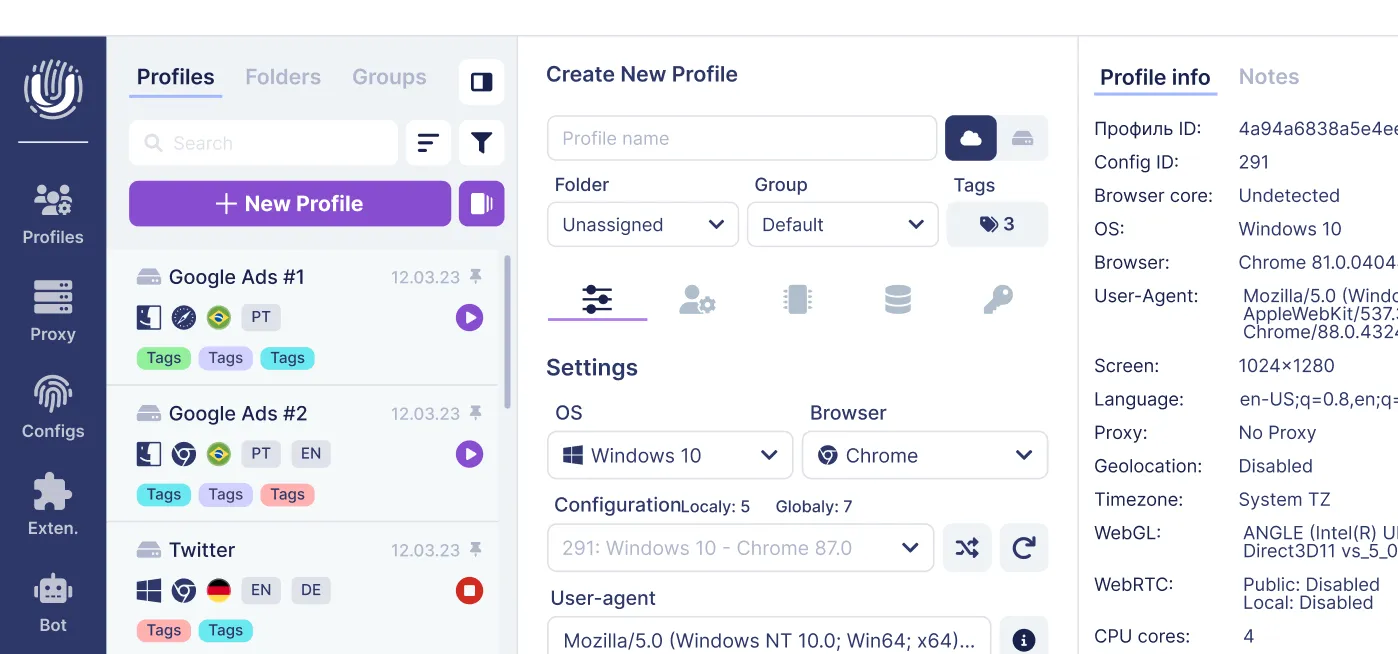
Undetectable.io's anti-detect browser helps further: create unlimited local profiles on paid plans with unique, realistic browser fingerprints. Align time zone, system language, and geolocation per profile with the corresponding proxy ip. Profiles are stored locally on your computer, giving you full control and reducing leak risk. Reviewing browser privacy settings can block tracking, and cookies and trackers can recognize users across browsing sessions-so each profile should manage its own cookie jar independently.
For automation and team workflows, use API and profile mass creation to generate hundreds of consistent profiles for campaigns, then validate each one with the anonymity check. Adjust currently supported browser technologies per profile: configure WebRTC, geolocation, language, time zone, Canvas, WebGL, and other relevant browser parameters, and use private proxies instead of shared ones. Using public Wi-Fi increases the risk of identity exposure, so always run checks after network changes. Each profile can hide your real identity when every parameter-from user agent to dns-tells a coherent story.
Start for free with Undetectable.io, download the app for Windows 64-bit or macOS 12+ (Intel and Apple Silicon), and run the anonymity check regularly while configuring your multi-account setups.
Best practices for long-term online privacy and risk awareness
No anonymity check can guarantee complete anonymity online. Anonymity and privacy are related but distinct concepts: privacy focuses on controlling who accesses your information, while anonymity prevents linking identity to online actions. User behavior matters as much as technical settings.
Safe-behavior recommendations: avoid sharing personal photos, work details, and real-time geolocation on accounts meant to stay anonymous. Separating identities across services reduces account linkage risk-never reuse the same email, phone number, or recovery options across profiles. Auditing social media visibility can enhance privacy. Effective anonymity methods include searching for oneself and reviewing your digital footprint periodically.
Build a routine: run the anonymity check at the start of each session, after changing proxies, or before registering on important platforms. Regularly monitoring online presence helps maintain anonymity online. If platforms suddenly require extra captchas, SMS verifications, or trigger bans, your ip anonymity or fingerprint consistency needs attention-revisit the checker results.
Undetectable.io combines an advanced anti-detect browser with transparent anonymization tools so you can understand, adjust, and continuously control how visible you are on the internet.
Related posts
View all articlesJoin 450,000+ users who chose Undetectable
- Advanced anti-detection technology
- Unlimited local profiles from $49
- The perfect solution for multi-accounting