Guides
SOCKS5 Proxy: Complete Guide to Fast, Flexible Anonymity
SOCKS5 Proxy: Complete Guide to Fast, Flexible AnonymityGuides
Introduction to SOCKS5 and Why It Matters in 2026
A socks5 proxy is an intermediary server that routes any kind of internet traffic between your device and a destination, masking your real IP address without inspecting or altering the data you send. In 2026, it remains one of the most versatile tools for online privacy, bypassing internet restrictions, and running multi-account workflows at scale.
If you manage dozens or hundreds of social media profiles, run ad arbitrage campaigns across Google and Meta, operate multiple e-commerce storefronts, or rely on automation bots, SOCKS5 gives you protocol-agnostic flexibility that http proxies and even a vpn server simply cannot match. It handles everything from web browsing to P2P transfers, game clients, and scripting frameworks.
SOCKS5 by itself does not encrypt traffic. For stronger security, it works best when combined with HTTPS, a VPN, or an anti-detect browser like Undetectable.io that isolates fingerprints and cookies per profile.
This article covers how the socks protocol works technically, compares proxy types (residential, datacenter, mobile), explains key benefits for marketers, walks through setup in Google Chrome and other apps, and shows how to manage SOCKS5 proxies efficiently inside Undetectable.io.
What Is a SOCKS5 Proxy Server? (With Real-World Examples)
A socks5 proxy server is an intermediary that forwards both TCP and UDP traffic between a client and a destination. The target website or service sees the proxy's IP address, not yours. SOCKS5 masks the user's IP address, providing a meaningful degree of privacy for any application that routes through it.
SOCKS5 operates at the session layer (Layer 5) of the OSI model. Unlike an HTTP proxy, a SOCKS5 proxy does not interpret application data. It never inspects web pages, caches content, or rewrites data packet headers.It relays application data through a separate proxy connection without interpreting higher-level content such as web pages.
This protocol-agnostic design means SOCKS5 can proxy applications beyond web browsers, including SSH, FTP, and virtually any networked tool. Common examples of apps with native SOCKS5 support include:
- Torrent clients (qBittorrent, Deluge)
- Telegram desktop
- Web scraping frameworks (Scrapy, Selenium)
- Trading bots and financial dashboards
- Game launchers (Steam, Epic)
SOCKS5 supports various authentication methods, such as username and password authentication. Serious proxy services require credentials to prevent abuse and maintain stable IP reputation across their network. The socks protocol version in use today traces back to RFC 1928 (1996), and it has effectively replaced SOCKS4 in all modern commercial proxy services.
SOCKS5 vs Other Proxy Types and VPNs
SOCKS5, HTTP/HTTPS proxies, and VPNs all route your traffic through an intermediary, but they handle different types of data, process it differently, and offer varying levels of security.
HTTP proxies are designed primarily for HTTP and HTTPS traffic, although their listening port and the destinations permitted through CONNECT depend on the proxy configuration. They are useful for caching, content filtering, and basic web browsing tasks, but they cannot carry non-web protocols. For HTTPS websites, an HTTP proxy commonly uses the CONNECT method to create a TCP tunnel, while TLS encryption is established between the client and the destination website.
A socks proxy works lower in the network stack. It forwards raw TCP and UDP streams without parsing them, making it suitable for P2P, VoIP, automation bots, and any app that speaks something other than HTTP. SOCKS5 supports both TCP and UDP protocols, giving it far broader reach than other proxy types.
A vpn connection encrypts all internet traffic at the OS level, changing your IP system-wide. That is great for security on public Wi-Fi, but it adds encryption overhead and offers less per-app control. SOCKS5 affects only configured apps, delivering lower latency for traffic intensive tasks where encryption is not critical.
Practical recommendations:
- Use HTTP proxy for simple, browser-only tasks
- Choose a socks5 proxy for diverse apps (P2P, video streaming, automation)
- Use vpns when you need end-to-end encryption
Undetectable.io supports both HTTP and SOCKS5 proxies per browser profile, letting you mix strategies based on platform rules and risk level.
SOCKS4 vs SOCKS5: Why Modern Projects Use SOCKS5
SOCKS4 is an older standard with serious limitations. Nearly all modern proxy servers and proxy providers have moved to the latest version of the protocol-SOCKS5.
The key differences:
| Feature | SOCKS4 | SOCKS5 |
| TCP support | Yes | Yes |
| UDP support | No | Yes |
| Authentication options | IP-based only | Username/password, GSSAPI |
| IPv6 | No | Yes |
| Remote DNS | No; SOCKS4a adds proxy-side hostname resolution. | Yes |
SOCKS4 only supports TCP connections, limiting its use for modern applications. SOCKS5 supports both tcp and udp protocols, making it suitable for live calls, gaming lobbies, real-time data streams, and video streaming. Password authentication and other authentication methods in SOCKS5 are essential for securing paid proxy services and keeping IP pools clean.
SOCKS5 can improve performance for P2P platforms, high-frequency scraping, and streaming workloads that SOCKS4 simply cannot handle. If a "SOCKS" option appears in your tools or browser in 2026, it almost always refers to SOCKS5. Avoid SOCKS4 unless a legacy system specifically requires it.
How a SOCKS5 Proxy Works Under the Hood
When an app connects through a SOCKS5 proxy, the process starts with a TCP connection to the socks server (typically on port 1080). The client sends a greeting that includes the version byte (0x05) and a list of supported authentication methods. The server selects one-usually username and password for commercial services-and the credentials are exchanged and validated.
Once authenticated, the client sends a request to connect to a target host and port number. For TCP traffic, this is a CONNECT command; for UDP, the client issues a UDP ASSOCIATE request. After the proxy successfully reaches the destination, it begins relaying data packets bidirectionally without inspecting or modifying them.
DNS resolution matters here. When the client resolves domain names locally, dns requests leak to your ISP. Using proxy-side resolution (often called "socks5h" in tools like curl or Firefox) ensures dns leaks are avoided because the socks server handles lookups. This is critical for online privacy.
SOCKS5 does not encrypt traffic by default, so your ISP can see metadata unless you layer HTTPS or a vpn server on top. However, the destination only sees the proxy's IP.
A typical 2026 network path looks like this: your device runs an Undetectable.io browser profile with a unique fingerprint configuration → traffic flows to the SOCKS5 proxy → the proxy connects to the target website. Fingerprint, cookies, and proxy endpoint all stay aligned for each identity.
Key Benefits of SOCKS5 Proxies for Marketing and Multi-Accounting
For digital marketers running traffic arbitrage, managing SMM panels, or operating marketplace storefronts, SOCKS5 proxies paired with reputable proxy service providers deliver concrete advantages that directly affect account health and campaign ROI.
Bypass IP-based restrictions. SOCKS5 proxies can bypass internet blocks effectively. Platforms like Google, Facebook, TikTok, and Amazon use IP signals to enforce geo-restrictions and detect multi-accounting. Assigning a different socks5 proxy per account lets you present region-appropriate IPs without changing your entire system connection.
Superior performance under load. SOCKS5 does not inspect or filter data, reducing latency compared to proxies that parse headers. SOCKS5 does not modify application-level HTTP headers, which can reduce the risk of proxy-side changes to web requests. SOCKS5 proxies can handle thousands of simultaneous connections, making them ideal for traffic-intensive tasks like scraping, cookie warming, and API polling. SOCKS5 proxies improve performance for traffic-intensive tasks across the board.
Reliability for long-lived sessions. Ad managers, trading panels, and dashboards that maintain persistent connections benefit from the improved performance and fewer errors that come with raw data relay. Because SOCKS5 normally does not process application-level content, it avoids some errors associated with content-filtering proxies. However, disconnections may still occur because of server load, network instability, timeouts, or provider limits.
Per-profile isolation. In Undetectable.io, you can assign a unique SOCKS5 proxy to each browser profile, isolating fingerprints, cookies, and IPs. If one account's proxy gets flagged, no other profiles are affected. Combined with local profiles stored on your device, sensitive data never leaves your machine while IP rotation still happens externally.
SOCKS5 reduces overhead, resulting in lower latency-an edge that compounds across hundreds of profiles running in parallel.
Proxy Types That Support SOCKS5 (Residential, Datacenter, Mobile, ISP)
SOCKS5 is a protocol, not a network type. It can be delivered across multiple proxy types, each with distinct cost, speed, and detection characteristics.
Datacenter SOCKS5 proxies originate from cloud providers and data centers. They are often faster and cheaper than residential or mobile proxies, although uptime varies between providers and service plans. They work well for bulk web scraping, ad verification, and automation. The trade-off: strict platforms detect datacenter IP ranges more easily.
Residential SOCKS5 proxies use IPs assigned by consumer ISPs to real households. They appear as genuine users to websites, making them better for social networks, retail platforms, and anti-fraud-sensitive sites. Some providers advertise large residential proxy pools with broad geographic coverage, but pool size, availability, and sourcing practices vary significantly between services.
Mobile SOCKS5 proxies route through 3G/4G/5G carrier networks. These IPs rotate frequently and are especially effective on platforms like TikTok and Instagram that aggressively flag non-mobile traffic. They cost more and bandwidth varies, but detection rates are lowest.
ISP / Static Residential options combine datacenter-like stability with residential IP ownership. These are valuable when platforms require long-term, consistent IPs for business accounts or advertising dashboards.
Inside Undetectable.io, you can assign different proxy types per browser profile. Match high-value accounts to residential or mobile proxies and use datacenter endpoints for lower-risk, high-volume work.
SOCKS5 Proxies vs VPN Servers: Which Should You Use?
Many users are unsure whether they need a SOCKS5 proxy, a VPN, or both. The answer depends on what you are trying to protect and how much control you need.
A vpn server routes and encrypts all internet traffic from your device, changing your IP globally. A socks proxy affects only the apps you configure-a specific browser profile, a bot, or a scraping script. This per-app control is why SOCKS5 dominates in multi-accounting setups.
Performance: SOCKS5 introduces less processing overhead than a VPN because it does not encrypt traffic. For high-volume tasks like scraping, bulk uploads, or faster download speeds on large datasets, SOCKS5 delivers better performance. VPN encryption adds latency that compounds across thousands of connections.
Security: SOCKS5 is typically not sufficient by itself for browsing on public Wi-Fi. VPNs protect against local network snooping because they encrypt everything. If you need to access sensitive websites from a coffee shop or hotel, a VPN is essential. SOCKS5 must be combined with HTTPS or an encrypted tunnel for similar protection.
Practical guidance for Undetectable.io users:
- Use SOCKS5 proxies per profile for identity segmentation across ad accounts
- When traveling or on public networks, add a VPN layer under your proxy connection
- For sensitive flows, chain a VPN with SOCKS5 to hide your home IP from the proxy provider
Advanced arbitrage teams in 2026 commonly use multihop configurations-a local VPN to mask the home IP, then a SOCKS5 exit to present a clean, geo-appropriate address to target sites.
How to Set Up SOCKS5 Proxies in Browsers, Tools, and Undetectable.io
SOCKS5 can be configured at the system level or per application. Undetectable.io simplifies this by letting you assign a unique proxy connection to each browser profile independently.
What you need from your proxy provider:
- SOCKS server hostname or IP address
- Port supplied by your proxy provider. Port 1080 is commonly used for SOCKS5, although providers may use a different port.
- Username and password for authentication
Desktop browser setup:
- Google Chrome / Chromium: Configure Chrome by adding --proxy-server=socks5://10.64.0.1 as a command-line flag. For proxy-side DNS, add --host-resolver-rules="MAP * ~NOTFOUND, EXCLUDE 10.64.0.1" to prevent dns requests from leaking. See our full walkthrough on how to set up a proxy in Chrome.
- Firefox: Open network settings, select Manual proxy configuration, enter your SOCKS5 host and port, and check "Proxy DNS when using SOCKS v5" to avoid an ip leak.
- macOS system-wide: Open System Settings → Network → Wi-Fi → Proxies. For macOS, enter 10.64.0.1 and port 1080 in the SOCKS Proxy fields under network settings.
- Windows: Windows does not provide universal native SOCKS5 routing through its standard manual proxy interface. Configure SOCKS5 in individual applications or use dedicated proxy-routing software.
Mobile devices: Mobile devices require SOCKS5 setup only on Wi-Fi networks. Android and iOS typically allow proxy configuration in Wi-Fi settings, but native SOCKS5 support is limited-some users rely on third-party apps or automation frameworks for direct configuration.
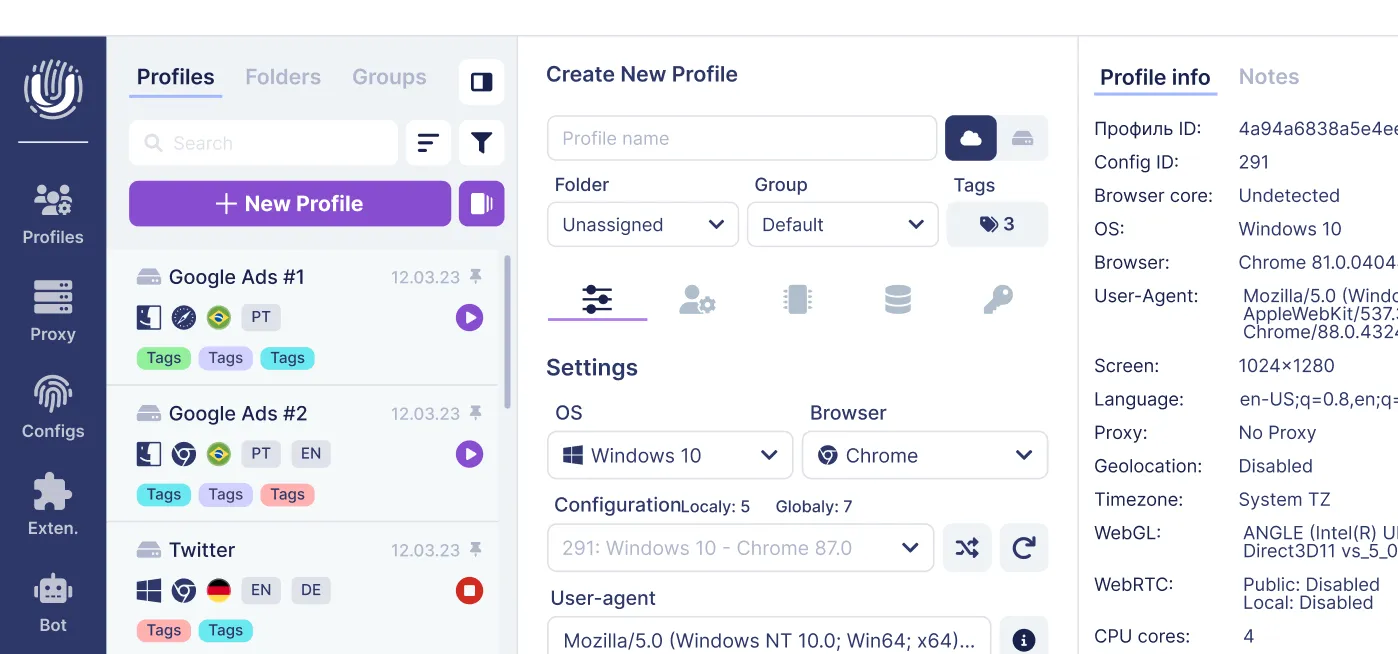
**Undetectable.io setup (see plan and pricing options if you need more profiles or features): **
-
Each browser profile stores its own SOCKS5 or HTTP proxy independently
-
Mass import proxies via CSV or API for rapid scaling
-
Combine proxy rotation with cookie bots and fingerprint templates
-
Profiles are stored locally on your device, keeping sensitive data under your control
Avoid reusing the same SOCKS5 IP across unrelated profiles. Always test IP reputation before connecting a fresh account, and document which proxy servers map to which campaigns.
Testing and Troubleshooting SOCKS5 Connections
Verifying that your proxy connection actually works is critical before linking it to valuable accounts. A misconfigured proxy on Google Ads or Meta Business Manager can trigger verification loops or permanent suspensions.
How to verify your connection:
- Open a "what is my IP" page from within the profile to confirm the displayed IP matches your proxy configuration
- Use specialized IP quality checkers to verify whether the IP is residential or datacenter, and whether geo-location aligns with your target country
- Verify your SOCKS5 connection using the Mullvad Connection Check page for a quick, reliable test
- Check for dns leaks using browser-based leak test tools
Common problems in 2026:
| Symptom | Likely Cause |
| Connection refused | Wrong port, server down, or firewall blocking |
| Timeout | Overloaded proxy node or network issue |
| Authentication failure | Incorrect username/password or expired plan |
| Wrong country / excessive CAPTCHAs | Blacklisted IP or subnet |
Troubleshooting steps: Re-check host and port, confirm you selected SOCKS5 (not HTTP) in the app settings, temporarily disable local firewalls or antivirus, and test the proxy in a minimal tool like curl --socks5-hostname host:port https://ifconfig.me.
Undetectable.io helps isolate problems: you can quickly switch proxies per profile and determine whether issues stem from fingerprint mismatches, stale cookies, or the proxy server itself. Contact your proxy provider with timestamps, target domain names, and error messages if you encounter consistently dead IPs or severe throttling.
Best Practices for Using SOCKS5 Proxies with an Anti-Detect Browser
Your IP address is only one of many signals platforms use to detect fraud. Browser fingerprints, behavioral patterns, cookies, and local storage all matter. A socks5 proxy handles IP anonymity-everything else requires a proper anti-detect setup.
Match fingerprints to proxy geo-location. For each SOCKS5 endpoint, create a distinct Undetectable.io profile with OS, timezone, language, and screen resolution settings that align with the proxy's exit country. A German IP paired with a Japanese timezone is a red flag. Review our guide on deep fingerprinting parameters for details.
Avoid obvious detection signals:
- Do not rapidly switch countries for the same account
- Warm up new profiles slowly using cookie robots before accessing target platforms
- Reuse the same SOCKS5 endpoint for each identity over time to build consistent login history
- Always operate within applicable laws governing the platforms and regions you target
Prioritize data hygiene. Keep local profiles on disk-as Undetectable.io allows-so sensitive data stays under your control. Regularly back up your configuration, including which proxy maps to which client or project. If a free proxy seems tempting, remember that shared, unmanaged IPs carry the highest risk of blacklisting and data exposure.
Layer security for high-risk flows. For banking, payment processors, or higher-risk advertising niches, consider routing SOCKS5 over a VPN to hide your home IP from the proxy provider while presenting a clean exit IP to target websites.
SOCKS5 proxies give you speed, flexibility, and granular control-but only when paired with disciplined profile management. Start for free with Undetectable.io, experiment with different SOCKS5 proxy types, and build a stable, scalable multi-accounting infrastructure that keeps every profile safe.
Related posts
View all articlesJoin 450,000+ users who chose Undetectable
- Advanced anti-detection technology
- Unlimited local profiles from $49
- The perfect solution for multi-accounting