Guides
WebRTC Leak Protection: Complete Guide to Prevent IP Leaks (with Undetectable.io)
WebRTC Leak Protection: Complete Guide to Prevent IP Leaks (with Undetectable.io)Guides
Even in 2026, a misconfigured browser may expose an unexpected IP address to websites that actively initiate WebRTC ICE candidate gathering. This complete guide walks you through exactly how webrtc leak protection works, how to test for vulnerabilities, and how to lock down every browser and profile you operate.
To skip the theory, download Undetectable.io and create your first 5 profiles for free.
What is a WebRTC leak and why you must fix it now
A webrtc leak occurs when a site discovers an unexpectedly hidden ip address through your browser's real time communication features-even while you're connected to a VPN, proxy, or anti-detect browser. If you manage multiple accounts for marketing, arbitrage, or e-commerce, this single exposure can cascade into mass bans.
WebRTC stands for Web Real-Time Communication. WebRTC has been enabled by default in Chrome and Firefox since the early 2010s and was later adopted by Edge, Safari, Opera, and other modern browsers. That default persists today.
Here is why this matters for multi-account users: a single webrtc leak can compromise multi-accounting operations by revealing the same public ip across profiles that are supposed to be completely isolated. Ad platforms, marketplaces, and social networks use IP correlation as one of their strongest signals for linking accounts.
Leaks typically occur through ICE and STUN procedures, which discover both your public ip addresses (from your ISP) and local ips like 192.168.x.x. WebRTC leaks can expose both public and local ip addresses simultaneously, creating multiple tracking vectors.
IPv6 leaks can be especially revealing when a VPN does not handle IPv6 correctly. Some IPv6 addresses or network prefixes may remain stable long enough to support correlation, although their persistence depends on the operating system and ISP configuration.
The good news: a properly configured stack-combining an anti-detect browser like Undetectable.io, a quality VPN or proxy, and verified webrtc settings-forms a webrtc leak shield that keeps your profiles genuinely separate.
WebRTC basics: how real time communication can cause IP leaks
WebRTC is an open-source technology enabling peer-to-peer voice, video calls, screen sharing, file sharing, and real time data communication directly inside browsers-no plugins required. Services like Google Meet, Google Hangouts, Zoom Web, and Discord's web app all rely on it for video conferencing and collaboration.
The core issue lies in ICE (Interactive Connectivity Establishment). During ICE gathering, the browser discovers potential network paths between peers by querying STUN and TURN servers. STUN may reveal a public-facing IP address, while host candidates can disclose local network information. Modern browsers often restrict or obfuscate local addresses, for example by replacing them with mDNS identifiers.
This behavior is by design-a feature, not a bug. WebRTC needs real addresses to establish direct connections, which makes webrtc leak prevention inherently difficult without explicit protection.
Consider a marketer who uses a VPN and joins a Google Meet call in Chrome. WebRTC may reveal an unexpected ISP or IPv6 address if the VPN, split-tunneling rules, or operating-system routing allow some WebRTC traffic to bypass the protected interface. The page's JavaScript silently reads the ICE candidates and now has the user's isp address.
Disabling WebRTC can affect services that rely on real time communication, and disabling webrtc may break video calling functionalities entirely. That is why selective protection-not blanket removal-matters for professionals who require webrtc traffic for legitimate tools.
What data can WebRTC expose:
- Your private and public ip addresses
- Local/private ip address ranges (10.x, 192.168.x)
- IPv6 addresses (often globally unique)
- Network interface metadata
How WebRTC leaks work under the hood (and why VPNs alone aren't enough)
The typical leak path is straightforward: a website runs JavaScript that creates an RTCPeerConnection, which triggers ICE candidate gathering. The browser queries a STUN server, receives your public ip address, and reports it back to the page. WebRTC leaks can occur silently while browsing without any visible indication-no popups, no permission prompts, no camera access required.
The primary function of a VPN is to mask user identity and location by tunneling network traffic is routed through an encrypted server. Full-device VPNs normally route both TCP and UDP traffic. Leaks are more likely when using a browser-only proxy, split tunneling, incomplete IPv6 support, or an incorrectly configured VPN client. This is why webrtc can leak your real ip address even with VPNs that appear to work correctly for regular browsing.
Malicious websites can exploit WebRTC to obtain your ip address by embedding a few lines of JavaScript. A 2025 cross-platform study found that Chrome remains highly leak-prone-especially on mobile-while Firefox desktop offered stronger protection. The study also showed that IPv6 addresses make webrtc leaks more damaging for tracking because they persist across sessions.
Browser fingerprinting can occur when webrtc leaks expose identifying information. Even advanced fingerprint spoofing in anti-detect browsers cannot compensate if WebRTC reveals the same hidden ISP ip behind multiple profiles. Imagine a media buyer running 30 Facebook ad accounts through separate proxies-one webrtc leak exposing certain ip addresses shared across profiles triggers Facebook's clustering algorithms, and every account gets flagged.
High-end vpn extensions and proxy servers try to intercept webrtc traffic, but behavior varies by OS, browser version, and network stack. Manual testing remains mandatory regardless of your vpn provider.
How to test if you have a WebRTC leak (step-by-step WebRTC leak test)
Before configuring any protections, you need a clear picture of what your browser is leaking right now. Testing for webrtc leaks can be done using specialized websites like BrowserLeaks.com for anonymity checks, and regular leak testing is important after configuring browser and VPN settings.
Start by recording your baseline: note your ISP public ip (without VPN), your VPN/proxy IP, and any IPv6 addresses from a general IP checker.
WebRTC leak test procedure:
- Turn OFF your VPN/proxy. Open your main browser and visit a reputable webrtc leak test site (browserleaks.com/webrtc or ipleak.net). Note all IPs shown under the WebRTC section.
- Turn ON your VPN or proxy. Revisit the same test site in the same browser, or use comprehensive anonymity checkers like Whoer.net with an anti-detect browser.
- Check whether your original ISP ip or any unexpected IPv6 address still appears. If it does, you have an ip leak.
- Repeat the test in different browsers-Firefox, Edge, Opera, Safari-since each handles WebRTC differently.
- Apply your chosen protections (extensions, about:config tweaks, firewall rules, or anti-detect browser profiles) and rerun the test.
- Retest whenever anything changes: browser updates, new profiles, OS patches, or a new proxy provider.
JavaScript must remain enabled for these tests to work-they rely on executing RTCPeerConnection scripts. If only your VPN/proxy IP appears in WebRTC fields, your setup is safe. If your original public ISP address or an unexpected globally routable IPv6 address appears while protection is active, the setup is leaking. Exposure of a private LAN address is also a privacy concern, although its severity depends on your threat model.
For teams, document your webrtc leak test flow as a standard procedure so every operator verifies profiles before deploying campaigns.
Browser-level WebRTC leak shield (Chrome, Firefox, Edge, Safari)
Your browser's privacy settings are the most accessible first line of defense. Some browsers allow users to disable webrtc through configuration settings, while others require extensions or external tools. WebRTC leak protection tools can block or limit network information exposure at this layer.
Three main strategies exist:
- Fully disable webrtc - strongest for online privacy, but breaks video calls, conferencing, and collaboration apps.
- Restrict or route webrtc through VPN/proxy only - preserves webrtc functionality while limiting exposure.
- Leave webrtc enabled but rely on anti-detect browser controls - the webrtc leak shield approach used by tools like Undetectable.io.
For marketers and arbitrage teams using Chromium-based engines (which match what target platforms expect), webrtc control must be handled carefully. Chrome and Edge lack a native "disable WebRTC" switch, so users rely on browser extensions or per-profile anti-detect configurations. Firefox offers the most granular native controls. Safari has limited user control over webrtc settings, making it a poor choice for high-risk multi-accounting.
Using browser extensions can enhance webrtc leak protection significantly, but you must implement protections in every browser you operate and verify with leak tests.
How to disable or limit WebRTC in major browsers (practical steps)
Steps to disable or limit webrtc differ by browser and operating system. Before making changes, understand the trade-off: disabling webrtc protects against ip leaks but can break Google Meet, Zoom Web, Discord voice, and other collaboration tools. If you need those services, you can temporarily enable webrtc access when required and disable it again afterward.
After every change-extension installation, flag toggle, about:config tweak-rerun your webrtc leak test to verify. On mobile browsers (Android Chrome, Firefox Android, iOS Safari), webrtc controls are more limited; avoid sensitive multi-accounting from mobile when possible.
WebRTC leak shield for Google Chrome and other Chromium browsers
Chrome does not provide a built-in option to disable webrtc. The same applies to Microsoft Edge, Opera, Brave, and most anti-detect browsers built on Chromium. Chrome offers a flag called "Anonymize local IPs exposed by WebRTC" in chrome://flags, but this only masks local ips-not your public ip via STUN.
To webrtc protect your Chrome sessions, install trusted chrome extensions that block host candidate discovery, force WebRTC over your configured proxy, or limit STUN requests. A typical extension configures webrtc's network traffic routing so that it returns only proxied addresses-or an empty array when no connection is needed. Look for well-reviewed, actively maintained options; check the options page and toolbar button behavior before trusting any extension with your privacy implications. There is no official google extension for this, so vet carefully.
Full-device VPNs handle WebRTC better than browser-only vpn extensions because they intercept UDP at the OS level. However, professional multi-account users should prefer anti-detect browsers like Undetectable.io, which offer controlled webrtc behavior per profile rather than relying on generic consumer extensions.
On Android, only a subset of extensions may be available. In high-risk operations, avoid doing sensitive multi-accounting from mobile Chromium browsers.
WebRTC leak shield for Mozilla Firefox
Firefox is the most configurable mainstream browser for webrtc leak prevention. Firefox allows complete webrtc disabling via about:config, and the process takes under a minute.
Steps to permanently disable WebRTC in Firefox:
- Type about:config in the address bar and press enter. Accept the risk warning.
- In the search bar, type media.peerconnection.enabled to locate the setting.
- Double click the preference to toggle it from true to false.
This single change prevents all WebRTC-based ip leaks-both private and public ip addresses are hidden because the browser no longer creates peer connections. Disabling webrtc can prevent ip leaks in browsers decisively, but Firefox-based video calls and conferencing will stop working.
Firefox also has hidden webrtc privacy settings beyond this primary toggle that privacy-conscious users may explore, such as limiting local IP exposure through additional media.* preferences.
If you still need WebRTC in Firefox, keep it enabled but pair it with a quality VPN and frequent leak tests, accepting a higher risk level. For Undetectable.io users, align your Firefox profile configuration with each profile's proxy routing to ensure consistency.
WebRTC behavior in Safari and Microsoft Edge
Safari on macOS and iOS has webrtc enabled by default. Apple applies some privacy defaults, but direct toggles for disabling WebRTC are limited. Users can enable the Develop menu via Safari > Settings > Advanced > "Show Develop menu in menu bar," then explore experimental WebRTC settings and camera/mic controls-but fully disabling WebRTC is not straightforward.
For sensitive multi-accounting, Safari is better avoided as a primary work browser. Its webrtc functionality restrictions are incomplete, and the privacy implications of partial protection can create a false sense of security.
For Microsoft Edge-being Chromium-based-webrtc behavior is almost identical to Chrome's. No built-in full disable switch exists, so users must rely on extensions or anti-detect browser configurations. A webrtc network limiter approach (configuring how webrtc's network traffic flows through specific ip addresses by configuring Edge's extension ecosystem) mirrors Chrome's workflow.
Both Safari and Edge users should run webrtc leak tests after every OS or browser update. Teams doing ad arbitrage or marketplace scaling typically standardize on Chromium or Firefox with known shield setups and avoid trying to harden Safari for production use.
System-level WebRTC leak shield: firewall and OS rules
For agencies and high-budget operations needing maximum anonymity, OS-level firewall rules add a critical second boundary. Webrtc leak protection routes traffic through a VPN or proxy server, but firewall rules ensure nothing escapes even if the browser or extension fails.
WebRTC primarily uses UDP for media streams and STUN/TURN communication. The main tools by platform:
- Windows: Windows Defender Firewall with advanced outbound rules restricting browser UDP traffic to VPN adapters only.
- macOS: The pf firewall, configurable to block UDP to STUN ports unless routed through your VPN interface.
- Linux: iptables or nftables rules dropping UDP packets to known STUN servers or forcing all traffic through tun/tap interfaces.
Blindly blocking all UDP will break DNS, VoIP, streaming, and some VPN protocols. Rules must be scoped carefully. Using a trusted VPN is essential for webrtc leak protection at this layer-quality VPNs can effectively prevent webrtc leaks when paired with firewall enforcement.
Always back up firewall configurations, document changes, and confirm that your rules work by running webrtc leak tests in multiple browsers. Never assume a rule works without verification on the public internet.
WebRTC leak shield in anti-detect browsers and Undetectable.io
Anti-detect browsers exist specifically to run dozens or hundreds of isolated browser profiles, each with unique fingerprints and separate proxy connections. Without a webrtc leak shield, even perfectly spoofed fingerprints across profiles can be defeated if WebRTC exposes the same hidden ISP ip behind all of them.
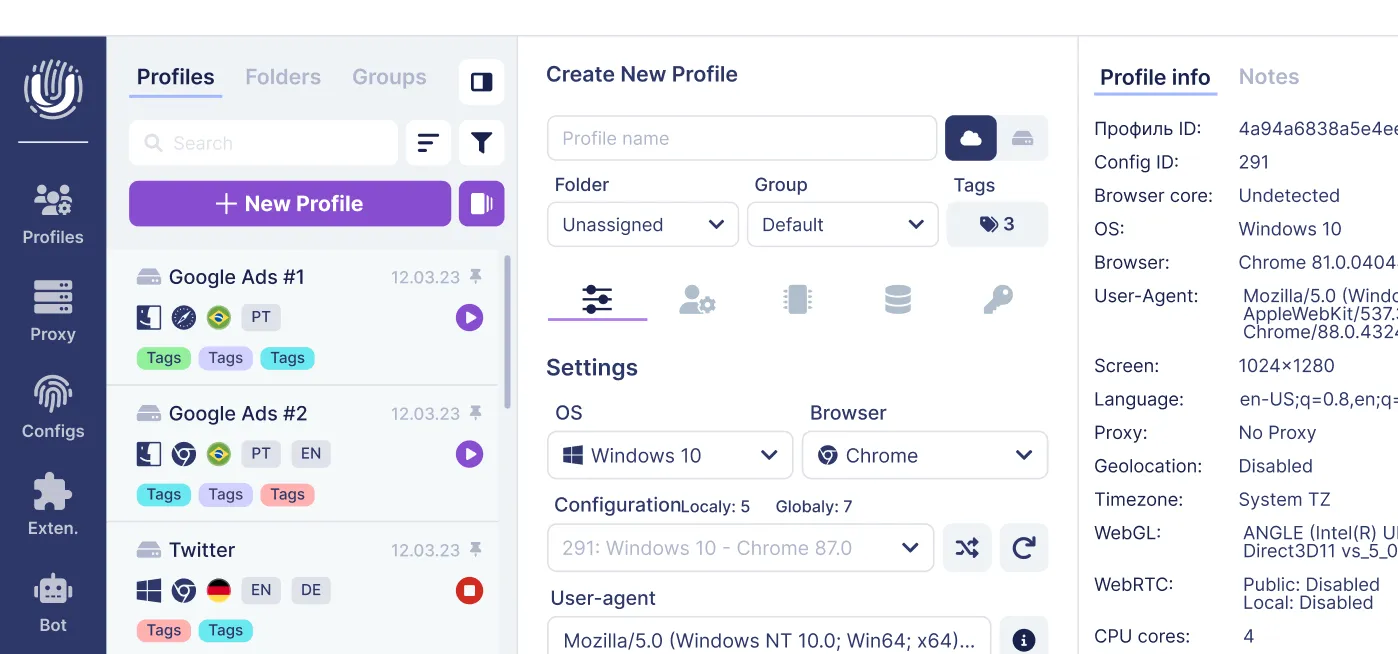
A webrtc leak shield protects each profile independently. Undetectable.io addresses this with:
- Per-profile WebRTC modes - disabled, proxy-only, or default, depending on what each profile requires. If a profile doesn't require webrtc traffic, disable it entirely; if it needs Google Meet, route WebRTC through the assigned proxy.
- Proxy-enforced routing - the extension returns only the profile's proxy ip for WebRTC requests, never your real isp address. This protect ip leak hides your actual location from any site that queries ICE candidates.
- Local profile storage - profiles are stored on your device only (Windows or macOS), eliminating cloud-based leak vectors and giving you full control. This configures webrtc at the profile level rather than relying on global browser flags.
Practical use cases include Facebook ad accounts, TikTok shops, Amazon seller accounts, and campaigns protected by premium cloaking services for advertising-all requiring strict separation of IPs. Integrate Undetectable.io's WebRTC controls with your VPN/proxy setup and OS firewall rules for a multilayered defense. Create internal guidelines for your team on how to webrtc leak prevent exposure across all profiles before launching new projects.
Why WebRTC leak prevention matters for privacy, business, and multi-account continuity
A single webrtc leak can deanonymize entire campaigns, trigger mass bans on ad platforms, or expose your real identity despite thousands of dollars invested in proxies and tooling.
Real-world consequences in 2024–2026:
- Ad platforms like Facebook and Google correlate accounts by ip to enforce single-account policies. A leaked public ip across profiles triggers automated linking.
- Marketplaces (Amazon, TikTok Shop) detect multiple seller accounts behind the same real ip address and suspend them simultaneously.
- Social networks use IP histories to connect suspicious behavior, even when all other fingerprint parameters differ.
WebRTC leaks bypass expensive residential proxies, dedicated servers, and complex fingerprint setups. They are a low-cost detection vector for platforms-and a high-cost disaster for operators who ignore them.
Protecting against webrtc leaks helps maintain separation between personal and work identities, preserve the lifespan of advertising and marketplace accounts, and reduce the risk of manual reviews and compliance flags.
This is not a one-time configuration. Whenever browsers, OS, VPN clients, or Undetectable.io receive updates, webrtc leak tests should be re-run. Treat your webrtc leak shield settings as part of your standard operating procedures for onboarding new staff or launching new multi-account projects.
The best webrtc leak protection is a cycle: test, harden, retest. Build it into every campaign launch, and your profiles stay genuinely separate.
Ready to prevent webrtc leaks across all your profiles? Download Undetectable.io and create your first 5 profiles for free-with per-profile WebRTC controls, local storage, and unlimited scaling on any paid plan, or compare Undetectable.io pricing plans and limits if you need to scale beyond the free tier.
Related posts
View all articlesJoin 450,000+ users who chose Undetectable
- Advanced anti-detection technology
- Unlimited local profiles from $49
- The perfect solution for multi-accounting