Guides
What Does a Proxy Do? A Practical Guide for Privacy, Performance & Multi‑Accounting
What Does a Proxy Do? A Practical Guide for Privacy, Performance & Multi‑AccountingGuides
Every time you visit a website, your device announces exactly who and where you are through its IP address. A proxy server changes that equation. Whether you need to manage fifty ad accounts, scrape pricing data across markets, or simply browse without handing your location to every site you visit, understanding what a proxy actually does is the starting point. This guide breaks down proxy mechanics, types, trade-offs, and real-world workflows - from basic privacy browsing to advanced multi-accounting with anti-detect tools.
Quick answer: what does a proxy actually do?
A proxy server sits between your device and the internet. It receives your web requests, forwards requests to the destination server using its own IP address, and relays the response back to you. The result is simple: websites see the proxy's IP address instead of your real IP address, which changes how they perceive your location, identity, and network.
A proxy server routes traffic between a user and the internet, and proxies mask your IP address to enhance online privacy by substituting it with their own.
Key effects a proxy server has:
- Hides your real IP address from websites, ad networks, and trackers.
- Changes your apparent location to the country or city where the proxy is hosted.
- Enables content filtering, letting organizations block or allow certain websites and categories.
- Can cache data to speed up repeat requests for frequently accessed web pages.
- Centralizes traffic control, providing logging, inspection, and policy enforcement.
In everyday terms: a proxy lets you watch geo-blocked streaming libraries, manage dozens of ad accounts with separate IPs, run large-scale web scraping without instant bans, or simply browse with more privacy.
Proxies handle IP addresses while an anti-detect browser like Undetectable.io handles browser fingerprints - together they create a far stronger anonymity layer than either alone.
In 2026, "proxy" covers many models - forward proxy, reverse proxy, residential proxy, data center proxy, anonymous proxy, high anonymity proxy, and more - all unpacked in the sections below.
Proxy meaning: clear definition and core concepts
A proxy server acts as an application-layer intermediary (OSI layer 7) that receives client requests, evaluates or modifies them based on configuration, then forwards them to destination servers. "Proxy," "proxy server," and "web proxy server" are used interchangeably when discussing outbound web traffic control.
The basic request flow works like this:
- Your browser prepares a request to visit a website.
- Instead of connecting directly, the request goes to the proxy server's IP and port.
- The proxy server forwards the request to the web server using the proxy's ip address.
- The destination server responds to the proxy.
- The proxy relays the response back to your user's browser.
This applies to HTTP, HTTPS, SOCKS, and other protocols.
Every device on the internet has an ip address assigned by its internet service provider. When you use a proxy, the proxy's own ip address becomes your visible identity online - websites see the intermediary server, not you.
- Consumer proxies are configured per browser, app, or through proxy settings in your device's network settings. They range from a single static IP to complex rotating residential pools.
- Enterprise proxies sit inside corporate networks alongside firewalls and secure web gateways, performing SSL inspection, authentication, and policy enforcement for multiple users.
Proxy servers can filter content based on preset policies, making them useful for both individual privacy and organizational control. Depending on configuration, proxies can be transparent, anonymous, distorting, or high anonymity - each revealing different amounts of the user's ip address and proxy usage in HTTP headers.
In 2025–2026, proxies are critical infrastructure for privacy tools, ad verification, brand protection, and multi-account workflows.
How does a proxy server work step by step?
Think of a proxy like a mail-forwarding service. Instead of sending your letter directly to the recipient, you send it to the service. They inspect it, possibly repackage it, then forward it under their own return address. Replies come back to the forwarding address first, then get passed along to you.
Without a proxy: your browser resolves DNS for the domain, connects directly to the external server's IP, sends an HTTP or HTTPS request, and receives the response. The web server sees your original ip address.
With a proxy configured:
- You configure proxy settings in your browser, OS, or anti-detect browser profile with the proxy server's IP and port.
- Your browser sends web requests to the proxy instead of the destination.
- The proxy may log, filter, or modify the request headers, then the proxy server forwards it to the destination server using its own IP.
- The destination website responds to the proxy's IP.
- The proxy relays the response back to you, optionally caching it so future requests load faster. Proxy servers can cache web pages to enhance loading speeds, and caching proxies store copies of frequently accessed web content.
Business proxies often add content filtering, SSL/TLS interception for internal monitoring, authentication, and bandwidth usage controls. Consumer proxies range from a simple HTTP or SOCKS connection to rotating proxy networks spanning millions of IPs across dozens of countries.
Key protocol difference:
- HTTP proxies understand web traffic and can inspect, modify, or cache HTTP/HTTPS requests.
- SOCKS proxies forward any TCP or UDP traffic without inspection, making them protocol-agnostic and suitable for diverse applications beyond browsing.
Concrete example: you sit in Paris and configure a US residential proxy in Undetectable.io. You visit https://example.com. The website sees a US IP, infers a US location, and serves US-specific content - all while your real IP stays hidden.
What does a proxy do for privacy, security, and control?
Proxies re-route and optionally inspect your internet traffic, which can meaningfully improve privacy, security, and organizational control. But they are not magic shields - understanding both their strengths and gaps matters.
Privacy benefits:
- IP masking: the proxy hides your user's ip address from websites, ad networks, and trackers. They see the proxy's IP instead of your real ip address.
- Location spoofing: appearing in another country or region to bypass geo-blocks or censorship. Proxies can bypass IP-based geolocation restrictions.
- Identity separation: using different IP addresses per account or project prevents correlation through shared IP reputation.
Security and control functions:
- Proxies can improve security by inspecting traffic and blocking malicious requests, acting as a basic application-layer firewall and web filter that blocks malicious domains, malware, or specific categories like gambling or adult content.
- Organizations enforce internet usage policies through allowed/blocked lists and time-window restrictions to control internet usage.
- Centralized logging of outbound network traffic supports audit, incident response, and compliance. Proxies can also prevent cyber attackers from accessing private networks by serving as a protective gateway.
Important limits: most standard proxies do not encrypt internet traffic, posing potential privacy risks. Proxies do not encrypt traffic by default, risking data exposure - a proxy is not automatically a VPN. Without HTTPS or protocol-level encryption, content can be interceptable.
Even with a high anonymity proxy, cookies, browser fingerprints, and logged-in account data still reveal identity. Tools like Undetectable.io complement proxies by randomizing and separating browser fingerprints, which proxies alone cannot change.
Common use cases: what proxies are used for in 2024–2026
By 2026, proxies underpin a wide range of everyday and professional workflows. Here are the most common scenarios.
Consumer use cases:
- Streaming access: watching US Netflix from Germany, or unlocking region-specific catalogs. Proxies can help bypass geographic restrictions by making it appear as though the request originates from a different location.
- Bypassing censorship: students, journalists, and residents in restrictive regions use web proxies to circumvent government censorship or institutional content filters. Web proxies are commonly used to circumvent government censorship.
- Privacy browsing: avoiding exposure of your IP and location to ISPs, trackers, or third parties when using public Wi-Fi.
Professional and business use cases:
- Ad verification: viewing live ads from real residential IPs in specific cities to detect fraud, cloaking, or misdelivery.
- E-commerce intelligence: checking localized product pricing, stock levels, and SERPs across different markets.
- SEO and data collection: web scraping at scale without immediate IP bans, often powered by rotating residential proxies.
Multi-account and marketing workflows:
- Running multiple social media or marketplace accounts on Meta, TikTok, Amazon, or Etsy without cross-linking via IP.
- Traffic arbitrage and affiliate marketing, where distinct IP profiles per campaign reduce ban cascades.
- Agency teams managing client accounts without mixing IP reputations - each client gets isolated proxy and profile environments.
Organizational control:
Proxies can be used for content filtering and parental controls by restricting access to specific websites. Corporate outbound gateways enforce compliance, log web access, and detect threats through centralized proxy infrastructure.
Types of proxy servers by role and visibility
Proxies are categorized by their position in the network and by how much they reveal about the internet user behind them.
Forward proxy: a forward proxy sits in front of clients, used by individuals, teams, or enterprises to control and anonymize outbound web traffic. Forward proxies forward client requests to external servers. Configuration typically happens through browser proxy settings, OS-level setup, or inside anti-detect browser profiles.
Reverse proxy: a reverse proxy acts as an intermediary that sits in front of web servers and APIs, handling incoming traffic for load balancing, caching, and DDoS protection. Reverse proxies handle requests on behalf of servers. Examples include Nginx, HAProxy, and Cloudflare. A reverse proxy acts as a shield for backend servers, performing TLS termination and hiding origin server details from external clients while managing incoming requests.
Transparent proxy: this type forwards requests without hiding the client IP and often without user awareness. Transparent proxies intercept traffic without user configuration and are widely used by ISPs, schools, and cafés for caching and content filtering.
Anonymous proxy: an anonymous proxy hides the client's ip address but may include headers (like Via or X-Forwarded-For) revealing that a proxy is in use. Anonymous proxies mask user IP addresses for privacy.
Distorting proxy: a distorting proxy identifies itself as a proxy but supplies a fake IP or location to the target site, useful when only approximate location spoofing is needed.
High anonymity proxy (elite): this type hides both the client IP and the fact that a proxy is in use by stripping all identifying headers. Target websites cannot reliably detect proxy usage from headers alone - preferred for sensitive or high-risk activities.
These types of proxy servers cover the full spectrum from complete transparency to near-invisible intermediation.
Residential vs datacenter vs other proxy IP sources
Beyond behavior and role, proxies differ by the kind of IP addresses they use, which directly affects speed, trust, and detectability.
Residential proxy: uses IPs assigned by ISPs to real household devices. Web traffic looks like normal home-user behavior, making residential proxies harder to block. Ideal for ad verification, sneaker drops, and localized research. Major providers advertise pools exceeding 90 million IPs across 195+ countries. Cost: typically $3–$20 per GB.
Data center proxy: IPs hosted in data centers (AWS, OVH, etc.), not tied to consumer ISPs. Advantages include speed (often under 50 ms latency), low cost ($0.10–$1 per GB), and availability in large blocks. Downside: easier to flag as "bot" or "proxy" by anti-fraud systems on platforms like Google, TikTok, and Facebook.
Mobile proxy: IPs from mobile carriers (3G/4G/5G), often shared among many users on the same cell tower, giving strong legitimacy for social media and mobile app workflows - but at higher cost.
Public/shared vs private/dedicated: public proxies are free and risky (often blacklisted, heavily logged). Shared pools split cost but share IP reputation - one user's abuse can trigger bans for everyone. Dedicated IPs give one user full control.
Rotating proxy: a rotating proxy assigns a new IP per request or interval. Rotating proxies provide new IP addresses for each request to avoid detection, making them essential for web scraping and multi-account sessions where repeated hits from a single IP trigger captchas or bans.
Proxies can improve performance by reducing bandwidth usage, and caching proxies reduce upstream bandwidth usage by 50-80%. Performance Enhancing Proxies also improve TCP performance in high latency networks.
Undetectable.io users often pair different proxy types with different profiles - residential proxy for Facebook accounts, datacenter proxies for bulk crawling - choosing the right trade-off per task.
Anonymous, high-anonymity, and CGI proxies: how "hidden" are you?
Many users search for "anonymous proxy" or "high anonymity proxy" expecting total invisibility. The reality is more nuanced.
Anonymous proxy: hides the user's ip address but may send headers revealing that a proxy is in use. Good for basic IP masking ip addresses and bypassing simple blocks. Anonymous proxies help users access blocked content without revealing their IP.
High anonymity (elite) proxy: removes all identifying headers and mimics a regular client. Anonymizing proxies hide your IP address from destination servers. Target websites cannot reliably tell from headers alone that a proxy sits between them and the user. This is the preferred choice for sensitive multi-accounting or ad verification.
Distorting proxy: intentionally provides incorrect IP or location data while still flagging proxy use. Useful when only approximate location spoofing is needed rather than full anonymity.
CGI proxy: a web-based proxy accessible through a website form - you enter a URL, and the proxy fetches and displays the page. Still present in 2024–2026 for casual use, but slow, limited to HTTP, and often heavily logged. Suffix proxies can bypass web filters by altering URLs, but share similar drawbacks.
There is a common myth that elite proxies make you completely invisible. In reality, even high anonymity proxies cannot hide browser fingerprints, cookies, or logged-in account data. IP is only one signal - platforms also analyze canvas hashes, WebGL renderers, font lists, and behavioral patterns. This is precisely why anti-detect browsers like Undetectable.io exist: to complete the privacy stack by managing what proxies cannot.
Anonymity is layered, not binary.
How proxies compare to VPNs and other privacy tools
Proxies and virtual private networks both route traffic through intermediaries, but they differ significantly in encryption scope, integration level, and intended use.
Proxy vs VPN:
- Proxies typically handle specific apps or protocols (browser via http proxies or socks proxies), often without full-tunnel encryption. Unlike proxy servers, VPNs create an encrypted tunnel at the OS level covering all network traffic, including DNS.
- VPNs add encryption overhead but offer better confidentiality on untrusted networks like public Wi-Fi. Proxies may be slightly faster for targeted tasks because they skip that encryption layer.
- Proxies can optimize traffic routes for faster internet access, and caching proxies speed up access to frequently visited sites - advantages VPNs typically don't provide.
Proxy vs Tor:
- Tor is a multi-hop, volunteer-run anonymity network offering stronger anonymity against global adversaries but with far higher latency and frequent blocking by mainstream sites. Proxies offer fewer hops, faster performance, and broader compatibility.
Proxy vs anti-detect browser:
- Proxies modify network-level identity (IP, ASN, geographic exit). Anti-detect browsers like Undetectable.io manipulate browser fingerprint parameters: user agent, canvas, WebGL, timezone, fonts, screen resolution.
- Serious multi-accounting needs both. A marketer using Undetectable.io profiles paired with residential proxies sees dramatically lower ban rates than the same marketer relying on a simple VPN, because the VPN changes only the IP while leaving a single, correlatable browser fingerprint across all accounts.
Other tools like firewalls and secure web gateways often embed forward proxy capabilities for routing traffic inspection and access controls - these are enterprise-focused but share core proxy mechanics.
Proxy settings: how users actually configure and manage proxies
Proxy configuration can live at multiple layers: OS-level, browser-level, or inside specialized tools like automation frameworks and anti-detect browsers.
OS-level configuration: Windows and macOS network settings allow defining HTTP, HTTPS, and SOCKS proxies for the whole system through your device's network settings. For example, you might configure a proxy at 203.0.113.10:3128 with username/password authentication in your system proxy configuration panel.
Browser-level configuration: web browsers like Chrome, Firefox, and Edge include proxy menus that either inherit system settings or accept custom proxies. Extensions can inject proxy settings per-tab or per-profile, offering more granular control. For a detailed walkthrough, see how to set up a proxy in Chrome.
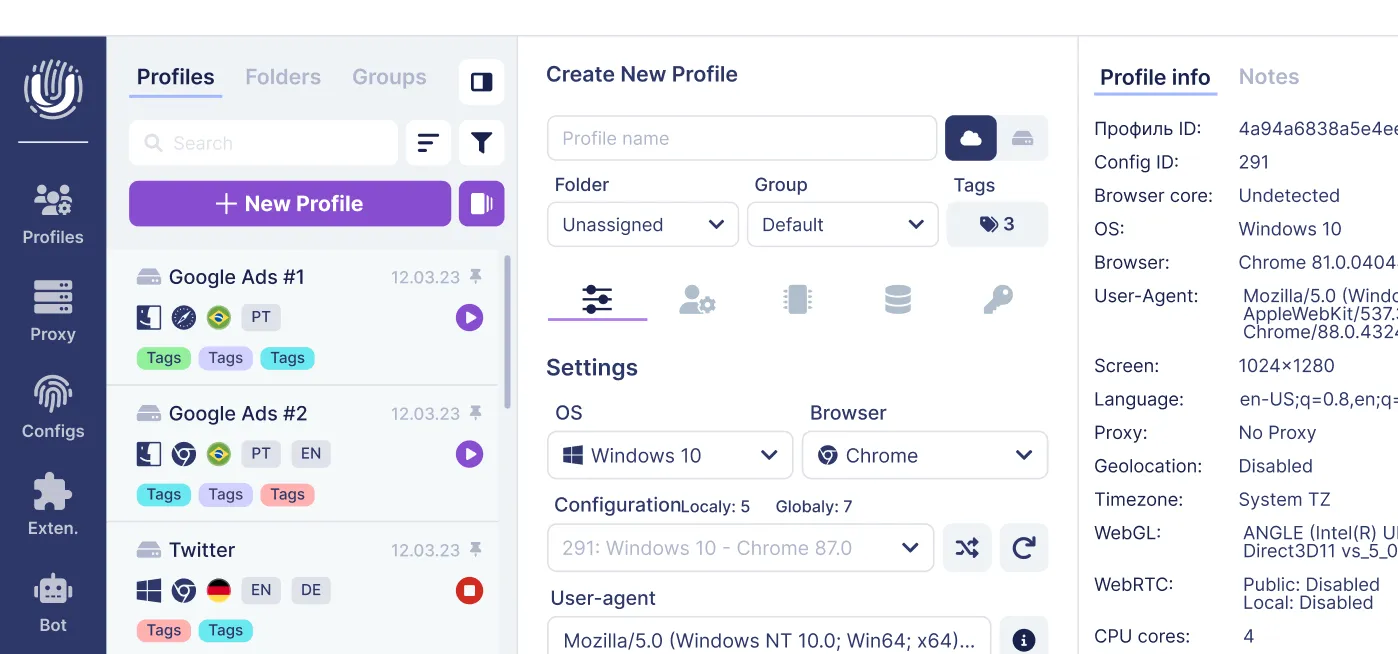
Advanced management in Undetectable.io: each browser profile can have its own proxy server settings - HTTP, SOCKS4/5, residential proxies, or rotating backconnect endpoints. Users connect, import/export proxy lists, and test proxies for IP leaks, country accuracy, and DNS behavior directly inside the tool.
Authentication modes: two common approaches exist - IP-based allowlisting (binding access to fixed source IPs) and username/password authentication (more flexible for remote use). Each has security trade-offs: credentials can be shared or leaked, while IP allowlisting breaks when your source IP changes.
Common misconfigurations to watch for:
- DNS leaks: browser resolves DNS outside the proxy, revealing your real location.
- WebRTC leaks: peer-to-peer endpoints expose your real IP even through a proxy.
- Fingerprint mismatch: proxy in the US but timezone and language set to Europe triggers detection.
Modern tools like Undetectable.io include built-in checks to catch these issues before they compromise accounts.
Proxies and multi-accounting with Undetectable.io
For digital marketers, affiliates, traffic arbitrage professionals, and SMM managers running tens or hundreds of accounts on Google, Facebook, TikTok, or Amazon, proxies are non-negotiable infrastructure. But they are not sufficient on their own.
Simply changing IP addresses via proxies is not enough. Platforms use browser fingerprinting, device fingerprinting, behavior analysis, and shared cookie stores to link accounts. IP correlation is only one signal among many - and often not even the primary one.
Undetectable.io uses proxies in tandem with profile isolation to solve this:
- Each profile gets its own proxy (residential, mobile, or datacenter), country, and timezone.
- Browser fingerprint parameters are randomized to match the proxy's IP location - US IP paired with US timezone, US language, and a matching WebGL renderer.
- Local profiles stay on your device, not on external servers, giving full control and reducing leak risk.
Unlimited local profiles on any paid plan is a key differentiator. You can create thousands of distinct proxy-bound environments on one machine, limited only by disk space.
A realistic workflow looks like this: a team creates 100 profiles for a new ad campaign, assigns unique residential proxies to each profile, then uses the cookie robot and warm-up features so accounts appear aged and natural before heavy spending begins.
The security benefit is containment: if one account gets flagged, the ban stays isolated to that single profile. No shared IP, no shared fingerprint, no cascade across your entire operation.
Benefits and limitations: what proxies do well - and what they don't
Proxy servers work best for masking ip addresses, routing traffic, and enforcing policy. But they have clear boundaries that every user should understand.
Benefits:
- Improved privacy through IP masking and geo-spoofing. A proxy hides your original ip address from every site you visit.
- Access to otherwise blocked content - geo-restricted catalogs, corporate filters, regional restrictions. Users can access blocked content by routing through proxies in permitted locations.
- Caching frequently accessed content to reduce bandwidth usage and speed up browsing across organizations. Proxy servers offer significant performance gains when caching is configured.
- Centralized logging, compliance enforcement, and access controls in enterprise environments. A network administrator can restrict access to certain websites and monitor all web access from a single control point.
Limitations:
- No inherent end-to-end encryption unless combined with HTTPS or secure sockets layer configurations. The proxy itself does not encrypt data by default.
- Trust issues: the proxy operator can see unencrypted web traffic. Free proxy services can pose privacy and security risks by logging activity and modifying content. Using free proxies can expose users to privacy risks including credential theft and ad injection. Public proxies are especially dangerous.
- Performance bottlenecks if proxy servers are overloaded, misconfigured, or geographically distant from the user or the destination server.
Even anonymous or high anonymity proxies can be detected by advanced anti-fraud systems through behavioral patterns, IP reputation databases, and mismatched fingerprints.
Specific risk scenarios:
- Open proxies frequently appear in botnet infrastructure and are heavily blacklisted.
- Shared proxies where another user's abuse leads to bans for everyone on that IP.
Best practices: use reputable proxy providers with clear privacy policies, always browse over HTTPS, and combine proxies with tools like Undetectable.io for full-stack identity separation. Retrieve data only through trusted, paid proxy infrastructure - never route sensitive credentials through unknown intermediaries.
Security risks, ethics, and legal considerations of using proxies
While proxy servers are legal and widely used by businesses, misuse and poor security practices can lead to serious consequences.
Security risks:
- Data interception: on unencrypted connections, malicious or compromised proxy operators can intercept credentials, session tokens, and personal data.
- Man-in-the-middle attacks: some proxies tamper with HTTPS by issuing forged certificates, silently breaking the secure connection between your browser and the destination. This is sometimes done legitimately in enterprise environments with internal network monitoring but is dangerous when done by unknown third parties.
- Malware and ad injection: free or public proxy services may inject malicious scripts, tracking pixels, or advertisements into the web pages they serve. This is why free proxies remain a significant threat vector.
Ethical and legal considerations:
- Using proxies to create fake accounts, impersonate others, or evade bans crosses ethical and often legal lines. Legitimate multi-account workflows - agency management, brand protection, competitive research - occupy a very different space.
- In tightly regulated sectors like finance and healthcare, proxy logging, data residency, and compliance with frameworks like GDPR or HIPAA require careful attention. An organization's internal network policies should clearly outline approved proxy use.
Legality:
- Proxies themselves are legal in most countries (US, EU, UK, and others) as of 2026.
- Gray areas include circumventing government censorship, scraping at scale without permission, or sourcing residential IPs from devices without informed user consent.
Responsible usage models:
- Ad verification, price comparison, brand protection, and competitive research using consent-based residential proxies.
- Clear internal policies defining who can use proxies, for what purposes, and with what level of logging.
Pair proxies with strong endpoint security, updated browsers, and a reputable tool like Undetectable.io to encrypt data where possible and minimize exposure.
Proxy server FAQs: concise answers to common questions
What is a proxy server in simple terms?
A proxy server is an intermediary server that sits between your device and the internet. It receives your web requests, forwards them using its own IP, and sends responses back to you. Websites see the proxy, not your device.
What does a proxy do on Wi-Fi or public networks?
On public Wi-Fi, a proxy adds an extra layer of control. The network owner may use a transparent proxy to log internet usage or filter content. You can also configure your own proxy to hide your web traffic from the local network and manage how your internet access appears to external sites.
Is it safe to use free proxy servers?
Generally, no. Free proxy services often log your activity, inject ads, or even modify page content to deliver malware. Always use paid, reputable proxy services for anything involving credentials or sensitive data.
Are proxy servers anonymous?
Partially. An anonymous proxy hides your IP but may reveal proxy usage through headers. A high anonymity proxy hides both - but neither hides your browser fingerprint, cookies, or account behavior.
How do proxies hide IP addresses?
When you use a proxy, the proxy server forwards your request using its own IP. The destination server sees the proxy's IP, not your own ip address. This is the core mechanism behind masking ip addresses.
Are proxy servers legal in 2026?
Yes, in most jurisdictions. Proxies are legal tools. Misuse - like violating platform terms of service, scraping protected data, or circumventing laws - can still carry legal consequences.
Do I have a proxy configured right now?
Check your proxy settings: on Windows, go to Settings → Network & Internet → Proxy. On macOS, check System Settings → Network → your connection → Proxies. In most web browsers, proxy configuration appears under advanced network settings.
What is the difference between a firewall and a proxy server?
A firewall filters packets at the network layer based on rules about ports, IPs, and protocols. A proxy server acts at the application layer as an intermediary server, handling and forwarding specific client requests. Many secure web gateways combine both functions, offering advanced security features alongside proxy capabilities for controlling access and routing traffic across an internal network.
Related posts
View all articlesJoin 450,000+ users who chose Undetectable
- Advanced anti-detection technology
- Unlimited local profiles from $49
- The perfect solution for multi-accounting