Browser Fingerprints
Device fingerprinting: how it works, how it's used, and how Undetectable.io helps you stay in control
Device fingerprinting: how it works, how it's used, and how Undetectable.io helps you stay in controlBrowser Fingerprints
Every time you open a website, your browser quietly broadcasts dozens of signals about your device. Device fingerprinting is the process of collecting those browser, hardware, operating system, and network attributes to create a unique identifier for a remote computing device-one that works independently of cookies or IP address changes.
Device fingerprinting creates unique IDs based on device attributes, combining over 100 data points for identification. A device fingerprint draws from browser-level signals like user agent strings, browser version, and canvas fingerprinting output, as well as broader device data such as OS details, hardware specs, and network stack characteristics. It's widely used in fraud prevention, bot detection, and account takeover protection by banks, e-commerce platforms, and SaaS providers.
Common subtypes include browser fingerprinting (focused on a user's browser), mobile device fingerprinting (leveraging sensors and app-level signals on mobile devices), and cross device fingerprinting that stitches the same user across a laptop, phone, and tablet.
At Undetectable.io, we build an antidetect browser that lets legitimate users control and manage their fingerprints to protect user privacy and handle multi-account setups ethically. This article is informational-not legal advice. Using fingerprinting or anti-fingerprinting tools must always respect local laws and platform terms.
How device fingerprinting works in practice
Here's how device fingerprinting works at a high level: when a web browser loads a page or a mobile app opens, client-side scripts and network layers expose hundreds of small data points.These signals may be normalized and combined into a device identifier that helps a risk system recognize similar device configurations over time.
Those device fingerprints are usually stored in a server side database and linked to accounts, sessions, or risk profiles for fraud detection and security analytics. The information collected feeds into risk engines that evaluate every login, payment, or sensitive action a user accesses.
Device fingerprints persist even after users clear browsing data, switch to incognito mode, or rotate their ip address via a VPN. Unlike cookies, the underlying device traits-GPU model, installed fonts, screen dimensions-change far less frequently.
Device fingerprinting works through both passive methods (observing TCP/IP behavior, TLS signatures, HTTP headers) and active methods (running JavaScript to query APIs, render graphics, or trigger timing tests). Modern providers apply machine learning algorithms to cluster slightly different fingerprints from the same device when a browser version or configuration changes, because device fingerprinting is probabilistic and can change with updates or alterations.
For example, a first login from Chrome on Windows in January 2025 creates a fingerprint. In March 2025, the current device with a newer browser version still gets linked by similar GPU output, fonts, and network stack signals.
Key data points: what goes into a browser fingerprint?
Device fingerprinting uses over 100 data points for identification, drawn from several categories of signals. Here are the most impactful ones.
Core browser signals. Fingerprinting systems may collect information like browser type and version through the user agent string. They also capture accepted languages, Do Not Track flags, JavaScript-enabled status, cookie support, and installed plugins or extensions. Research shows 54.86% of users have unique browser extensions, adding meaningful entropy.
Display and UI metrics. Fingerprinting systems may collect screen resolution and color depth information, along with device pixel ratio, available screen area, and window sizing patterns. Fingerprinting systems may also collect installed fonts information-font lists alone can contribute 6–8 bits of entropy.
HTML5 and API features. Canvas fingerprinting, WebGL rendering (GPU model and driver quirks), AudioContext behavior, media codec support, WebRTC IP leaks, and touch vs. mouse input capabilities all factor in. Each API call adds a layer of uniqueness.
Network-level data. IP address, ASN, service provider, connection type (mobile vs. broadband), TLS cipher suites, and HTTP header ordering all contribute entropy to the same device fingerprint.
Hardware hints. Fingerprinting systems may collect CPU core count and available memory, along with battery API data (where supported) and sensor lists on mobile devices like accelerometer and gyroscope. Fingerprinting systems may also collect time zone and preferred language settings and operating system details. These hardware signals are carefully combined to avoid over-collecting sensitive data under GDPR and CCPA frameworks.
Advanced techniques: canvas, audio, and hardware fingerprinting
Beyond the standard data points, several advanced techniques push fingerprint uniqueness further.
Canvas fingerprinting uses the HTML5 canvas element to render specific text and shapes with selected fonts and colors, then hashes the resulting bitmap. Tiny differences in GPU rendering, font rasterization, and anti-aliasing can produce outputs that vary across individual devices. Canvas fingerprinting can produce 5.7 bits of entropy even in small sample sets, making it a reliable supplementary signal.
Fingerprinting systems may collect audio processing characteristics through Web Audio APIs. By generating and processing sound via OscillatorNode and AudioContext, tiny timing and amplitude differences create an additional fingerprint layer that's difficult to spoof without engine-level modifications.
Fingerprinting systems may collect graphics hardware details via WebGL by drawing 3D scenes, reading back pixel data, and using renderer strings and supported extensions to identify GPUs and drivers-even when the user agent is spoofed. Together with canvas output, this forms a strong hardware profile of the user's device.
Micro-benchmarking runs short JavaScript performance tests to estimate CPU characteristics and power-saving modes, adding subtle distinguishing power without explicit hardware IDs.
Modern browsers try to reduce fingerprinting effectiveness with various protections. Chrome, Firefox, Safari, Brave, and Tor Browser have gradually restricted access to high-entropy APIs or added noise. This pushes fingerprinting vendors toward more sophisticated statistical models-and pushes privacy-conscious users toward tools like Undetectable.io that simulate realistic outputs for these APIs per profile, avoiding both naive blocking and obviously fake values that raise red flags.
Passive vs. active device fingerprinting
Passive fingerprinting collects characteristics from existing traffic at the network or application layer-TCP/IP options, TLS handshake parameters, HTTP headers-without sending custom probes to the user side. It happens silently as the user's browser communicates with any website.
Active fingerprinting requires initiating connections to the target device. It explicitly runs JavaScript or native code to query APIs, render graphics, or trigger timing tests, often via injected script tags or SDKs embedded in page content.
Semi-passive approaches sit in between: a server sends standard content but embeds small assets-invisible images, lightweight script snippets-that elicit responses revealing device traits without running full fingerprint batteries.
Concrete network examples include TCP/IP stack fingerprints used by tools like nmap, and TLS ClientHello variations captured by JA3/JA4 hashes that can differentiate browsers and TLS libraries at the network level. Enterprise and telecom environments sometimes use passive device fingerprinting for asset inventory and zero-trust policies, while consumer-facing sites rely more heavily on active browser fingerprinting.
Undetectable.io primarily helps users defend against active browser fingerprinting by controlling exposed JavaScript-level signals and software outputs, while proper proxy configuration can reduce some passive network fingerprints as well.
Real-world uses: fraud detection, bot detection, and risk scoring
U.S. consumers reported losing more than $12.5 billion to fraud in 2024, while the FBI recorded more than $16 billion in reported global cybercrime losses. Modern fraud detection stacks treat a device fingerprint as a persistent device id feeding into risk engines that evaluate every login, payment, signup, or sensitive action.
Account takeover protection. When bad actors use stolen credentials from data breaches, device fingerprinting flags login attempts from new or suspicious fingerprints, often triggering MFA or step-up verification. Fingerprinting can improve security by detecting fraudulent logins and identifying suspicious account takeovers. Device fingerprinting helps detect account takeovers and payment fraud before they succeed.
Payment fraud. E-commerce and fintech platforms use fingerprinting to detect repeated failed fraudulent transactions, abnormal geolocation, mismatched browser language and timezone, or previously blacklisted device fingerprints. Device fingerprinting detects patterns of fraudulent purchases across accounts, preventing unauthorized access to payment systems. Fingerprinting can help prevent payment fraud and detect automated bots.
Bot detection. Headless browsers, automation tools, and cheap proxy swarms often produce inconsistent or impossible combinations of signals. Fingerprint systems spot patterns of malicious bots to block scraping, fake signups, and ad fraud. In a TransUnion case study, 4Finance reported a 40% reduction in its overall fraud rate after implementing the TruValidate Device Risk solution.
Device fingerprinting identifies suspicious user activity with high confidence-it can achieve 99.5% accuracy in identity verification when combined with behavioral and contextual signals. Device fingerprinting can identify users with 99.5% accuracy.
However, these same systems occasionally misclassify power users, privacy advocates, or researchers as high-risk when fingerprints look unnatural or constantly change-a key reason why controlled, realistic fingerprints matter.
Device fingerprinting vs. browser fingerprinting and cross-device tracking
Browser fingerprinting typically refers to signals within a single browser instance on a given user's machine-user agent, canvas output, fonts, and similar software attributes. Device fingerprinting aggregates multiple layers: browser, OS, network, and hardware data, sometimes including native app telemetry from the same device.
Cross device fingerprinting goes further by linking activity from the same person across different devices-phone, laptop, work PC-using probabilistic methods, shared logins, overlapping IP ranges, and behavioral patterns. For example, when a user logs into the same account from Chrome on Windows and Safari on iOS, cross-device systems correlate login timestamps, IPs, and device fingerprints to maintain a unified risk profile.
Beyond fraud prevention, some companies use cross-device fingerprinting for attribution and personalized advertising, which typically requires explicit consent under GDPR and CCPA. Users cannot easily opt-out of device fingerprinting like cookies, since there's no simple "clear" button for hardware and software characteristics. Browser fingerprinting can enable tracking across websites even if cookies are cleared, and device fingerprints persist even after clearing browsing data.
Undetectable.io is designed to prevent unauthorized cross-device fingerprinting by letting users isolate and customize fingerprints per profile, so separate activities across accounts and projects don't get trivially linked.
Privacy, regulation, and ethical considerations
Device fingerprinting raises significant privacy concerns for users. It's invaluable for stopping fraud, but it can also enable long-term tracking without clear user awareness or consent. Privacy regulators increasingly view fingerprinting as a form of tracking requiring transparency and consent.
Privacy regulations like GDPR impose strict guidelines on fingerprinting. Under EU law, fingerprinting for fraud prevention often qualifies as "legitimate interest," but GDPR requires explicit consent for device fingerprinting in marketing or profiling contexts. The Planet49 ruling (C-673/17) confirmed that pre-checked consent boxes are invalid-even for cookies, let alone fingerprinting. Cumulative GDPR fines have exceeded €7 billion, although the precise total varies depending on the tracker and reporting date.
Frameworks like CCPA/CPRA in California and similar laws in Brazil and Canada restrict hidden tracking and mandate transparency around data collection. Users have rights to access, deletion, and objection to profiling, though enforcement is complicated when identifiers are hashed but still linkable.
Browsers are responding: Firefox's Enhanced Tracking Protection cuts user tracking by roughly 70%, Safari uses Intelligent Tracking Prevention, and Brave randomizes fingerprint outputs. A balanced approach to fingerprinting includes limiting information collection and being transparent with users.
At Undetectable.io, we advocate for users' ability to control their own browser fingerprint, prevent fingerprinting for invasive tracking, and still comply with the laws and platform policies relevant to their use case.
Common evasion and spoofing techniques used by attackers
On the other side of the arms race, fraudsters use virtual machines, emulators, and anti-detect browsers to generate large numbers of synthetic device fingerprints for mass account creation and bonus abuse across various forms of first party fraud.
Typical spoofing involves altering user agent strings, screen sizes, timezone, and language settings to mimic real users in specific regions-for example, pretending to be in the US while operating from another continent. More advanced configuration cloning involves importing stolen fingerprints (full browser and device profiles) into tools to impersonate a victim's devices during account takeover or payment fraud attempts.
Sophisticated fraud prevention now checks for internal consistency: browser version vs. supported features, GPU strings vs. OS, WebGL vs. canvas output, and timing anomalies that indicate virtualization. Scripts detect mismatched combinations-like a user agent claiming Windows 11 but fonts matched to macOS-as immediate red flags for malicious behavior.
Simplistic randomization of every parameter often backfires. Producing impossible combinations of signals makes a profile stand out to device fingerprinting systems more than an ordinary browser would. Bad actors who randomize everything actually increase their detection risk.
Undetectable.io's positioning is clear: we focus on realistic, consistent browser fingerprints for privacy and multi-accounting professionals-marketers, SMM managers, arbitrage teams-not on helping anyone bypass KYC or commit fraud. We exist to stop fraud from impacting legitimate users, not to enable it.
Defensive strategies: how users and businesses can respond
Whether you're protecting yourself as a user or securing a platform as a business, understanding your options is essential. Fingerprinting is often combined with other signals for security purposes, and defenses should follow the same layered philosophy.
For everyday users and researchers. Privacy-focused browsers like Firefox (with add-ons), Brave, and Tor Browser reduce exposed signals. Script blockers and VPNs help, though they can trigger CAPTCHAs and degrade customer experience. "Simplified fingerprint" strategies-reducing exposed fonts, disabling unnecessary APIs like WebGL and canvas, using standardized window sizes-help you blend into a crowd rather than standing out.
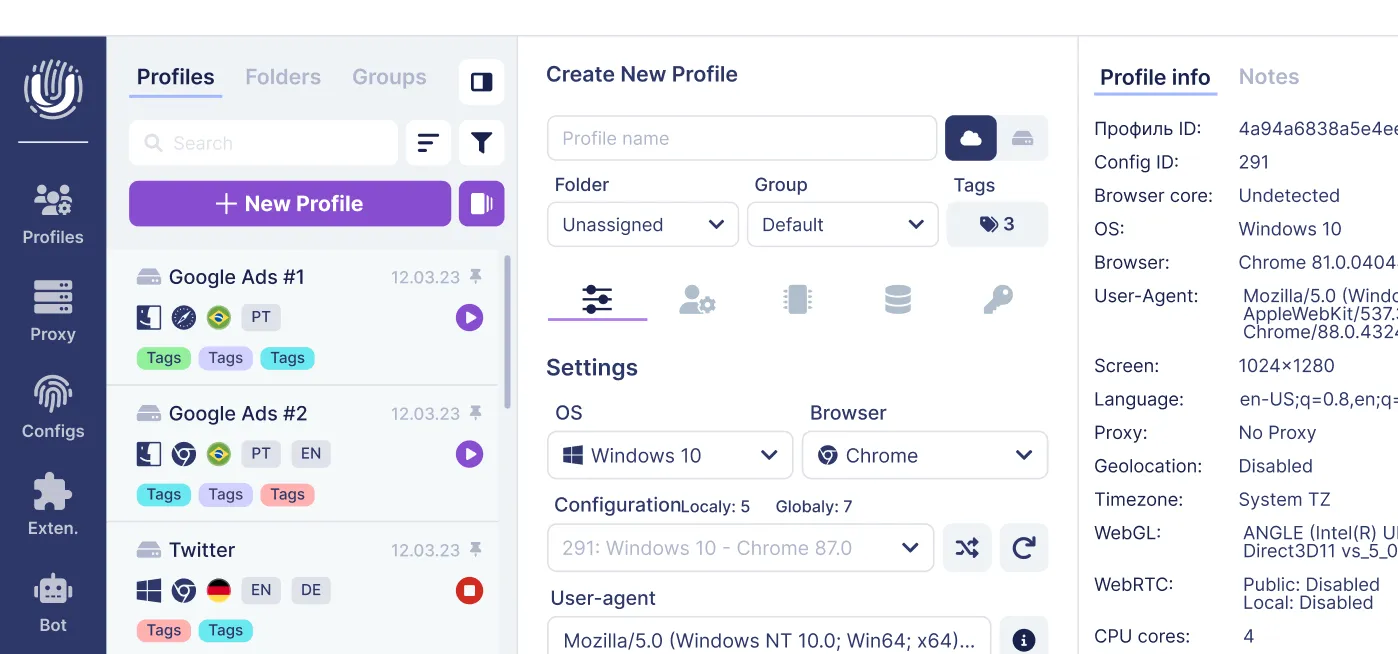
For multi-account professionals. "Spoofed fingerprint" approaches using anti-detect browsers like Undetectable.io generate consistent, human-like fingerprints per profile. Each profile acts as an isolated environment, decoupling activities across accounts and projects so a single device doesn't link them together. This matters for affiliates, SMM teams, and traffic arbitrage professionals who manage work across many platforms.
For businesses. Use device fingerprinting as one layer in a broader security stack alongside IP reputation, velocity checks, behavioral biometrics, and strong authentication (WebAuthn, FIDO2). Rely on device fingerprinting to identify evolving threats and spot patterns of abuse, but avoid over-relying on any single signal.
Companies should be transparent in privacy policies, provide user controls where feasible, and carefully separate fraud prevention uses from marketing uses to stay compliant and maintain trust with legitimate users.
How Undetectable.io uses fingerprinting profiles for safe multi-accounting
Undetectable.io is an antidetect browser built for legitimate users: affiliates, social media managers, traffic arbitrage teams, and e-commerce sellers who must manage many accounts without triggering anti-fraud systems on platforms like Google, Facebook, TikTok, and Amazon.
Each browser profile has its own stable, realistic browser fingerprint-including user agent, screen parameters, GPU string, fonts, and canvas/WebGL behavior-along with separate cookies, local storage, and dedicated proxy settings. The tool works to prevent fingerprinting from linking your profiles by ensuring each environment appears as a completely independent device to any website.
Paid plans allow effectively unlimited local profiles, limited only by your disk space. This means teams can create hundreds or thousands of isolated environments for campaigns or clients, all from a single device. Local profiles stay on your hardware, so your data isn't sent to external servers-reducing the risk of leaks and giving you full control over stored information.
The Cookies Robot is an automation feature that warms up fresh profiles by browsing and collecting cookies, building credible histories so fingerprints and behavior don't look like newly created bots. This is essential because detection systems flag profiles with zero browsing history and no cookie data.
Synchronization options include local vs. cloud profiles, team sharing, and API-based automation to mass-create and manage fingerprints while keeping sensitive data on your own infrastructure when desired.
Undetectable.io is designed to help you protect privacy, avoid unwanted tracking, and manage multi-account work-while you remain responsible for following platform rules and local laws.
Conclusion: the future of device fingerprinting
Device fingerprinting serves a dual purpose: it's a critical tool for fraud detection, bot detection, and account takeover protection, but it's also a persistent tracking mechanism that raises serious privacy questions for every user on the internet.
Over the next few years, expect stronger browser defenses, more regulatory enforcement, increased use of behavioral biometrics, and more sophisticated AI models to link-or deliberately de-link-device fingerprints over time. Both businesses and power users need to understand how device fingerprinting works to make informed decisions about security, compliance, and privacy.
If you manage many accounts or care about online anonymity, leaving your device identity completely unmanaged is a risk. Try Undetectable.io for free and experiment with controlled, realistic browser fingerprints that keep your profiles isolated and your work protected. Start with a free plan, explore how each unique identifier stays consistent and believable, and take control of your fingerprint instead of hoping no one is watching.
Whatever tool you choose-use it responsibly. Align your approach with local law, industry regulations, and platform policies.
Related posts
View all articlesJoin 450,000+ users who chose Undetectable
- Advanced anti-detection technology
- Unlimited local profiles from $49
- The perfect solution for multi-accounting