Reviews
Random User Agent: How It Works, When It Fails, and What Actually Protects You
Random User Agent: How It Works, When It Fails, and What Actually Protects YouReviews
Every time your browser visits a website, it shares a secret code about itself—a user agent string that reveals details about your browser type, operating system, and version. Randomizing this string has become a popular tool for scrapers, marketers, and privacy-conscious users. But does it actually protect your identity in 2026?
Quick Answer: What Is a Random User Agent?
A random user agent is a system that automatically swapped browser identification strings sent to websites with each request or session.The user agent string is an HTTP header that identifies your browser and platform—one signal among many that can be used in browser fingerprinting, such as “Mozilla/5.0 (Windows NT 10.0; Win64; x64; rv:124.0) Gecko/20100101 Firefox/124.0.”
Since around 2015, random user agent rotation has become standard in scraping, SEO tools, and simple browser extension solutions. The tool works by substituting your real identifier with randomly selected strings from a pool of real user agents representing different devices, browsers, and operating systems.
This helps with basic bot detection and A/B testing, but modern fingerprinting used by Google, Facebook, and TikTok goes far beyond the user agent header alone.
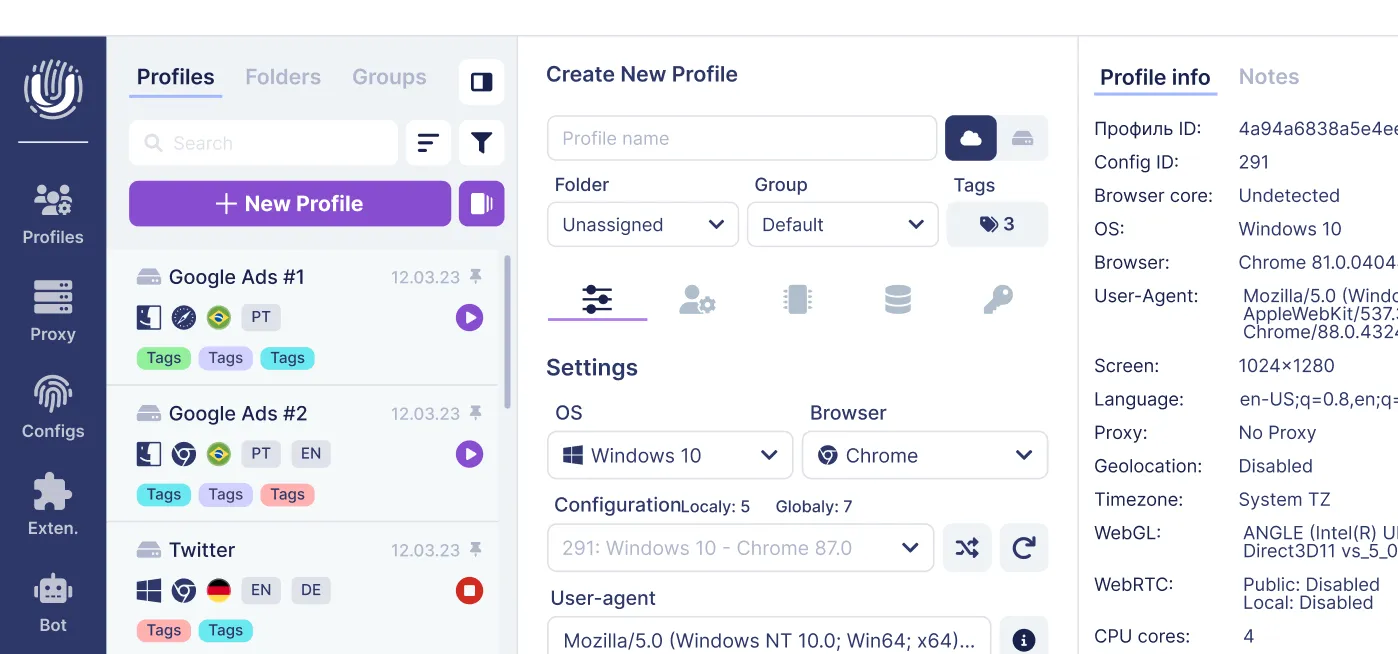
More advanced solutions like Undetectable.io manage full browser fingerprints, not just user agent strings.
What Is a User Agent?
The user agent is an HTTP header string your browser sends to every website you visit. It’s how your browser shares information about itself with web servers.
Here are concrete examples:
- Chrome on Windows 11: Mozilla/5.0 (Windows NT 10.0; Win64; x64) AppleWebKit/537.36 (KHTML, like Gecko) Chrome/125.0.0.0 Safari/537.36** **
- Firefox on Ubuntu: Mozilla/5.0 (X11; Ubuntu; Linux x86_64; rv:126.0) Gecko/20100101 Firefox/126.0
- Safari on iOS 17: Mozilla/5.0 (iPhone; CPU iPhone OS 17_4 like Mac OS X) AppleWebKit/605.1.15 (KHTML, like Gecko) Version/17.4 Mobile/15E148 Safari/604.1
Websites use this data to serve mobile vs. desktop layouts, collect basic analytics, apply browser-specific workarounds, and implement simple bot filtering. In Nginx or Apache access logs, user agent is a primary column for traffic analysis—and identical agents across millions of requests create such a clear trail of automation.
What Is a Random User Agent and Why People Use It?
A random user agent system automatically picks a different, realistic user agent string from a maintained pool. Common rotation strategies include:
- Per HTTP request (new agent every request)
- Per browser tab or profile
- Per specified period (every 5-10 minutes)
- On browser startup
Use cases in 2024-2026 include web scraping, SEO rank tracking, price comparison bots, marketing automation, and QA testing across different devices. These systems typically rely on lists of currently popular browser versions.
The perceived benefits include avoiding trivial IP+user agent blocking and simulating traffic from multiple platforms. However, people expect anonymity from user agent rotation alone, which is no longer realistic against modern detection.
Random User Agent Browser Extensions
Many users prefer to install a browser extension rather than coding custom solutions. These add on tools typically offer a super easy interface: dropdown menus to select browsers and operating systems, interval settings for how often agents automatically change, and an exceptions list for special cases.
Some extensions pull remote user agent lists from URLs to stay updated without republishing. However, most only modify the User-Agent header, leaving the rest of the browser’s fingerprint unchanged—creating detectable inconsistencies.
Random User Agent for Chrome
On Google Chrome in 2025-2026, users install random user agent switcher extensions from the Chrome Web Store. Setup is super light: install from the store, pin the icon to your toolbar, configure which platforms to emulate (Windows, macOS, Android, iOS), and set rotation at regular intervals.
Chrome-based tools can rotate per tab or per request, but most still do not provide full, coherent fingerprint management across browser-exposed signals. For serious multi-accounting, selecting a dedicated anti-detect browser provides better control than a single Chrome with a masking plugin.
Random User Agent for Firefox
Firefox Add-ons offer user agent switcher extensions with granular configuration options. Firefox’s historically flexible APIs allow custom behavior including timers, domain-specific rules, and profiles per container tab.
A typical workflow: install from AMO, manually set randomization interval, and test on a user-agent-checker page. Even with deeper customization, user agent changes alone cannot hide high-entropy fingerprinting signals like canvas or WebGL data.
Random User Agent for Safari and Opera
Safari (macOS 12-14): Apple’s extension ecosystem offers few reliable randomization tools. Most Safari randomization happens via the Develop menu or automation frameworks, not normal plugins. Users working on Intel Mac OS or Apple Silicon typically use developer tools directly.
Opera (Chromium-based): similar user agent switcher extensions are available through Opera’s Add-ons store, but behavior and compatibility can vary by extension. Opera inherits the same limitation—changed header, unchanged deeper fingerprint components that anti-fraud systems correlate.
Random User Agent on Mobile Browsers (Android/iOS)
Android Chrome and iOS Safari generally don’t support desktop-style extensions, making random user agent rotation on mobile device browsers difficult. Firefox for Android supports certain extensions including some user agent switchers for advanced users.
Large-scale mobile randomization typically requires automation frameworks, device farms, or cloud phones rather than simple app plugins. Professionals in traffic arbitrage prefer anti-detect browsers with mobile proxy solutions.
Random User Agent in Code and Automation
Serious scraping and QA testing rarely rely on browser plugins—they rotate user agents directly in source code. The core approach: maintain a list of up-to-date real user agent strings and randomly pick one per request.
Python Random User Agent (requests and Scrapy)
Using fake-useragent or a custom list with random.choice() when setting headers in requests.get() is standard. Scrapy projects plug in scrapy-user-agents middleware, configured in settings.py without modifying spiders.
Puppeteer and Node.js Random User Agent
Node.js developers use random-useragent or user-agents npm packages. Install with npm, import the package, call getRandom(), then pass the value into page.setUserAgent() before navigation. Developers can filter by browser family and OS to generate believable combinations.
Selenium, Go, PHP, and curl Random User Agents
- Selenium: Choose a random agent, pass to ChromeOptions/FirefoxProfile before launching
- Go: Use a slice of agents with math/rand and set the User-Agent header on http.Request
- PHP: Array of strings with array_rand(), then CURLOPT_USERAGENT on the cURL handle
- curl/bash: Bash array with $RANDOM to pick, then curl -A "$UA" https://example.com
Random User Agent in Security and Pentesting Tools
Many web security scanners include user agent customization to bypass naive filters looking for default scanner signatures. However, modern WAFs rely on far more than user agent alone.
ffuf, Gobuster, Nikto, and Nuclei User Agent Options
| Tool | Flag/Option | Notes |
| ffuf | -H "User-Agent: ..." | Loop multiple values while fuzzing |
| Gobuster | --useragent | Mimic Chrome/Firefox during brute forcing |
| Nikto | -useragent | Avoid default signature WAFs block |
| Nuclei | -H or template headers | Inject realistic browser string |
In 2024-2026, pentesters rarely rely on UA changes alone—they also vary IPs, timing, and request patterns.
Online Random User Agent Generators and APIs
Web-based random user agent generator tools output strings on demand. Typical UX: select browser families, choose operating system, click “Generate.” Some services let users export thousands as CSV or JSON—completely free for basic use and ad free in premium tiers.
These work for quick testing without coding, but static lists become outdated. For long-term projects, dedicated solutions outperform ad-hoc generators.
The Real Limits of Random User Agents in 2024-2026
User agent is just one field in a vast browser fingerprint. Faking it might make you more fingerprintable through sneaky javascript tricks designed to detect inconsistencies.
Major platforms use sophisticated detection including (and you can see many of these exposed in BrowserLeaks.com anonymity checks):
- Canvas and WebGL fingerprinting
- WebRTC (reveals internal IPs)
- Font availability and screen size
- Time zone, language, hardware concurrency
- Audio context and even some plugins
If your user agent claims “iPhone Safari” but other signals look like Windows desktop, anti-bot systems flag that inconsistency immediately. Many random-user-agent extensions have distinctive JS fingerprints, making them easy to identify. Tools like AmIUnique.org browser fingerprint tests clearly show how unique these combinations remain. For multi-accounting, random agents per request break the illusion of a stable human user.
What Actually Works: Full Fingerprint Management with Undetectable.io
Anti-detect browsers generate full, coherent browser fingerprints per profile—not just user agent changes. Undetectable.io creates profiles where user agent, canvas, WebGL, fonts, time zone, and screen resolution all match coherently, and its pricing plans for profile management scale from casual use to large teams.
Key differentiators vs competitors:
- Unlimited local profiles on paid plans
- Local profiles stay on your device for data control
- Proxy manager, mass profile creation, cookies robot for warming
- Automation API for scaling operations
Random User Agent vs. Full Anti-Detect Browser Profiles
| Aspect | Random UA Extension | Undetectable.io Profile |
| Fields changed | Usually the User-Agent header and sometimes related JS/browser-exposed UA values | Full fingerprint (50+ signals) |
| Coherence | Inconsistent, detectable | Matched, believable |
| Persistence | Changes constantly | Stable human-like sessions |
| Profiles | Single browser | Unlimited local profiles |
| Detection resistance | Low | High |
For casual experimentation, UA rotation might suffice. For high-stakes work involving accounts, payments, or ad networks, full fingerprint control is the 2025-2026 standard.
How to Use Random User Agents Safely and Strategically
Random UA rotation is appropriate for quick manual tests, basic SEO checks, and low-risk scraping. Best practices: use real, recent agents; keep OS/browser combinations believable; sync with Accept-Language headers.
One stable user agent and full fingerprint per account is safer than many random ones.
Combine user agent management with quality proxies, realistic delays, and human-like patterns. When project scope or security requirements grow, upgrade to full-profile management.
Ready to boost today’s multi-accounting workflow? Start for free with Undetectable.io or go directly to the Undetectable download for Mac and Windows, and create coherent browser profiles instead of just randomizing user agent strings.
Related posts
View all articlesJoin 450,000+ users who chose Undetectable
- Advanced anti-detection technology
- Unlimited local profiles from $49
- The perfect solution for multi-accounting