Account Management
Instagram Account Suspended: Why It Happens, How To Get Your Account Back, And How To Avoid It
Instagram Account Suspended: Why It Happens, How To Get Your Account Back, And How To Avoid ItAccount Management
Title: Why Is My Instagram Account Suspended? Key Reasons and Solutions Desc: Discover the key reasons behind your Instagram account suspension and find effective solutions to regain access. Read the article for essential insights.
Instagram Account Suspended: Why It Happens, How To Get Your Account Back, And How To Avoid It
Finding your Instagram account suspended feels like having your digital identity erased overnight. Whether you manage a personal brand, run client campaigns, or operate an e-commerce business, losing access to your account can disrupt everything from customer communication to revenue streams. The good news: some suspensions can be appealed, and many risks can be reduced once you understand the behaviors and policy violations that commonly trigger them.
This guide breaks down exactly why Instagram suspends accounts, how to navigate the appeal process, and how professionals use tools like an anti detect browser to protect accounts when managing multiple Instagram profiles at scale.
My Instagram Account Is Suspended – What To Do Right Now
Many legitimate Instagram accounts get suspended without a clear reason. Many users wake up to a message telling them “Your account has been disabled for violating our terms” with no further explanation. If you’re staring at this screen right now, take a breath—you’re not alone, and you likely have options.
What Suspension Messages Look Like
Suspended accounts display a notification upon login that informs the user of the suspension. Depending on the severity, you might see:
- A red banner across the top of your login screen stating your account is disabled
- A pop-up modal blocking profile access on desktop
- Partial restrictions like a grayed-out like button with a countdown timer (e.g., “Try again in 23:47”)
- Inability to post Stories, Reels, or access DMs
- A full login block with only an “Appeal” or “Disagree with decision” button visible
These visual cues tell you whether you’re dealing with a temporary action block or something more serious requiring immediate action.
Your 10-Minute Emergency Checklist
1. Screenshot everything immediately Capture the exact error message, URL, and timestamp. This can help you keep the details consistent when submitting an appeal.
2. Note the date and time Write down specifics: “7 May 2026, 10:22 AM UTC.” This helps with appeal submissions.
3. Check your email and spam folder Users should check their email for notifications from Instagram regarding account suspension, which can aid in appeals. Look for messages from security@mail.instagram.com or support@instagram.com.
4. Do NOT repeatedly log in and out Each failed attempt can extend IP-based rate limiting from hours to 72 hours.
5. Never tap “Delete account” This permanently eliminates your recovery options. If you see any deletion prompts, ignore them.
Temporary suspensions often lift automatically after 24–48 hours for minor issues. However, serious violations can result in a permanently disabled Instagram account. In some cases, Instagram gives users a limited time window to request a review. If an appeal is available, follow the on-screen instructions immediately.
The following sections explain exactly why accounts get suspended, step-by-step appeal methods, and how tools like Undetectable.io help prevent multi-account suspensions for professionals managing several profiles.
Why Is My Instagram Account Suspended? 6 Common Triggers
Instagram accounts are most commonly suspended for violating the platform’s Community Guidelines or Terms of Service. The platform rarely provides detailed explanations, leaving users confused about what went wrong. Here are the six most common triggers.
1. Community Guidelines and Community Standards Violations
Instagram’s Community Guidelines and Meta’s Community Standards cover areas such as spam, harassment, nudity, hate speech, violence, impersonation, intellectual property, and other unsafe or misleading behavior. Common reasons for Instagram account suspension include hate speech, graphic violence, nudity, harassment, spam behavior, impersonation, copyright infringement, and suspicious activity.
Meta uses automated systems and human review to enforce policies such as hate speech, nudity, and graphic content. The exact detection rates vary by policy area and reporting period. Repeated copyright or trademark violations can lead to content removal, account restrictions, or account disablement, depending on the severity and history of violations.
Selling counterfeit goods, promoting scams, or making promises like “DM for free giveaway link” without fulfillment also violate commerce policies expanded since 2022.
2. Authenticity and Identity Issues
Instagram accounts can be suspended for violating Community Guidelines, which include impersonation, spam behavior, and inappropriate content. Accounts mimicking celebrities without clear parody labels receive an “account suspended for authenticity and identity” message.
Parody and fan accounts should clearly indicate that they are not the official person, brand, or organization, and should avoid usernames, bios, or visuals that could mislead users.Even clearly labeled fan or parody accounts can still be flagged if their username, profile image, or content looks too similar to the original creator or brand. Using someone else’s photos as your profile picture—even unknowingly—can trigger immediate action.
3. Suspicious Activity Patterns
Instagram does not publicly disclose exact daily limits for follows, likes, or DMs. In practice, new accounts should act conservatively and avoid sudden spikes in repetitive actions.
Automated actions, such as mass-following or using bots, can trigger Instagram’s security systems, leading to account suspension. Even manual high-speed actions (100 likes in 10 minutes) activate velocity heuristics that flag your behavior as non-human.
4. Data Scraping and Bot-Like Behavior
Tools that extract follower lists, automate comments, or scrape engagement data have increased 50% since 2025 API restrictions. Platforms can use behavioral signals, such as repetitive timing, interaction patterns, and automation-like activity, to detect bot-like behavior.
Session duration anomalies also trigger flags. If your interaction patterns don’t match typical human browsing, the system treats you like automation regardless of whether you’re actually using third party apps.
5. Security and Account Safety Holds
If Instagram detects unusual login activity, such as access from unrecognized devices or locations, it may temporarily suspend the account for security reasons. Logins from high-risk IPs (certain VPN datacenters), passwords found in HaveIBeenPwned breach databases, or sudden activity spikes after security incidents all trigger protective locks.
These holds are designed to protect users from unauthorized access. They typically resolve faster than violation-based suspensions once you verify your identity.
6. Mistaken Suspensions and Mass Reporting
Mass reporting by other users can lead to account suspension, even if the reported content does not actually violate Instagram’s rules. Coordinated reporting can draw additional review attention to an account, but Instagram does not publicly disclose exact report thresholds or how often mass-reporting leads to suspension.
Instagram suspensions often occur due to violations of Community Guidelines, which can include using banned hashtags or engaging in spam-like behavior, even unintentionally. Additionally, suspensions can occur if Instagram suspects a user is under the age of 13, triggering immediate action regardless of actual user age.
Automated moderation can make mistakes, and even established creators or businesses may sometimes need to appeal incorrect enforcement decisions. Even established businesses and influencers experience wrongful suspensions during report waves or when hashtag blacklists catch legitimate content.
Types Of Instagram Account Suspension And How Long They Last
Understanding the difference between temporary restrictions and permanent disablement helps you respond appropriately.
Soft Restrictions: Action Blocks
Action blocks limit specific functions without fully suspending your account. Your account status remains technically active, but you’ll see restrictions like:
- Likes limited to approximately 12 per hour
- Comments capped at around 15 per hour
- Follows restricted to 20–60 per day based on account age
- On-screen timers showing when restrictions lift
These typically last 2–24 hours and resolve automatically. Avoid the triggering behavior to prevent escalation.
Temporary Suspensions
Temporary account suspension ranges from 24 hours to 30 days. When you try to log in, you’ll see a notice explaining the suspension with an option to “Disagree with decision.”
Some temporary restrictions may lift automatically, while more serious account suspensions can require review and may take longer to resolve.
Permanent Disablement
A permanently disabled account shows “Your account has been disabled for violating our terms” with no timeline for restoration. You lose access to your profile, and Instagram initiates a 30–90 day data retention clock unless you successfully appeal with identity verification.
In some cases, Instagram gives users a limited time window to request a review. If an appeal is available, follow the on-screen instructions immediately.Permanent disables are usually associated with serious or repeated violations, but Meta does not publicly disclose exact appeal statistics or internal violation-score thresholds.
Suspension Length Comparison
| Violation Type | Typical Duration | Recovery Likelihood |
| First minor violation (100 follows/day) | 3–12 hour action block | Auto-resolves |
| Repeated spam (3+ mass follow cycles) | 3–7 day temporary suspension | 60–70% with appeal |
| Severe violation (fraud, hate speech) | Permanent disable | 10–20% with appeal |
Meta does not publish exact timeframes publicly. Appeal processing time can vary significantly depending on the case, review volume, and whether identity verification is required.
How To Appeal An Instagram Account Suspension And Get Your Account Back
Instagram allows users to appeal a suspended account through both the app and web interfaces. Most users should try official appeal options first before considering additional steps.
Step 1: Document Your Suspension
Before doing anything else, take a full screenshot of the account suspension screen. Note the exact wording of your error message—you’ll need to paste this verbatim into appeal forms.
To appeal an Instagram account suspension, users can typically find an option to “Disagree with Decision” or “Appeal” when they attempt to log in and see a suspension message.
Step 2: Use the In-App Appeal Flow
Instagram provides an in-app appeal option for users facing suspension, along with official appeal forms available in the Help Center. If you can still access the login screen:
- Tap “Disagree with decision” or “Appeal”
- Fill in the form with a professional, concise explanation
- Keep it under 500 characters
- Emphasize that you did not intend to break community guidelines
- Submit and note the timestamp
Avoid emotional language, excessive caps, or emojis. A straightforward statement like “I posted legitimate content and did not violate any policies. Please review my account” works better than lengthy explanations.
Step 3: Submit a Web-Based Appeal
For disabled Instagram accounts, visit help.instagram.com and select “My Instagram account was deactivated.” You’ll need to:
- Paste the exact error message from your screenshot
- Provide your username and associated email
- Upload government ID if requested (passport, driver’s license)
- Include a selfie matching your profile photo
The appeal process for a suspended account often involves submitting an identity verification, such as a selfie video or a government-issued ID.
Step 4: Complete Identity Verification
If Instagram suspects fraud or impersonation, they may require additional verification, such as a photo or ID, to process the appeal and restore access to the account. This might include:
- A 30-second selfie video reciting a specific phrase
- Government-issued identification
- Business documentation (EIN for business pages)
Refusing verification results in permanent loss of the account in approximately 90% of cases. Complete these requests promptly.
Step 5: Wait and Monitor
Appeals typically take 24 to 72 hours for processing, though complex cases may require longer review times. After submitting an appeal, users may need to wait several days for a response, as Instagram’s review process can vary in duration depending on the complexity of the case and the volume of appeals being handled.
Check your spam folder daily for responses from meta@support.facebookmail.com or similar addresses. Missing an email can delay your recovery by weeks.
Step 6: Follow Up Strategically
If users do not receive a response to their appeal within a reasonable timeframe, they are advised to follow up through other support channels or by responding to any emails received from Instagram.
Best practices for follow-up:
- Reply to the same email thread rather than starting new tickets
- Resubmit forms only every 72 hours
- Avoid sending dozens of multiple appeals—duplicates can delay review by 5–7 days
If the issue involves a specific content decision, some users may be eligible to appeal to the Oversight Board after Meta’s final decision. This option is not a general recovery path for disabled Instagram accounts.
Recurring Suspensions, “My Account Gets Suspended For No Reason”, And What To Do
Some users experience their account is suspended repeatedly. If you’ve had several Instagram accounts suspended in a short period—say, 6–7 accounts created within one month on the same phone—you’re dealing with systemic issues beyond individual violations and should apply advanced multi-account safety strategies on Instagram.
Device and IP Reputation
Managing multiple Instagram accounts can lead to suspensions if the platform detects suspicious activity, such as logging in from different locations or creating accounts too quickly. Instagram may connect accounts through:
- Shared login details
- Phone numbers
- Email addresses
- IP patterns
- Device and app signals
- Cookies
- Browser or session fingerprints
Repeated disables from the same environment can increase the risk that newly created or linked accounts will face additional checks or restrictions.
Patterns That Trigger Suspicion
Repeatedly creating multiple accounts in a short time frame can trigger Instagram’s security systems, leading to account suspensions as the platform may flag this behavior as suspicious.
Red flags include:
- Creating a new account minutes after another is disabled
- Reusing the same profile photo and bio
- Quickly following the same groups of people from new accounts
- Using the same email address or phone number across accounts
Hidden Limits You’re Probably Violating
Many users feel they did “nothing wrong” but still trigger invisible caps:
- Daily follow limits (lower for new accounts)
- DM caps around 50 per day
- Automation rules even for manual high-speed activity
Even innocent overuse—like enthusiastically following 200 accounts in your first hour—looks like suspicious activity to detection systems.
Cooling Off and Recovery
If an account is suspended, users should refrain from creating new accounts immediately, as this can lead to further suspensions; instead, they should wait for the appeal process to conclude.
Recovery steps:
- Stop creating new instagram accounts on the same device for 7–14 days minimum
- Remove third party apps with Instagram access via settings/security
- Reset passwords for both Instagram and your email
- Secure your primary email with two-factor authentication
- Focus on recovering your main account before spinning up new profiles
Repeated suspensions reduce trust in your entire device ecosystem. Every new account created during this period inherits that damaged reputation.
Managing Multiple Instagram Accounts Safely With An Anti Detect Browser
Social media managers, ad arbitrage specialists, and e-commerce sellers often need to manage 5, 10, or even 100+ Instagram accounts legitimately. Using one browser and one IP address for all of them is dangerous.
Why Browser Fingerprinting Matters
Instagram’s detection systems analyze far more than your IP address. They track:
- Canvas rendering patterns
- WebGL data
- Font enumeration
- Timezone and language settings
- Hardware concurrency
- AudioContext signatures
- Screen resolution and color depth
When you log into more accounts from the same device using the same browser, Instagram sees identical fingerprints across all sessions. Even with different IPs and separate logins, accounts may still be linked if they share the same browser environment, cookies, device signals, or repeated behavior patterns.
How Anti Detect Browsers Solve This Problem
Using an anti-detect browser can help manage multiple Instagram accounts by providing unique browser fingerprints for each account, reducing the risk of being flagged as spam.
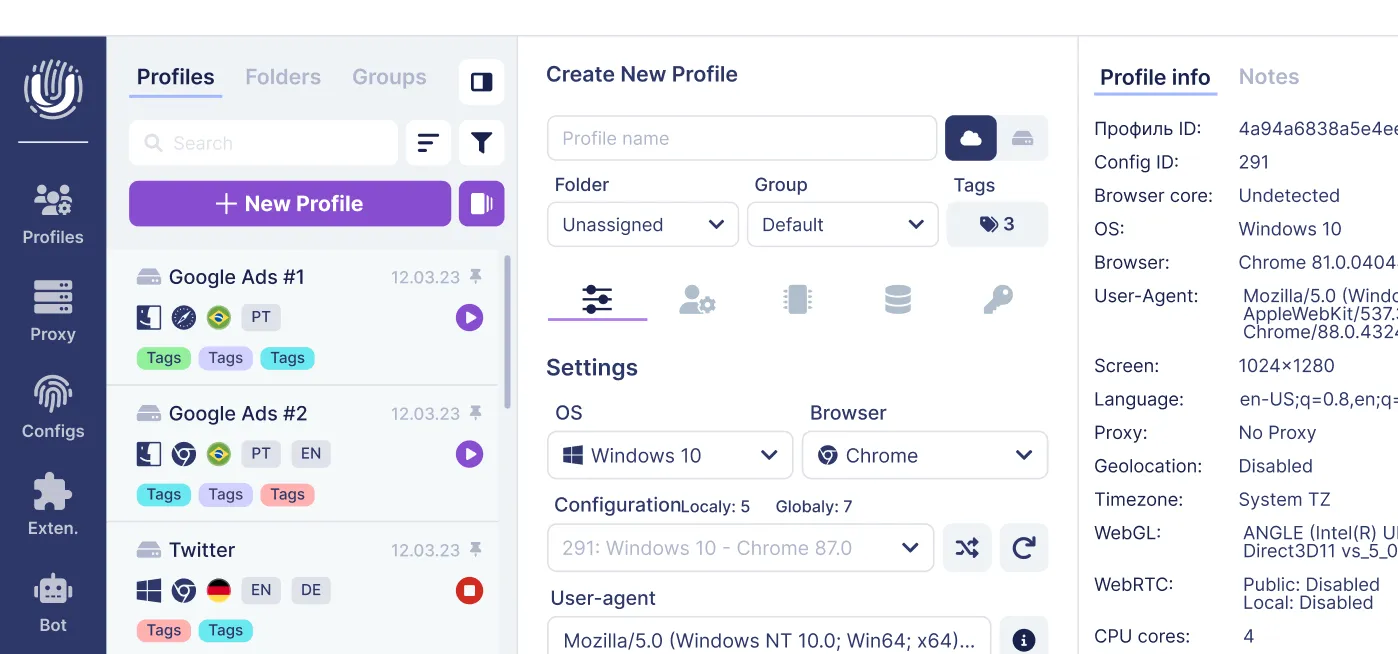
Undetectable.io is an anti detect browser specifically designed for anonymity and multi-accounting. Unlike alternatives like Multilogin, GoLogin, or Octo Browser, you can compare the best GoLogin alternative anti-detect browsers to decide what fits your stack, but Undetectable.io offers:
- Unlimited local profiles on paid plans—create hundreds or thousands of profiles limited only by disk space
- Local data storage—your data stays on your device, not external servers
- Proxy management—supports thousands of providers including residential and mobile IPs; see a curated list of the best proxy services for Undetectable.io
- Cookies robot—warm up new profiles gradually with organic browsing history
How Profile Isolation Works
Undetectable.io creates separate browser profiles for each Instagram account. Each profile contains:
- Unique device fingerprint (emulating 1000+ configurations)
- Isolated cookies and local storage
- Dedicated proxy connection
- Separate timezone and language settings
To Instagram, each profile appears as a completely different real person on a different device in a different location.
Real-World Use Case
A small marketing team manages 20 client Instagram accounts without bans by:
- Creating dedicated Undetectable.io profiles for each client (tagged like “clientA_US_proxy”)
- Assigning unique residential proxies ($10/month per account average)
- Using human-paced actions (60 follows/day, ramping 10% weekly)
- Never cross-logging accounts between profiles
Result: the team reduced cross-account confusion and lowered the risk of linked-session issues compared with managing all accounts in one native browser.
Important Caveat
Anti detect browsers reduce technical false-positive suspensions but don’t provide immunity from guideline violations. You still must respect Instagram’s community standards and terms. Fraud, spam, and hate speech will get accounts banned regardless of fingerprint isolation.
Step-By-Step: Using Undetectable.io To Reduce Instagram Suspension Risk
This walkthrough assumes you understand why multi-accounting from one device risks suspensions. Before you start, you can test your setup on BrowserLeaks.com to check anonymity with Undetectable. Here’s how to set up properly.
Step 1: Download and Install
Download Undetectable for Mac and Windows from undetectable.io for Windows 64-bit or macOS 12+ (Intel and M-series supported). The installation requires approximately 500MB.
The free tier includes 5 cloud profiles and 10 browser configurations, which is enough to test the system before upgrading. Review Undetectable.io pricing plans and limits to choose the right tier, then start for free to evaluate whether it fits your workflow.
Step 2: Create Your First Browser Profile
When creating a profile:
- Select device type: “Desktop Chrome” or “Mobile Android 15” etc.
- Set timezone to match your proxy location (e.g., US/Pacific for a California-based IP)
- Match language settings to the region
- Save the configuration with a clear naming convention
Each profile should represent one distinct “virtual user” to Instagram’s systems.
Step 3: Configure Proxy Connection
Inside each profile, input your proxy credentials:
- Format: 192.168.1.1:8080:username:password
- Test ping should be under 100ms for reliable performance
- Use SOCKS5 or HTTP protocols
Critical: Each Instagram account should have a stable, consistent IP address rather than rapid changes. Frequent IP rotation across sessions can look suspicious, especially if the account suddenly appears in different locations or networks.
Dedicated residential or mobile proxies work best. Budget approximately $10–15 per month per account for quality proxies.
Step 4: Warm Up New Profiles
Before using a new profile for important work, spend some time setting it up naturally:
- Open relevant websites
- Keep settings consistent
- Avoid logging into many accounts immediately
- Let the profile build a normal browsing environment before heavy use
This mimics organic user behavior and reduces the “fresh device” red flag that new profiles create.
Step 5: Login Protocol
- Log into one account per profile only
- Never cross-login accounts between profiles
- Enable 2FA using Google Authenticator or other options (not SMS)
- Use secure email addresses—consider ProtonMail for privacy
Keeping sessions completely isolated prevents any account linkage through shared cookies or login tokens.
Step 6: Team Collaboration
For agencies managing many accounts:
- Paid plans, starting with the Base plan at $49/month, support larger workflows with cloud profiles, unlimited local profiles, and team-related options depending on the plan.
- Use API access for bulk operations
- Implement tags and naming conventions (“team1_clientA_Q1”)
- Scale to 500+ profiles without fingerprint bleed
Assign specific profiles to specific team members. Document who manages which account to prevent accidental cross-contamination.
Best Practices To Avoid Future Instagram Account Suspension
Even with proper tools and isolated profiles, behavior management determines long-term account safety.
Review Guidelines Regularly
To avoid account suspensions, users should adhere strictly to Instagram’s Community Guidelines and avoid behaviors that could be interpreted as spam or bot-like activity, such as mass following or excessive liking.
Bookmark Instagram’s Community Guidelines and Meta’s community standards pages. Review quarterly, especially sections covering:
- Spam definitions and limits
- Misinformation policies
- Violence and graphic content rules
- Intellectual property requirements
Instagram rules evolve frequently. What worked six months ago might violate current policies.
Respect Daily Activity Limits
Safe daily limits vary by account age:
| Account Age | Follows/Day | Likes/Day | DMs/Day |
| Week 1 | 20 | 50 | 10 |
| Week 2–4 | 50 | 100 | 25 |
Scale gradually—increase by 10–20% weekly maximum. Big spikes in activity trigger velocity detection regardless of your total numbers.
Avoid Risky Content
Content that frequently triggers false positives:
- Before/after transformation images (flagged by nudity detectors)
- Aggressive political content
- Unlicensed music in Reels (Content ID scans everything)
- Posts that could be misinterpreted as harassment or scams
- Hashtags on current blacklists
When in doubt, preview how your content might look to an automated system optimized for catching bad actors.
Secure Your Accounts
Basic security prevents many suspensions:
- Use 16+ character unique passwords for each account
- Enable two-factor authentication everywhere
- Check login devices weekly
- Revoke access for suspicious third party apps immediately
- Audit connected apps quarterly
Compromised accounts often get suspended for the attacker’s violations, not yours. Prevention is easier than recovery.
Agency-Specific Guidance
For businesses and agencies managing client accounts:
- Document internal rules for each account
- Log who manages which profile and when
- Use Undetectable.io so each staff member works in isolated profiles
- Never share one browser session across multiple client accounts
- Create SOPs for onboarding new team members
This protects accounts against both Instagram detection and internal mistakes.
Stay Optimistic
Most suspended Instagram accounts can either be recovered or safely replaced if you understand the instagram rules, appeal correctly, and use professional tools to manage risk. Approximately 70% of temporary suspensions resolve successfully through appeals.
Even permanent bans don’t have to end your social media presence. With warmed profiles, proper fingerprint isolation, and behavior that respects community guidelines, you can rebuild sustainably.
Frequently Asked Questions About Instagram Account Suspension
How do I unsuspend my Instagram account?
Start by taking a screenshot of the suspension message, then use the “Disagree with decision” button if available. Submit an appeal through Instagram’s Help Center with your ID if requested. Appeals typically take 24–72 hours for processing, though complex cases may take 1–3 weeks. Success rates vary: 40–60% for temporary suspensions, 10–20% for permanent disables. Check your spam folder regularly for responses.
Why does my Instagram account get suspended for no reason?
Accounts often get suspended for no apparent reason due to automated detection systems, hidden activity limits, mass reporting campaigns, or device/IP reputation issues. Instagram’s AI moderation produces false positives in 20–30% of verified creator cases. Using banned hashtags unknowingly or exhibiting spam-like behavior—even unintentionally—triggers suspensions without clear explanations.
How long is an Instagram account suspended for?
Durations vary significantly:
- Action blocks: a few hours to 48 hours
- Temporary suspensions: 3–30 days
- Permanent disablement: indefinite unless successfully appealed
Users typically have 30 days to appeal before data deletion begins. Processing times range from 24 hours to several weeks.
What to do if Instagram disables your account?
Take immediate action:
- Screenshot the error message with date/time
- Check email (including spam folder) for Instagram notifications
- Submit an appeal immediately through Help Center
- Complete any identity verification requests
- Secure your email and phone number
- Avoid creating new accounts until you understand what happened
Can I manage multiple Instagram accounts on the same device without risking a suspension?
Instagram supports switching between multiple accounts in the app, but this does not guarantee that every setup is risk-free. Suspicious activity, repeated account creation, or policy violations can still trigger checks or restrictions. For professionals needing more accounts, Undetectable.io isolates each profile with unique fingerprints, separate proxies, and independent cookies—making each account appear as a different user on a different device.
What if my appeal gets denied multiple times?
If appeals are denied, users may escalate the issue to the Oversight Board within 15 days of the final decision. You can also try resubmitting with additional documentation or clearer explanations. Some users have success story outcomes after public pressure on social platforms, though this approach works better for verified creators with existing audiences.
Do the same suspension principles apply to other platforms?
Yes. TikTok, Facebook, and Amazon use similar fingerprinting detection. The same multi-account safety principles—unique fingerprints, dedicated proxies, human-paced behavior, and guideline compliance—apply across platforms. The same general principles—separate environments, consistent proxies, careful behavior, and policy compliance—can help reduce risk on many platforms, but each platform has its own rules and detection systems.
Protecting your Instagram presence requires understanding both the rules and the technical systems enforcing them. Whether you’re recovering one account or managing twenty client profiles, stay informed about guideline updates, appeal professionally when mistakes happen, and use proper tools to isolate risk.
Ready to manage multiple Instagram profiles safely? Start for free with Undetectable.io and see how browser profile isolation can protect your accounts from false-positive suspensions.
Related posts
View all articlesJoin 450,000+ users who chose Undetectable
- Advanced anti-detection technology
- Unlimited local profiles from $49
- The perfect solution for multi-accounting