Reviews
IP Fingerprint: How Your IP Address Shapes Your Online Identity
IP Fingerprint: How Your IP Address Shapes Your Online IdentityReviews
Every time you connect to the internet, your device broadcasts a set of network signals that websites, ad platforms, and anti-fraud systems quietly collect. Together, these signals form your ip fingerprint-a composite profile that can determine how much trust you receive, whether you pass verification, or whether your accounts get flagged. Understanding what goes into this profile is the first step to controlling it.
What Is an IP Fingerprint (and How to Check Yours Fast)
An ip fingerprint is a profile built from your public ip address combined with surrounding network characteristics. Websites, anti-fraud systems, and advertisers use it to assess risk, serve location-targeted content, and track activity over time. IP fingerprinting identifies devices by analyzing unique characteristics of their network packets, and the concept has roots going back decades-digital fingerprinting has been explored since the late 1990s.
Here is what actually goes into one:
| Signal | What It Reveals |
| Public IP address | Your device's identity on the network; assigned by your internet service provider |
| IP geolocation | Country, city, coordinates, time zone |
| ISP / ASN | The organization that owns your IP block |
| Connection type | Mobile, broadband, corporate, public Wi-Fi |
| Proxy / VPN status | Whether the IP is a known proxy, VPN, or Tor exit node |
| DNS behavior | Which DNS resolvers you use; potential leaks |
| WebRTC data | Can expose a secondary or real IP behind a proxy |
| Blacklist reputation | Whether the IP appears on spam, abuse, or malware lists |
Your public IP address identifies your device online, and an ip address can determine your general geographic location. IP geolocation uses publicly available network databases to match your IP to a place on the map. When you visit a typical "IP score" page, you immediately see your ip address, your approximate location (for example, "185.23.14.9 - Frankfurt, Germany, Deutsche Telekom AG"), an accuracy radius of roughly ± 20 km, and basic device or network information such as browser version, operating system, IPv4/IPv6, and connection type.
It is important to understand the difference between an ip fingerprint and a browser fingerprint. The IP side deals with network-layer properties-your ip, ISP, ASN, geolocation. A browser fingerprint covers hardware and software parameters: User-Agent, fonts, GPU rendering, screen resolution, time zone, language, installed plugins, and more. Digital fingerprinting identifies devices using unique browser characteristics, and in practice most trackers combine both for far stronger identification than either provides alone.
The privacy stakes are real. A stable IP fingerprint lets online services link your activity across sessions even after you clear cookies or use private browsing. Your public IP may change if you reconnect or use a VPN, but if your network traits remain consistent, the fingerprint persists. For users who run multiple accounts-marketers, SMM specialists, traffic arbitrage teams-having many clean, distinct IP identities is critical to avoiding bans and verification loops.
Undetectable.io users can instantly see how each browser profile appears from the IP side by pairing profiles with different proxies and running external IP-check or dns leak test tools.
What Data Builds Your IP Fingerprint (Score, Reputation, and Leaks)
Modern "IP score" and "IP intelligence" systems aggregate dozens of signals into a single risk profile tied to each ip. That score then influences whether you pass frictionlessly, face a captcha, or get blocked entirely.
Core IP Attributes
Every fingerprint starts with your public ip address, which is assigned by your ISP, VPN provider, or mobile operator. It may be dynamic or static. IP addresses are assigned by your Internet Service Provider, and the version matters too-IPv4 vs IPv6 can affect how security databases treat you.
Geolocation fields round out the picture: country, region, city, time zone, coordinates, asn, and organization. For instance, IP 34.12.105.46 might resolve to google llc in Groningen, United States, on network 34.12.0.0/16. Country-level accuracy is roughly 99.8%, but city-level accuracy drops to about 66% within a 50 km radius in the U.S., and is far worse on mobile networks.
Reputation and Security Signals
An IP Score assesses the trustworthiness of your ip address by inspecting multiple signals simultaneously. A higher IP Score indicates a healthier network profile, while IP Scores are influenced by blacklist status and ISP reputation. IP Scores combine multiple network insights into one report, covering:
- Blacklist status - presence on spam, abuse, or malware lists
- History of suspicious traffic - bots, scraping, attacks
- IP type - data center ranges carry higher risk than residential or mobile IPs
- Shared or recycled IPs - VPN exit points and hosting IPs often inherit negative history
Reputation data updates fast. Threat intelligence feeds like Bitdefender's add malicious IP indicators within approximately 5 minutes of detection. Regularly checking your IP Score helps monitor connection health before it becomes a problem.
Network Configuration and Leaks
Beyond the IP itself, systems inspect how your network behaves:
- DNS servers: A dns leak test reveals whether your real isp or location is leaking through default DNS resolvers instead of the expected ones (google DNS, Cloudflare, etc.).
- WebRTC and STUN leaks: Even behind a VPN or proxy, WebRTC calls can expose a different IP than the one you intend to show.
- Connection type: Home broadband, mobile 4G/5G, corporate network, or public Wi-Fi each carry different risk values.
- Proxy transparency: Transparent proxies leak origin information via HTTP headers; elite proxies do not.
Passive fingerprinting monitors normal traffic without sending additional probes to detect devices, while active fingerprinting sends test packets to a target and analyzes responses for identification. TCP/IP stack fingerprinting detects operating systems by examining packet formatting nuances. Network characteristics evaluated in fingerprinting include TCP window size and Time-to-Live (TTL) values. Vulnerability assessment identifies outdated software by analyzing the operating system and software version.
Cross-Referencing with Browser Data
Anti-fraud platforms and ad networks don't stop at the IP layer. They correlate time zone against IP location, check whether language settings match the IP country, and flag suspicious patterns like many new accounts from one ip in a short window. A US ip combined with a browser time zone set to Ho Chi Minh City is an obvious red flag.
Pseudonymized IP addresses limit access to ip geolocation features. Using pseudonymized IP addresses can hinder device identification accuracy, though pseudonymization helps enhance user privacy by obscuring real IP addresses. Pseudonymized IP addresses are not stored in plain text format, which is why some services and regulations encourage their use.
Undetectable.io is designed to work with quality residential or mobile proxies so each profile's IP fingerprint looks natural and consistent across IP score tools, dns leak test services, and "what is my IP" pages.
IP Fingerprint vs Browser Fingerprint: Tracking, Multi-Accounting, and Risk
Two digital fingerprint types dominate modern tracking: the ip fingerprint (network-side) and the browser fingerprint (device-side). Anyone serious about privacy or multi-account work needs to understand how both operate-and how they're used together.
What a Browser Fingerprint Actually Contains
A browser fingerprint is a unique identifier built from dozens of hardware and software parameters:
- Browser version and User-Agent string
- Operating system and OS version
- Screen resolution and color depth
- Installed fonts and plugins
- WebGL/GPU rendering, canvas, and audio context
- Time zone, language, and system settings
Digital fingerprints are formed from system settings like OS version. Research projects like Am I Unique? and the "Guess Who?" study (arXiv, 2020) demonstrate how identifying these parameters are: with roughly 216 attributes collected, about 81% of browsers in a dataset of nearly 2 million were uniquely identified.
Stability: IP vs Browser
| Factor | IP Fingerprint | Browser Fingerprint |
| Change frequency | Changes with reconnection, VPN switch, or mobile hop | Persists for months unless hardware/software changes |
| Ease of modification | Moderate-switch proxy or provider | Harder to change; browser fingerprints are harder to change than ip addresses |
| Tracking continuity | Bridges sessions when browser config shifts | Bridges sessions when IP rotates |
Trackers and anti-fraud systems use them together. When IP rotates, the browser fingerprint maintains continuity. When someone updates their operating system or installs new fonts, the ip and asn provide the anchor. TLS and HTTP characteristics are utilized in fingerprinting to enhance device recognition beyond what either layer offers alone.
How Platforms Use Combined Signals
Advertising platforms like google Ads, Meta, TikTok, and Amazon deploy sophisticated anti-fraud logic:
- Fingerprinting can detect rogue devices by identifying unauthorized hardware in a network.
- Identifying device masquerading reveals inconsistencies between claimed and actual network behavior.
- Fingerprinting helps in detecting automated attacks by identifying anomalies in network packet behavior.
- Fingerprinting allows security systems to monitor encrypted traffic despite payload concealment.
- Security tools use fingerprinting to prioritize vulnerability scans based on identified devices and software.
- Fingerprinting aids incident response by tracking behavior patterns linked to distinct network stacks.
For digital marketers and arbitrage specialists, the problems are concrete:
- Account bans when many profiles share the same IP subnet or obvious data center IPs
- Low trust scores when a browser fingerprint and ip fingerprint obviously mismatch
- Repeated re-verification on major platforms, wasting time and making scaling impossible
Digital fingerprinting also helps trace illegal distribution of IP designs, so businesses rely on these signals for brand protection as well-not just ad fraud.
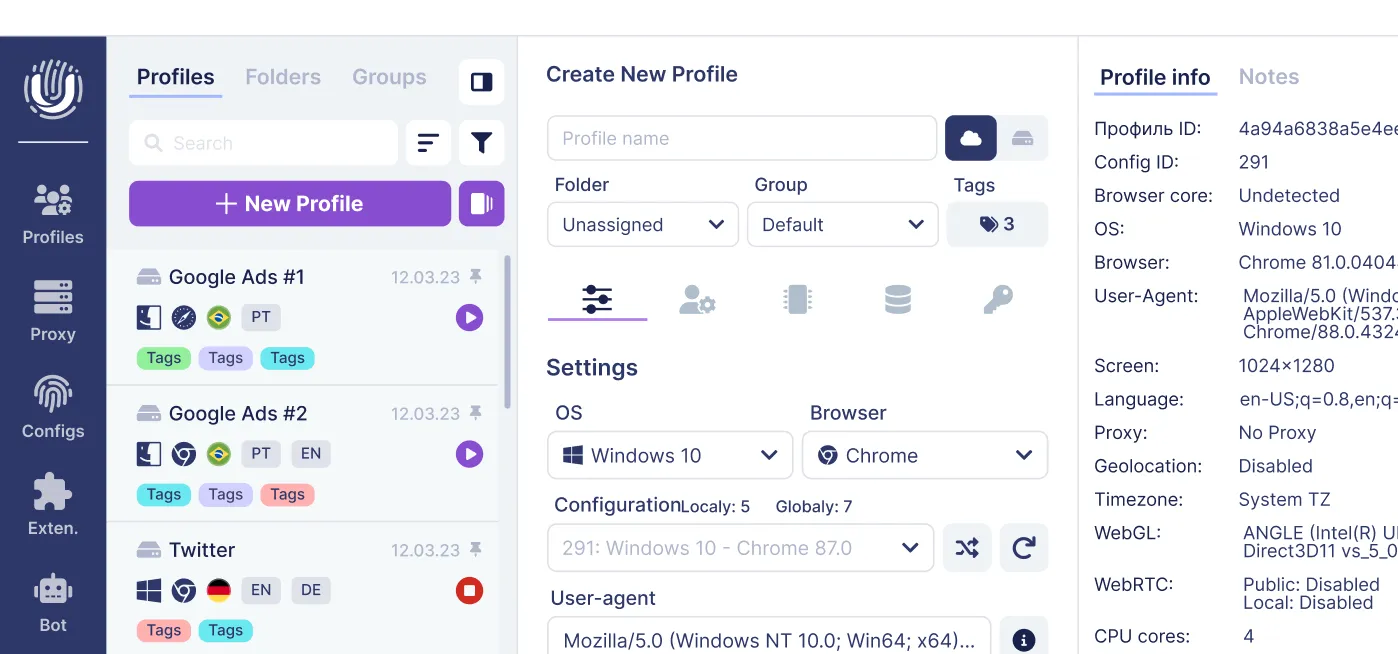
Undetectable.io's antidetect browser addresses both layers. Each profile gets a unique, customizable browser fingerprint covering deep parameters like canvas, WebGL, audio, and font rendering. Profiles are stored locally on your device, and each one integrates with its own proxy so the ip fingerprint and geolocation match naturally.
How to Control Your IP Fingerprint with Undetectable.io
Managing your ip fingerprint is not a nice-to-have-it's the foundation of any serious privacy or multi-account strategy. Here are the practical steps that actually work.
For Individual Privacy
- Use trustworthy VPNs or residential proxies to separate your home IP from sensitive activities
- Regularly run a dns leak test and "what is my IP" check to verify only the expected ip and DNS resolvers are visible
- Avoid logging into personal accounts (email, banking) from experimental or high-risk IPs
Multi-Account Workflow with Undetectable.io
- Create separate browser profiles - one per google Ads, Facebook, TikTok, or Amazon account. Use bulk profile creation to scale this across dozens or hundreds of accounts.
- Assign each profile its own dedicated proxy - residential or mobile, so IP fingerprints never overlap. This keeps each profile's location, isp, and network data distinct.
- Warm up profiles with Undetectable.io's cookies robot to simulate normal browsing, build cookie history, and establish trust before connecting to ad platforms.
Operational Best Practices
- Align everything per profile: keep ip location, time zone, and system language consistent. A mismatch between collected data points is how anti-fraud systems identify suspicious accounts.
- Don't over-rotate: changing ip addresses too frequently on stable accounts looks bot-like, not human. Favor consistent, "human" behavior patterns to stay under the radar.
- Monitor IP reputation first: run any proxy through blacklist-check and IP-score tools before assigning it to a valuable account. A clean ip with a good reputation introduced to a fresh profile is worth the extra testing step.
With Undetectable.io, you get unlimited local profiles on any paid plan-your data stays on your device, helping you maintain full control and protect against leaks. Every profile can be inspected from the outside using tools like Whoer or iphey to verify that the ip fingerprint, browser fingerprint, and all parameters match before you visit any platform.
The world of online tracking is getting more sophisticated, not less. Businesses, ad platforms, and developers are constantly refining how they collect and cross-reference information from your ip address, browser, and device. The users who learn to manage both layers-network and browser-are the ones who scale without bans, maintain their accounts, and keep their real identity where it belongs.
Start for free with Undetectable.io to check how your IP and browser fingerprints appear across different profiles. No cost, no risk to your core accounts-just clarity on what the world sees when you click connect.
Related posts
View all articlesJoin 450,000+ users who chose Undetectable
- Advanced anti-detection technology
- Unlimited local profiles from $49
- The perfect solution for multi-accounting