Guides
How to Run Multiple Facebook Ad Accounts Safely and Efficiently in 2026
How to Run Multiple Facebook Ad Accounts Safely and Efficiently in 2026Guides
Running facebook ads across several accounts is one of the most effective ways to scale paid social - and one of the fastest ways to lose everything if done carelessly. This guide covers the exact steps to manage multiple facebook ad accounts in 2026, from setting up your meta business manager to isolating each account's digital environment so Meta's anti-fraud systems don't flag you.
Quick Start: The Fastest Way to Manage Multiple Facebook Ad Accounts
The core challenge is straightforward: you need to run ads across many accounts without triggering bans, creating billing chaos, or losing track of performance metrics. Effectively managing multiple facebook ad accounts requires a structured approach based on organization.
Here's how to manage multiple ad accounts from a single meta business manager:
- Go to business.facebook.com
- Create or choose a meta business manager (now called Business Portfolio in 2026)
- Navigate to business settings → Accounts → Ad Accounts → Add
- Request access to existing client accounts or create new ad accounts directly
Once your accounts are live, use ads manager filters and the left hand menu to jump between different ad accounts quickly. Establish a Business Portfolio to manage all ad accounts and assets in one centralized location.
Use one secure business profile - not your personal account - as the hub to manage access across all accounts via roles and permissions. This keeps your own ad account separate from client work.
Here's the critical part most guides skip: each ad account should look like a different real user to Meta. That means separate devices, IPs, and browser fingerprints. If Meta's systems detect that 8 accounts are all operated from the same browser on the same IP, you risk linked bans across every account.
A concrete example: An agency in Berlin running 8 client accounts in 2026 sets up 8 ad accounts under one Business Manager. Each account is opened from its own Undetectable.io browser profile with a dedicated residential proxy and separate billing. Zero overlap, zero linked risk.
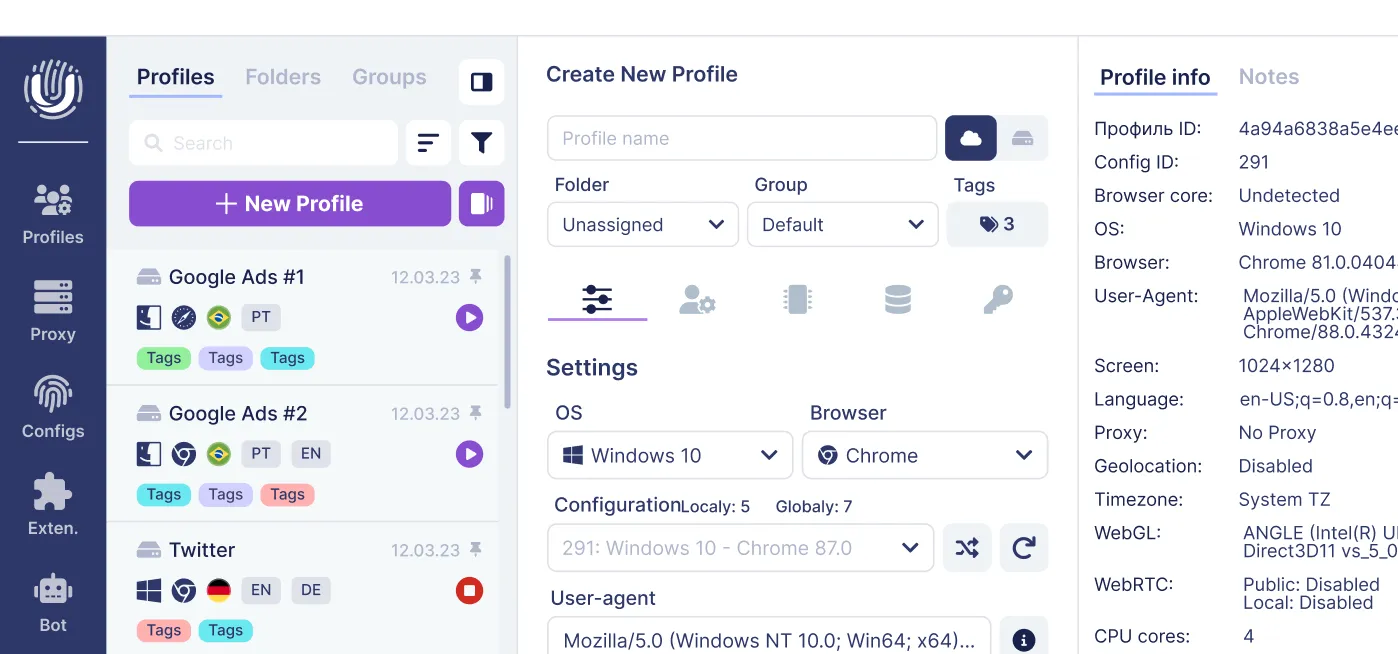
Undetectable.io's anti-detect browser for Mac and Windows is built for exactly this kind of multi account management - anti-detect browser profiles with unique fingerprints, per-profile proxy control, and full isolation between accounts.
Why Businesses and Agencies Use Multiple Facebook Ad Accounts
There are clear, practical reasons why digital marketers and agencies managing multiple clients don't cram everything into one account:
- Cleaner reporting. Multiple accounts allow cleaner reporting for different brands. A "Brand X Men's Shoes" ad account produces reports that aren't muddied by "Brand X Women's Shoes" data. Use separate ad accounts for different brands or products.
- Client protection. Separate accounts help protect client budgets and data. Agencies keep each client's billing, pixels, and ad creatives walled off.
- Risk management. Using multiple accounts minimizes the risk of account bans. If one ad account gets restricted, your other ad account keeps running. Using multiple ad accounts can enhance risk management for campaigns - imagine losing all revenue because your one account was flagged for a single creative violation.
- Geographic expansion. Global advertisers benefit from separate accounts for each region (US, EU, LATAM) to handle local currency, compliance, and time zone differences.
- Testing and scaling. Multiple accounts allow safer testing of new ad strategies. Run aggressive creatives in a test account while keeping your core account stable. Keep campaigns focused on one product to reduce risk.
Separate ad accounts help with risk management and reporting accuracy across every scenario above.
Setting Up Meta Business Manager to Handle Multiple Ad Accounts
Creating your business manager account is the foundation. Here's the 2026 walkthrough:
- Visit business.facebook.com and click "Create account"
- Enter your legal business name, work email, and primary facebook page
- Complete business verification when requested by Meta to confirm your organization's legal details and access eligible business features. Domain verification should be completed separately when you need to confirm ownership of a website.
Inside business settings, you'll find the structure that makes managing multiple accounts possible: People, Ad Accounts, Pages, Pixels, and Payment Methods - all under one roof. Meta business suite acts as a central hub for multiple ad accounts, pages, and pixels.
To create a new ad account:
- Business Settings → Accounts → Ad Accounts → Add → Create a new ad account
- Choose a descriptive name, set the correct time zone and currency (these cannot be changed after creation)
- You can create new ad accounts directly in Business Manager
To bring in existing accounts, use "Add an ad account" (if you own it) or "Request access to an ad account" (if the client retains ownership). The second option is standard for agencies where the client wants to keep their ad account id under their own control.
Ad account creation limits vary between Business Portfolios. New advertisers may initially be limited to one ad account until a confirmed payment is made. You can check the current creation limit in Business Portfolio Info. Separately, Meta limits the number of ad accounts that an individual user can manage. You can also assign multiple ad accounts to the same Facebook Page when there is a legitimate business need.
Managing Access and Roles Across Multiple Ad Accounts
Strict access control is non-negotiable. One wrong permission can lead to accidental billing changes, deleted ad campaigns, or unauthorized spend on a client's budget.
Meta's ad account roles break down as follows:
- Admin: Full control - create ads, manage campaigns, change billing, assign roles. Assign multiple admins to each ad account for backup.
- Advertiser: Can launch ads, edit ad sets, and manage campaigns, but cannot modify billing or user permissions.
- Analyst: View-only access to performance metrics and reports.
Assign roles like Admin, Advertiser, or Analyst for each ad account based on actual need. Best-practice role design:
- Only 1–2 trusted Admins per business manager
- Most team members as Advertisers
- Finance teams or external partners as Analysts
To manage access: Business Settings → People → Assign assets → choose specific ad accounts and role. Allow only necessary permissions for team members to improve accountability and security. Assign role-based user permissions to enhance security when managing multiple accounts.
Regular audits of access permissions help maintain security within ad accounts. Run quarterly reviews to remove ex-employees, ex-freelancers, and old agency partners. Log every change for compliance.
Two-factor authentication should be required for all users managing ad accounts. Teams using Undetectable.io can also share hardened browser profiles instead of raw login credentials, adding another isolation layer with admin access controls over who uses which profile.
Structuring and Organizing Multiple Ad Accounts Inside Meta Business
Once you have a dozen or more accounts, naming and structure determine whether you stay organized or drown in confusion.
Use consistent naming conventions for ad accounts, campaigns, and ad sets. A proven format:
ClientName_Country_Objective_YYYYMM - for example, StoreA_US_CONV_2026Q3
Group ad accounts by client or project for better organization. In ads manager, use saved filters and labels to quickly find the right account without scrolling through everything.
Asset organization rules:
- Each ad account should have its own Meta Pixel to keep data clean - one primary pixel per site or store
- Verify domains for each brand separately
- Map pixels to the correct ad account to avoid tracking chaos that corrupts your target audience data
For structure decisions: use one master Business Manager when all accounts are low-risk and under one legal entity. Create separate Business Managers for high-risk verticals or different legal entities to prevent cross-contamination.
Undetectable.io's profile folder system mirrors this structure naturally. Create one folder per client, each containing dedicated browser profiles and proxies for that client's facebook ad accounts.
Billing and Financial Control for Multiple Ad Accounts
Billing failures are the silent killer of multiple campaigns. A declined card at 2 AM pauses your highest-performing campaign, and you don't notice until the morning.
Set up billing for each ad account via Business Settings → payment settings → Add Payment Method. Current options include credit/debit card, PayPal, and bank debit, depending on country.
Two models to choose from:
- Centralized billing: One main payment method for several accounts. Works for internal teams managing multiple products under one brand.
- Per-client billing: Each ad account tied to its own card or PayPal. Essential for agencies. Separate client billing from internal business spending for clearer accounting and reporting.
Link a distinct payment method to each ad account for billing separation. Set up billing methods for each ad account to manage ad spend consistently.
Clear internal rules to establish:
- Document which cards go with which ad accounts
- Reconcile spend weekly
- Log every change to different payment methods
For reliability, always configure backup payment methods and set billing threshold notifications to prevent sudden traffic stops. When payment issues hit, you need a fallback ready immediately.
Risk reduction matters here: using different payment instruments for different Business Managers limits "domino" bans or cascading failures where one flagged card takes down everything.
Avoiding Audience Overlap and Internal Competition Between Ad Accounts
When you run campaigns across multiple Facebook accounts targeting similar audiences, you may end up bidding against yourself. The result can be inflated CPMs, ad fatigue, and wasted budget. Monitor audience overlap, frequency, reach, and campaign performance to identify repeated exposure and internal competition.
Use the audience and reporting tools currently available in Meta Ads Manager to evaluate whether campaigns are targeting similar users. Because the availability of dedicated audience overlap features may vary by account and audience type, also compare targeting settings, reach, frequency, CPM, and auction performance across campaigns.
Practical methods to prevent overlap:
- Add audience exclusions to prevent competing campaigns (e.g., exclude purchasers from prospecting audiences)
- Segment by geography, device, or language across different audiences
- Segment campaigns by funnel stage to avoid overlap - split cold, warm, and retargeting into separate accounts or campaign structures
- Use different interests for each facebook ad campaign
- Create multiple ad sets within one ad account to target different audiences without separate billing
- Limit the number of campaigns running simultaneously
For audience engagement and creative freshness, set frequency caps where available and rotate ad creatives regularly. When different teams handle different ad accounts targeting overlapping audiences, maintain central documentation and a shared planning calendar.
Undetectable.io doesn't change targeting logic, but by keeping each account environment stable and isolated, it ensures your data stays clean enough to make smart segmentation decisions, whether you're running Facebook, Instagram, or multiple Reddit accounts with proper isolation.
Security, Anonymity, and Ban Prevention When You Run Many Ad Accounts
Meta's 2026 anti-fraud systems are more aggressive than ever. AI-based detection now analyzes device fingerprints, IP patterns, login behavior, and environmental signals to identify accounts operated by the same person or entity. Tools like AmIUnique.org for fingerprint analysis show just how identifiable a browser setup can be. For multi-account advertisers, this is the single biggest operational risk.
What creates "linked" signals that trigger bans:
- Same device or browser across multiple accounts
- Shared IP addresses
- Identical browser fingerprints (Canvas, WebGL, fonts, screen resolution)
- Overlapping payment methods
- Synchronized login habits or campaign launch times
Monitor account quality to avoid violations that could lead to account bans. Best practices for keeping separate accounts isolated:
- One stable IP or residential proxy per account. Unique residential proxy IP addresses should be assigned to each account to maintain isolation. Launch ads from a single IP address per account, choosing from the best proxy services for Undetectable.io.
- Unique browser fingerprint and cookie set per account
- Never log in and out of dozens of accounts from the same raw browser
This is where anti-detect browsers earn their value. Utilize anti-detect browsers to create isolated environments for managing multiple accounts. Here's how Undetectable.io works:
- Generate separate browser profiles with unique hardware and software fingerprints
- Attach different proxies to each profile, following a step-by-step guide for connecting residential proxies to Undetectable
- Store cookies and local data separately so each profile behaves like a distinct real user
Concrete workflow: An affiliate team running 20 meta ads accounts binds each to its own Undetectable.io profile and residential proxy. Each profile has a unique fingerprint, independent cookies, and a properly warmed-up browsing history. Result: if one account faces a restriction, the other 19 remain untouched.
Undetectable.io is built for legitimate marketers who need privacy and stability - not for violating Meta's terms or running prohibited content. The goal is operational resilience, not policy circumvention.
Using the Right Tools to Manage Multiple Facebook Ad Accounts at Scale
Think of your tool stack in layers: Meta Business Manager handles official control, while external tools handle multi-account isolation, analytics, and automation. As your stack grows, compare Undetectable.io pricing plans and limits so your browser infrastructure scales with your ad volume.
What meta business suite covers natively:
- Centralized access to Pages, ad accounts, pixels, and catalogs
- Basic analytics and reporting across campaigns
- Unified inbox for comments and messages (hootsuite ads and similar tools can extend this)
Undetectable.io serves as the core multi-account infrastructure layer for Facebook and other platforms; for example, you can apply similar principles when mastering multi-account strategies on Instagram:
- Unlimited local browser profiles on paid plans - limited only by disk space
- Local data storage for maximum privacy (profiles stay on your device, not cloud servers)
- API and automation features for power users and agencies managing dozens of accounts
Complementary tools to round out your stack:
- Reporting dashboards like Looker Studio for cross-account visualization. Utilizing automated reporting tools can streamline monitoring KPIs across multiple accounts.
- Bid and rule-based optimization tools. Automated rules can be set up in Ads Manager to monitor performance across all accounts.
- Project management platforms for creative approvals and collaboration
Build standard operating procedures around these right tools so new team members can manage multiple accounts consistently. Run internal workshops at least twice a year to keep the team aligned on tool updates, Meta policy changes, and account safety practices.
Best Practices and Ongoing Maintenance for Multiple Ad Accounts
Everything above means nothing without consistent upkeep. Here's the recurring maintenance checklist that keeps your multi-account system healthy over the long term.
Recurring operational routines:
- Weekly: Performance reviews per ad account - ROAS, CPA, CTR. Flag underperformers early.
- Monthly: Budget reallocation between accounts based on results. Review performance monthly and document changes made to campaigns for accountability.
- Quarterly: Access and billing audits for all accounts. Regularly audit user access to maintain security. Check that no former team members retain admin access to any account.
Maintain a live spreadsheet or internal wiki documenting every ad account, its business manager, associated payment method, responsible owner, and ad account id. This is your single source of truth when things go wrong.
For testing, standardize your framework: always run new ad creatives and audiences in dedicated test campaigns before rolling out to your core accounts. This prevents unproven strategies from damaging your stable new account performance data.
When incidents happen - and they will - have a response plan:
- Ad account restriction: Switch to a backup account, file an appeal immediately, and document the cause
- Billing failure: Swap to a backup payment method first, then diagnose the card or bank issue
- Suspicious login or security alerts: Secure the affected account, review active sessions, update passwords, enable or verify two-factor authentication, remove unauthorized access, and audit recent team actions.
Running multiple facebook accounts at scale is a discipline, not a one-time setup. The advertisers who win in the past year and going forward are those who treat multi account management as an ongoing operational practice.
Ready to build a safer multi-account system? Start with Undetectable.io's free plan, set up isolated profiles for 2–3 key ad accounts, and experience what it's like to manage multiple accounts without the constant fear of linked bans. Scale from there as your needs grow.
Related posts
View all articlesJoin 450,000+ users who chose Undetectable
- Advanced anti-detection technology
- Unlimited local profiles from $49
- The perfect solution for multi-accounting