Reviews
Facebook Ads Multi Accounting: How to Scale Safely With Undetectable.io
Facebook Ads Multi Accounting: How to Scale Safely With Undetectable.ioReviews
Running facebook ads across dozens or hundreds of accounts is no longer a niche tactic-it's the operational backbone of serious agencies, affiliate teams, and e-commerce operators. But Meta's detection systems have evolved dramatically, and the margin for error is razor-thin. This guide breaks down exactly how to structure, isolate, and scale multiple facebook ad accounts safely in 2026, and how Undetectable.io makes it possible.
What Is Facebook Ads Multi Accounting (and Why It Matters in 2026?)
Multi-accounting in facebook ads is managing campaigns through multiple ad accounts-typically 10 to 1,000+-under a unified operational framework. This covers agencies with multiple clients, arbitrage teams rotating offers, dropshippers testing many storefronts, and brands splitting ad spend across regions or legal entities. Using multiple ad accounts for legitimate business organization is common and supported by Meta, but the way you structure and operate those accounts determines whether you thrive or get shut down.
Meta's current ecosystem (2024–2026) increasingly links identities across ad accounts via business manager, devices, browser fingerprints, IPs, pages, billing, and pixels. After iOS 14.5, Meta shifted toward identity signals beyond cookies-device IDs, hardware fingerprints, IP history-and this has matured further with the Meta Account system launched in 2026, which ties personal profiles, apps, devices, and authentication signals across all Meta properties.
Why does this matter now? Stricter policy enforcement, more aggressive risk scoring, AI-based fraud detection, and higher competition in paid social mean that one misstep can cascade across your entire portfolio. Multiple accounts help isolate risks associated with ad campaigns, but only if the isolation is real-not just cosmetic.
Who is facebook ads multi accounting for:
- Agencies managing dozens of client accounts across verticals
- Affiliate marketers rotating offers with different risk levels
- Dropshippers and e-commerce teams testing many stores simultaneously
- Brands splitting activity across regions, legal entities, or business units
- Media buyers who need backup capacity when account issues arise
How Meta Actually Links "Multiple Facebook Ad Accounts" Behind the Scenes
Bans and restrictions are driven by composite risk scores, not just ad content or budget size. Meta cares deeply about who is behind the spend. If two ad accounts share multiple linking signals, a policy violation on one account can increase risk on the other-even if the second account is perfectly clean.
Here are the main signals Meta uses to connect different ad accounts:
- Device and browser fingerprints: Hardware and OS data, browser version, installed fonts, WebGL/WebGPU rendering signatures, audio fingerprinting. Meta detects linked accounts through browser fingerprinting, and research shows that ~66% of desktop devices can be uniquely identified this way-even after clearing cookies or changing IPs.
- IP address and location history: Shared or overlapping IP usage, especially from the same residential connection or VPN exit node. Geolocation mismatches also trigger alerts.
- Overlapping admins and user roles: The same Facebook user serving as admin on many Business Managers or Pages.
- Shared pages, pixels, domains, and datasets: Reusing the same pixel code or landing domain across multiple ad accounts.
- Payment methods: Same credit card, bank account, or virtual card used across multiple ad accounts or Business Managers.
- Behavioral patterns: Similar campaign setups, identical ad creatives, matching schedules, rapid account creation.
Consider a concrete example: one media buyer logging into 8 ad accounts from the same laptop and home Wi-Fi in Berlin. Despite using different browser profiles, the hardware fingerprint remains consistent-Meta links them. Or three separate Business Managers all using the same Revolut card: even though they represent different brands, the payment signal ties them together. Meta may link related business assets, leading to restrictions on associated accounts, and account restrictions can spread to linked accounts through these vectors.
Meta enforces at multiple levels: ad account disablement, business manager restriction, and profile-level advertising bans. These cascade-a restricted business manager can freeze all contained ad accounts. Meta's policies explicitly cover "evading or attempting to evade review", which includes creating new ad accounts after a restriction or managing assets connected to previously penalized ones.
Business Manager vs. Business Portfolios: Building a Safe Hierarchy
Meta historically used "Business Manager" to denote the framework for managing business assets. In 2026, the newer naming "business portfolio" appears in many interfaces, but functionality is largely identical. Most users and documentation still say business manager.
The clean hierarchy for 2026 looks like this: a single authentic personal Facebook profile is required to manage business assets → Business Manager / Portfolio → pages, pixels/datasets, ad accounts, catalogs, and system users. Business Manager centralizes assets, pages, and team access, and you can create new ad accounts directly in Business Manager.
Ad account creation limits vary by business portfolio. New businesses may initially be limited to creating one ad account, while the current limit for a specific portfolio can be viewed directly in Meta Business Suite. Meta also states that one person can manage up to 25 ad accounts.
When one business manager is enough:
- Small teams running 3–6 offers in the same vertical
- Same GEOs, similar risk levels, moderate spend
- Shared pixel data and unified domain ownership benefit performance
When to split into multiple Business Managers:
-
Different legal entities or tax structures
-
High-risk verticals mixed with clean ones
-
Regional operations requiring country-specific ownership
-
Large spend where one breach could jeopardize significant revenue
Over-creating Business Managers from one profile is dangerous. Even if each is clean, shared signals (device, IP, payment method) link them in Meta's risk systems. Don't create throwaway BMs to mask risk-it invites broader enforcement.
Single vs. Multiple Business Managers: Choosing the Right Model
A single business manager works well when you have one brand, moderate ad spend, 5–15 ad accounts, similar GEOs and verticals, and unified monthly invoicing. You benefit from consolidated pixel learning, easier cross account reporting, and simpler finance.
Multiple Business Managers make sense for the agency model with separate legal contracts, affiliate marketers running 10+ offers with different risk levels, and multinational brands needing country-specific ownership or tax setups. Each brand should have its own ad account, and agencies should never mix campaigns in one ad account. Budget and pixel segregation prevent data contamination when managing different clients.
Policy reality: each business manager must map to a real legal entity. Creating entities purely to evade policy is explicitly against Meta's rules. Practical examples include agencies forming separate Ltd/LLC structures in the UK, US, and EU-each owning its corresponding business manager and ad accounts with legitimate business purposes.
Downsides of "BM sprawl":
- More verification requests and audits from Meta
- Scattered pixels and datasets reduce algorithm learning
- Harder cross account reporting and analytics
- Higher administrative overhead for managing accounts
The right choice depends on your risk profile. If you're running campaigns across multiple audiences in the same vertical, consolidation wins. If you're managing multiple clients with fundamentally different compliance requirements, separation is essential.
Structuring Facebook Ad Accounts for Risk Isolation and Scale
Professionals rarely run everything from a single ad account because one restriction can pause 100% of revenue. Multiple ad accounts reduce the risk of total operational shutdown. Separate ad accounts prevent bans from spreading across linked accounts, and separate accounts help isolate pixel data and customer audiences.
New ad accounts often have daily spending limits that can be overcome with multiple accounts. Separate accounts also allow for testing new ad creatives and audiences without contaminating your proven campaigns. Advertisers use multiple accounts to mitigate the impact of ad account bans.
Common structuring patterns:
-
By brand/business unit: "Brand A – Main," "Brand B – Main"
-
By GEO: "Brand A – US," "Brand A – EU," "Brand A – UK"
-
By funnel stage: "Brand A – US – Prospecting," "Brand A – US – Retargeting"
-
By vertical risk: Whitehat offers in one cluster, sensitive niches in separate isolated clusters
-
"Canary" or reserve accounts: Low-spend, clean-history profiles reserved for emergencies and re-launching successful campaigns if core accounts are hit
-
By client (agencies): One or more ad accounts per client, never shared
Don't over-fragment. Running 50 ad accounts for one small store harms pixel learning and increases complexity. Balance risk isolation with algorithm efficiency-group related campaigns where the risk profile is identical.
Naming, Permissions, and Billing: The Governance Layer
As you scale to managing multiple ad accounts, governance becomes critical. Use consistent naming conventions for ad accounts to improve tracking. Without them, you'll lose track of which ad account id belongs to which entity, which payment method is attached, and who has admin access.
Naming convention example: Undetectable.io – Affiliate – EU – 2026-07
Apply similar logic to campaigns, asset groups, and ad sets so anyone on the team can identify context at a glance.
Permissions best practices:
- Business Manager supports role-based permissions for team members: Admin, Employee, Advertiser, Analyst
- Apply "least privilege"-multiple team members should not all have admin access across many facebook ad accounts
- Enable two-factor authentication for all ad account users; it's essential for security
- Review access monthly and remove former contractors or team members immediately
Billing setup:
- You can centralize billing for multiple ad accounts in Business Manager, but this creates linkage
- Separate payment methods reduce the risk of account bans; using unique payment methods for each account reduces ban risks
- Using distinct payment methods prevents account linking risks
- For high-spend advertisers, Meta offers monthly invoicing-useful for consolidating billing details within one legal entity while keeping ad accounts separate
- Map each card clearly: document which legal entity owns which payment method and invoice profile, along with backup payment methods for continuity
Operating multiple accounts may increase administrative overhead and complexity. Build payment history gradually on each method, and conduct monthly access reviews to keep your governance layer tight.
Browser Fingerprinting and Why Standard Browsers Fail for Multi Accounting
A browser fingerprint is a combination of your OS, browser version, installed fonts, WebGL/canvas rendering output, time zone, language, CPU cores, GPU driver, and more. Platforms like Meta collect these attributes via scripts and combine them into a probabilistic identification vector. This vector persists even after you clear cookies, switch IPs, or open incognito mode, and tools like BrowserLeaks anonymity checks with Undetectable let you see what data is exposed.
Chrome profiles, Firefox containers, and normal incognito sessions are not enough. They change surface-level signals like cookies and profile storage, but share core fingerprint components: hardware signature, rendering pipelines, audio stack, WebGL output, GPU driver, and font lists. Meta's detection easily links activity across multiple ad accounts when these deeper signals match.
Concrete scenario: one media buyer opens 5 ad accounts in 5 Chrome profiles on the same MacBook Pro 14" (2023). Despite different user agents, the WebGL signature, GPU rendering artifacts, and font list are identical across all profiles. To Meta, this looks like the same device controlling 5 separate identities. Separate browser profiles must have unique digital fingerprints to avoid this linkage.
VPNs and basic proxies only change your IP address-they don't alter your fingerprint. Proper management tools are necessary to keep accounts separate and avoid linking them. You canaudit your current browser fingerprint to see just how unique and trackable your setup already is.
Key takeaways:
- Cookies and IP are just two signals among dozens; fingerprinting is the deeper threat
- Standard browser separation (profiles, containers, incognito) shares hardware-level identifiers
- Solving this requires purpose-built tools that generate distinct, realistic fingerprints per profile
How Undetectable.io Helps You Safely Manage Multiple Meta Ad Accounts
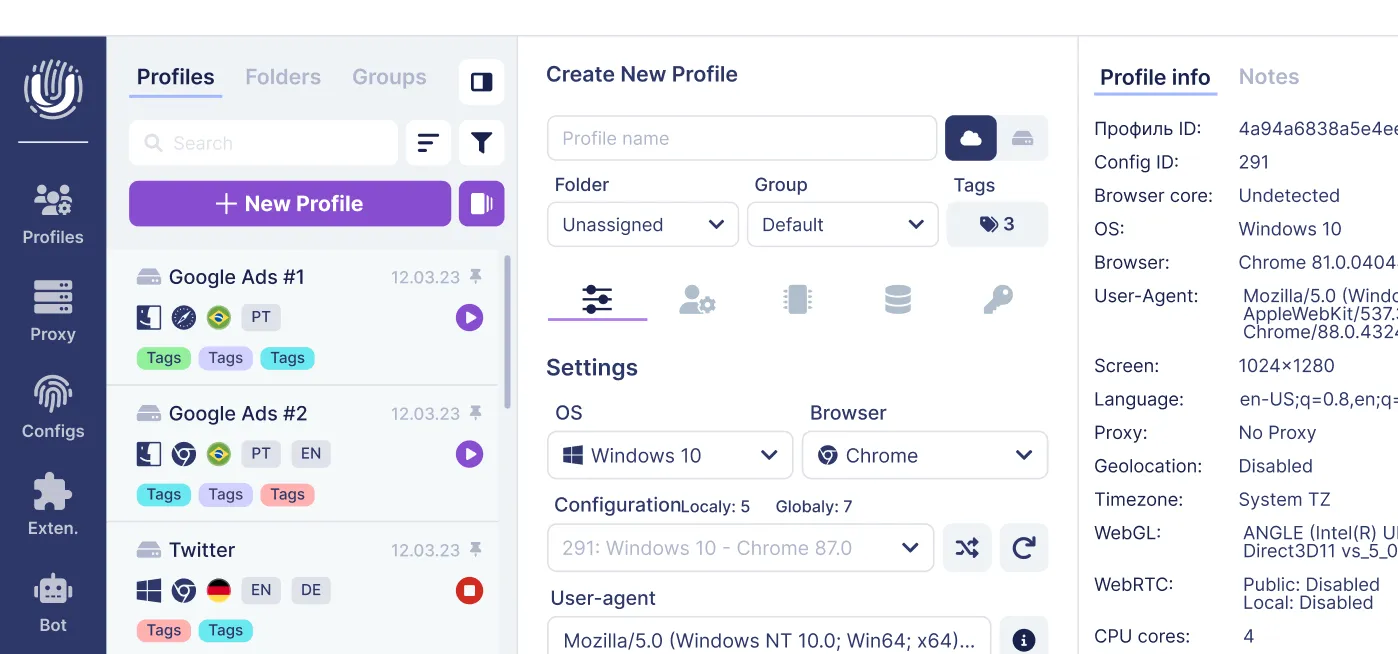
Undetectable.io is an antidetect browser purpose-built for multi account management, online marketing, and anonymity. It runs on Windows 64-bit and macOS 12+ (Intel and M-series), and you can download Undetectable for Mac and Windows in a few simple steps.
The core advantage: unlimited local profiles on any paid plan, limited only by your disk space. Unlike competitors that cap profile counts or store everything in third-party clouds, Undetectable.io keeps profile data-fingerprints, cookies, session data-on your device. This gives you full control and reduces the risk of data leaks, and you can choose the right option from Undetectable.io’s pricing and subscription plans.
Each browser profile in Undetectable.io carries a unique, realistic fingerprint: distinct OS, user-agent, screen resolution, CPU cores, WebGL/WebGPU rendering, fonts, and more. When you log into a Facebook account from one profile, it appears to Meta as a completely distinct, stable device. Using unique proxies prevents account linking by IP address, and you can assign a different residential or mobile proxy to each profile directly through the built-in proxy manager.
How specific features solve multi-accounting problems:
- Mass profile creation: Generate 5, 50, or 500 profiles in bulk with randomized but realistic configurations
- Cookies robot: Automates natural browsing in target GEOs to accumulate cookies and simulate real user behavior-essential because account warming is essential to avoid detection by Meta
- Per-profile proxy assignment: Each profile gets its own IP, matching the GEO of the Facebook identity
- Local/cloud sync: Share specific profiles with team members without exposing passwords; store cloud profiles on private servers for added security
- API for automation: Integrate with Selenium, Puppeteer, or custom scripts for routine optimization tasks across accounts
Using distinct creatives across profiles further prevents cross-linking of accounts. Automation tools help manage multiple accounts efficiently, and Undetectable.io provides the identity isolation layer that makes everything else possible.
Setting Up Your First 5–20 Facebook Ad Accounts With Undetectable.io
Here's a step-by-step workflow for launching ads safely across your first batch of ad accounts:
Phase 1: Infrastructure setup
- Install Undetectable.io on your primary machine
- Create 5–10 browser profiles, each with a unique fingerprint configuration (OS type, screen resolution, fonts, WebGL parameters)
- Attach a unique residential or mobile proxy to each profile, matching the target GEO; choose providers from high-anonymity proxy services with wide GEO options
- Align time zone, language, and OS settings within each profile to match the proxy location
Phase 2: Identity creation
- Using each profile, create or log into one Facebook account
- Do not rush into creating Business Managers or ad accounts immediately
- Spend time building normal user behavior: browse the feed, join relevant groups, interact with pages, add profile details
Phase 3: Account warming
- Warm each identity for 3–7 days with natural browsing activity using the cookies robot
- Gradually enable business manager creation; don't create all Business Managers on day one
- Add payment methods one at a time; build payment history with small initial transactions
- Create your first ad account within each business manager and start with low-budget campaigns for running facebook ads
Phase 4: Scaling up
-
Once accounts show stable activity and no verification flags, increase ad spend incrementally
-
Add more ad accounts within each business manager as Meta raises your platform limits
-
Keep detailed logs of every ad account id, associated proxy, payment method, and domain
The key mistake newcomers make is rushing. Launching ads on day one from a fresh profile almost guarantees verification prompts or restrictions.
Advanced Scaling: 50–500+ Ad Accounts and Team Operations
A solo operator typically caps around 10–20 active ad accounts before operational complexity becomes unmanageable. Beyond that, you need SOPs, clear team structure, and automation.
Team structure inside Undetectable.io:
- Share specific profiles securely with team members-they get access to the isolated browser environment without needing Facebook passwords or shared logins
- Sync profiles to cloud storage where needed for remote team access, while keeping sensitive profiles local
- Assign roles: one person manages business manager structure and permissions, another handles ad creatives and campaign builds, while technical staff maintains proxies and automation scripts
Automation at scale:
- Use Undetectable.io's API with tools like Selenium or Puppeteer to handle repetitive actions: logins, pixel checks, or simple ads reporting pulls across multiple meta ad accounts
- AI tools automate budget adjustments based on campaign performance, reducing manual workload
- AdEspresso allows bulk ad creation and A/B testing across accounts
- Revealbot automates scaling and pausing rules for campaigns, freeing media buyers to focus on strategy
Operational best practices for 50+ accounts:
- Maintain a master inventory spreadsheet: profile ID, proxy, business manager, ad accounts, payment method, domain, status
- Run weekly health checks: verify each profile's fingerprint consistency, proxy uptime, and account standing
- Rotate proxies when IPs show degraded trust scores
- Keep reserve ("canary") accounts warmed and ready for rapid deployment
Risk Management: Bans, Restrictions, and Recovery Protocols
Every operator running many facebook ad accounts will eventually face enforcement actions. The types you'll encounter:
- Identity verification prompts (selfie, ID upload)
- Ad account disabled (single account frozen)
- Business manager restriction (entire BM locked, all contained accounts paused)
- Policy strikes on pages or domains
Having more accounts doesn't guarantee safety if all accounts are tightly linked by device, IP, or billing. The goal is isolated clusters that can fail independently without wasted ad spend across your portfolio. Improper multi-accounting can lead to ad account restrictions from policy violations.
Recovery protocol:
- Document which assets were hit: ad account id, business manager, associated page, domain, and proxy
- Freeze related accounts that share major signals with the restricted ones-don't keep running campaigns on linked profiles
- Move critical campaigns to reserve accounts on separate fingerprints and proxies
- File appeals with Meta through the affected account's support channel
- Update your master inventory to reflect the new status of all affected assets
Keep logs of all Business Managers, ad account IDs, proxies, payment methods, and associated domains. Update this inventory at least monthly. When account issues arise, speed matters-and you can only move fast with accurate documentation.
Using Proxies, Payment Methods, and Domains Without Getting Everything Linked
Proxy guidelines:
- Assign one residential or mobile IP per Undetectable.io profile
- Never reuse the same IP across unrelated identities
- Keep GEO realistic for the account's declared location-a US-based business manager shouldn't consistently access from a Ukrainian IP
- Use the built-in proxy manager for streamlined per-profile assignment
Payment strategies:
- Avoid using one card across multiple Business Managers when you need isolation
- Consider virtual cards or separate bank accounts per legal entity
- Map each card in your inventory with its associated business manager and legal entity
- Maintain backup payment methods to avoid payment failures or billing failures that could disrupt running campaigns
- Different payment methods for each cluster is the baseline; different billing methods (prepay vs. monthly invoicing) add another layer of separation
Domain and landing page practices:
- Use separate domains or subdomains per project where possible
- Never reuse a flagged domain across new ad accounts-Meta tracks domain reputation aggressively
- Place distinct pixels and datasets per business manager to avoid cross-contamination
- If you're running similar offers, differentiate landing page structure and design to reduce behavioral pattern matching
Standardizing Campaign Structures and Reporting Across Multiple Accounts
When you're running 20–50 ad accounts in parallel, standardized campaign naming, ad set structure, and UTM parameters make cross account reporting manageable instead of chaotic. Without this, you'll spend hours in ads manager trying to consolidate reporting across accounts that use inconsistent labels.
Naming schema for campaigns:
[Brand] | [GEO] | [Objective] | [Audience Type] | [Creative Concept] | [Date]
Example: Undetectable.io | EU | Conversions | Lookalike-1% | VideoTestimonial-A | 2026-07
Apply the same logic to ad sets and individual ads. This lets you export reports from any account and immediately understand what you're looking at-whether you're reviewing campaign performance in a spreadsheet or a BI dashboard.
Reporting tools:
- Meta's native cross account reporting works for quick overviews across multiple ad accounts when they're within the same business manager
- For operations spanning multiple Business Managers, graduate to BI tools or Google Looker Studio with API connectors pulling data from multiple ad accounts
- Use consistent UTM parameters so website visitors can be attributed accurately regardless of which ad account drove the traffic
Undetectable.io doesn't replace your analytics stack-it underpins the identity layer, keeping accounts alive so your reporting systems remain meaningful and your data pipeline stays unbroken. You consolidate reporting on top; Undetectable.io keeps the foundation stable underneath.
Agency and Affiliate Models: Ownership, Access, and Client Transparency
Two dominant models exist in multi account management: agencies managing client-owned Business Managers, and arbitrage/affiliate teams owning their own accounts while promoting third-party offers.
Agency model best practices:
- Clients retain ownership of their Business Managers and ad accounts; agencies should use partner access to manage client accounts securely via agency access
- Clients retain ownership of pixels, domains, and audience data-this protects both parties
- The agency maintains its own business manager for internal testing, infrastructure, and managing multiple social media accounts
- Partner access means if the relationship ends, the client keeps all their data and campaign history intact
Affiliate model:
- Affiliate marketers typically own their own Business Managers and ad accounts
- Each offer cluster should have separate accounts with separate identities to prevent cross-contamination
- E-commerce and dropshipping multi-accounting follows similar principles: isolate each storefront's advertising identity
What to address contractually:
- Who owns the pixel data and custom audiences?
- What happens if an account gets banned during a critical Q4 campaign?
- Who controls domains, and who bears the cost of replacement infrastructure?
Undetectable.io helps agencies avoid risky practices like password sharing or logging into 10 client profiles in the same browser. Each client environment gets its own isolated profile, so one client's account issues never bleed into another's. Use a cloud phone solution for verification codes when managing separate identities at scale.
Practical Example: Building a 2026-Ready Multi-Account Setup With Undetectable.io
Consider a small performance agency in London managing 12 clients across 3 GEOs (UK, EU, US) with approximately 40 facebook ad accounts. Here's how they structure their operation:
Phase 1: Business Manager hierarchy They create 4 Business Managers: one internal (agency testing), plus one per GEO cluster. Each maps to a real legal entity-their UK Ltd, an EU subsidiary, and a US LLC. Each business manager manages multiple ad accounts for the clients in its region.
Phase 2: Undetectable.io profiles They create 15 browser profiles: one per client identity plus reserves. Each profile has a unique fingerprint, a dedicated residential proxy matching the client's GEO, and its own session data. Mass profile creation makes this a 10-minute task.
Phase 3: Billing and proxy assignment Each client's ad accounts use the client's own payment method (clients retain ownership). The agency's internal testing accounts use separate virtual cards. Every proxy, card, and domain is logged in a master inventory document with ad account id, proxy IP, and business manager name.
Phase 4: Campaign standardization All campaigns follow the naming schema. UTMs are standardized. The team uses a BI dashboard to consolidate reporting and manage campaigns from across multiple ad accounts, allowing them to track multiple audiences and export reports efficiently.
Phase 5: Risk preparation Three "canary" accounts sit warmed and ready-low spend, clean history, on isolated fingerprints. If a core account is restricted, the team can migrate launching ads for the most critical campaigns within hours. The events manager configurations are pre-set on reserve accounts for instant activation.
Results: reduced ban chains, faster client onboarding, clearer reporting, and safer access for freelancers via shared profiles instead of password spreadsheets. No more unlimited ad accounts fantasy-just disciplined, structured scaling.
Conclusion: Safely Scaling Facebook Ads Multi Accounting With Undetectable.io
Success in facebook ads multi accounting comes down to structure, isolation, and discipline-not just spinning up more accounts. The advertisers who scale sustainably invest in proper infrastructure before they need it: isolated fingerprints, dedicated proxies, separated billing, consistent naming, documented recovery protocols, and clear ownership models.
Undetectable.io underpins this entire system. Unique fingerprints per profile, built-in proxy management, cookies robot for account warming, local data control, and API-driven automation give you the foundation to manage multiple accounts across dozens of clients without the constant threat of cascading bans. Formalize your governance-naming, permissions, billing, reporting-before pushing to dozens of accounts. Then start with a free plan on Undetectable.io, test a small 5–10 account cluster, and scale once you see stable performance. The tools exist. The playbook is here. The rest is execution.
Related posts
View all articlesJoin 450,000+ users who chose Undetectable
- Advanced anti-detection technology
- Unlimited local profiles from $49
- The perfect solution for multi-accounting