Updates
Undetectable browser 2.3.0 Update: Significant Improvement to User Experience
Undetectable browser 2.3.0 Update: Significant Improvement to User ExperienceUpdates
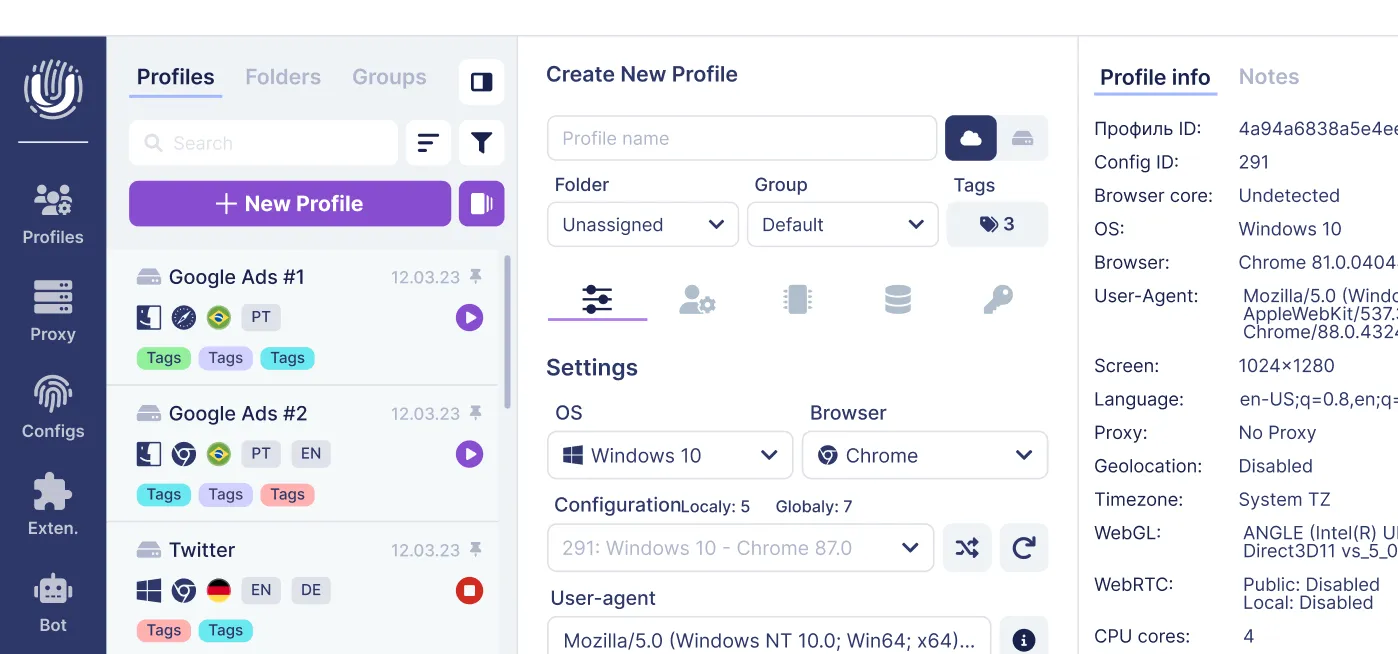
The latest update brings significant improvements to the user interface of Undetectable. In addition, hotkey management and the first integration with a proxy service have been introduced. New API commands are now available, several bugs have been fixed, and performance has been enhanced. So, let's dive in!
Enhancing the User Experience
One of the main goals of this update is to make Undetectable more user-friendly and intuitive. We hope that these changes will be beneficial to you.
Enhanced Interface
Cloud Profile Section
Firstly, we have made some changes to the home screen. We have added a new "Group" tab, which allows you to view available groups of cloud profiles. When you select a specific group, the main screen activates a filter, making it much easier to navigate through profiles. Gradually, we will continue to transfer the functionality of the cloud panel into the program.

License Information
Account and license information has been moved from the main screen to a separate "Account" tab. This tab provides you with information about your subscription, including the number of remaining days, your plan, alias, login, and role. It also includes buttons to access the cloud panel and payment portal.

Updated Design for Managers
We are pleased to announce that the design of our proxy managers, browser profiles, and extensions has been updated.
The new design makes it easier for you to manage proxy servers, browser profiles, and browser extensions. The design is more intuitive and user-friendly, simplifying navigation and information retrieval.
The control panel has been redesigned to have a universal appearance across all managers, and the table columns are now fixed.

Streamlining Interaction
Hotkeys
We have added hotkey management to make working with profiles from the main window even more efficient.
You can now select a profile using the up and down arrow keys, open and close profile information using the left and right arrow keys, launch a profile using the Enter key, and delete a profile using the Delete key.
This new feature will be particularly useful for users who value time and need to quickly switch between multiple profiles. Overall, these hotkeys will make your work with Undetectable more efficient and convenient. We hope you enjoy using them and find them helpful.

Proxy Management
We are excited to announce the integration of ipidea.net service into the Proxy Manager. This integration allows you to select the desired geolocation, protocol, and create new proxies with just a few clicks, without leaving Undetectable to visit the service's website.
Before you can use this feature, you need to register on the partner's website and top up your balance. In the future, we plan to add more proxies to this tab.

Additionally, we have made some improvements to the proxy checking feature. It now additionally checks access to Google, Facebook, and Yandex services. This provides you with more information about the proxies you are using and ensures their proper functioning.
On-the-Fly Note Saving
A new feature allows you to save notes during a profile session. This enables you to save important information related to your browsing session, such as login credentials, website URLs, or any other information you want to remember.
Import and Export Accounts in Chromium Profiles
Previously available only on WebEngine, this feature allows you to easily transfer accounts between files and browser profiles on the Chromium core and vice versa.
Technical Improvements
New API Commands
The new commands allow you to programmatically manage browser profiles and update their settings. This can be useful if you want to automate certain tasks or if you need to update multiple profiles simultaneously.
You can now use API requests to update data in your browser profiles, such as proxy servers, notes, or names. Another new request allows you to completely delete a profile.
We recommend using these commands for developers and experienced users. Detailed instructions with examples can be found in the API documentation.
Optimization
Enhanced Spoofing
Another key aspect of this update is the enhanced security features that provide users with even greater protection against online threats. This update includes changes to the spoofing of WebGL metadata and SpeechSynthesis caching. These changes will help you better hide your browser fingerprint and make it more difficult for websites to track you.
Group Operations with Cloud Profiles
In this update, we have optimized group operations such as bulk creation, editing, and deletion of cloud browser profiles. We have improved the performance of this feature to make it faster and less resource-intensive.
Bug Fixes
The following bugs have been fixed:
- An issue with extensions not being displayed in the running profile.
- An issue where scripts did not work in default Chromium bookmarks.
- An issue where Opera and Edge browsers were not detected for Android configurations.
We hope this update proves to be relevant and significantly improves your work experience. As always, feel free to reach out to our support team for any questions. To stay up to date with our updates, you can subscribe to our social media channels. A new update will be released soon, focusing on significantly improved spoofing and an updated browser core version.
Related posts
View all articlesJoin 450,000+ users who chose Undetectable
- Advanced anti-detection technology
- Unlimited local profiles from $49
- The perfect solution for multi-accounting