Reviews
Antidetect Browser Guide 2026: How Undetectable.io Beats Fingerprinting & Bans
Antidetect Browser Guide 2026: How Undetectable.io Beats Fingerprinting & BansReviews
Running multiple accounts across advertising platforms, social networks, and marketplaces has become a standard part of digital marketing. But the infrastructure that keeps those accounts alive has changed drastically. This guide covers how antidetect browsers work in 2026, what actually matters for staying undetected, and how Undetectable.io fits into a modern multi-accounting workflow.
Quick answer: Do you really need an anti detect browser in 2026?
If you manage multiple accounts on any platform that enforces one-account-per-person policies, the short answer is yes. An anti detect browser is necessary for affiliate marketing, social media management, dropshipping across marketplaces, airdrop farming, and traffic arbitrage. A VPN or incognito mode is enough only when you need basic IP masking for a single account and don't care about fingerprint-level tracking.
Here's the problem: platforms no longer rely on IP addresses alone. Anti-fraud systems now combine browser fingerprints, behavioral signals, cookie histories, and network metadata to link accounts. Meta removed over 1.5 billion fake accounts in Q3 2025 alone. Services like Cside monitor 102+ device, network, and behavioral signals per session to catch multi accounting. Facebook Ads, Google, TikTok, Amazon, and crypto platforms like Binance are all using these layered detection systems.
Consider these specific scenarios where antidetect browsers help manage multiple accounts without detection:
- Running 20+ Facebook ad accounts from one laptop. Each Business Manager needs a distinct digital fingerprint, separate cookies, and a unique IP address. Without isolation, one ban cascades to every linked account.
- Farming TikTok accounts for boutique or influencer brands. TikTok's anti-fraud system checks device fingerprints aggressively, especially on desktop. Accounts that share fingerprints get flagged and suspended.
- Managing multiple Amazon seller stores across regions (US, EU, Asia). Amazon links accounts via browser data, payment methods, and device fingerprints. A single cross-contamination event can result in permanent suspension.
- Crypto airdrop participation. KYC and behavioral systems reject wallets tied via fingerprint or IP patterns.
Antidetect browsers are necessary for users managing multiple accounts on platforms like Google or Facebook because they allow managing multiple accounts seamlessly while keeping each profile isolated. Undetectable.io is an antidetect browser built specifically for multi-accounting, anonymity, and automation. You can start for free without a credit card on Windows 10+ and macOS 12+.
What is an antidetect / anti detect browser?
An antidetect browser is a specialized browser that changes your browser fingerprint and isolates multiple browser profiles so each one appears to be a separate real device and user. Unlike a standard browser, it doesn't just clear cookies or swap your IP. It creates unique browser fingerprints for each profile by controlling dozens of parameters simultaneously.
Core elements of a digital fingerprint in 2026 include:
- User agent and client hints (the modern replacement for traditional UA strings)
- Canvas and WebGL rendering signatures (tied to your GPU)
- WebRTC configuration (can leak local IPs)
- AudioContext fingerprint
- Installed fonts and font rendering
- Time zone, language, and locale settings
- Hardware concurrency (CPU cores), device memory
- Operating system and screen resolution
- Touch/pointer capabilities
A normal browser-even in private/incognito mode-exposes all of these. A VPN changes your IP but leaves every other parameter untouched. An antidetect browser can spoof over 50 fingerprint parameters across all these categories, creating isolated profiles with unique fingerprints that mimic real devices.
Modern antidetect browsers like Undetectable.io emulate realistic device fingerprints sourced from real hardware combinations, rather than generating random "fake" values that trigger anti detection flags.
How browser fingerprints really work in 2026
Think of your browser fingerprint as a digital passport. Every time you visit a website, your browser hands over a collection of signals-through HTTP headers, JavaScript APIs, and rendering behavior-that anti-fraud systems like those run by Google, Meta, TikTok, Cloudflare, and Arkose Labs combine into a unique identifier.
Websites analyze browser parameters to form unique fingerprints using signals like navigator.* properties, screen size, GPU model, installed fonts, WebGL vendor/renderer, touch support, and time zone versus IP geolocation. Modern antifraud systems check for inconsistencies in hardware parameters and cross-reference them against known device configurations.
Since Chrome began reducing the User-Agent string and moving to client hints (a transition spanning 2022–2025), naive user agent spoofing alone is useless. Detection systems now compare the HTTP User-Agent header against Client Hints values and JavaScript navigator properties. If they don't align, the profile gets flagged instantly.
Research published in early 2025 found that real user browsing interactions revealed nearly 45% more fingerprinting activity than automated crawls detected. This means fingerprinting scripts often activate only when real user behavior is detected-logging in, clicking, scrolling.
Uniqueness is less important than believability. A fingerprint that's internally consistent with a real device configuration passes checks, even if it isn't perfectly unique. A random mashup of parameters is far more suspicious than a common one.
Fingerprint management includes changing user agent and screen resolution, but also ensuring every dependent signal-fonts, GPU vendor string, locale, touch support-stays coherent with the spoofed identity. You can learn more about deep browser fingerprint parameters that matter for anti detection.
Why marketers and teams need anti detect browsers now
Between 2024 and 2026, every major platform has tightened its anti-fraud apparatus. Meta's enforcement engine is more aggressive than ever. Google Ads uses advanced risk scoring. TikTok suspends desktop accounts at higher rates. Amazon's seller linking detection crosses continents. Crypto exchanges like Binance and Bybit employ behavioral profiling that goes beyond simple KYC.
Here are the specific use cases driving adoption:
- Affiliate marketing and traffic arbitrage. Running 50+ Facebook Business Managers or Google Ads accounts across GEOs. Each account needs separate browsing environments, a different ip address, and distinct browser fingerprints. Antidetect browsers help in safely operating multiple social media or e-commerce accounts at this scale.
- Social media agencies. Managing multiple social media accounts for clients-Instagram, TikTok, X, LinkedIn-without cross-contamination between client profiles. They can facilitate secure team collaboration by maintaining separate accounts for each client.
- Marketplace sellers. Operating Amazon, eBay, or Etsy stores in multiple regions. Managing multiple accounts requires unique digital identities for each store.
- Crypto and airdrop farming. Participating in token launches, testnets, and airdrops with separate wallet identities.
- Web scraping and data collection. Gathering competitive intelligence or monitoring ads without triggering bot detection systems, often combined with premium cloaking services for filtering unwanted traffic.
For each of these, the antidetect browser provides the same solution: isolated cookies, different browser fingerprints per profile, a dedicated proxy per profile, and team sharing without cross-contamination. Undetectable.io was designed around these exact workflows-multi-accounting, automation, and marketplace participation.
Anti detect browsers vs VPNs, proxies, and headless tools
Effective anti detection requires stacking tools, not choosing only one. Each layer solves a different problem:
- VPN/proxy: Changes your IP address only. Does nothing about browser fingerprints, cookies, or local storage. Two accounts on the same browser with different VPN servers still share the same fingerprint.
- Privacy browsers (Brave, Firefox, Tor): Reduce tracking surface but don't simulate normal users at scale. Firefox's new fingerprint protections cut tracking by roughly 70%, but this protects one user, not multiple profiles. These browsers don't support multi accounting.
- Headless browsers (Puppeteer, Playwright, Selenium): Automatable but easily flagged as bots. Detection services look for headless indicators, missing rendering APIs, and automation frameworks. They allow users to bypass anti-fraud systems by acting as new users each time only if fingerprints are properly managed.
- Antidetect browsers: Focus on realistic multi-profile fingerprints and isolation. They spoof browser characteristics to prevent detection while maintaining an environment that looks like a standard browser session.
Affiliate marketers in 2026 rarely rely on pure headless setups for Facebook or Google Ads accounts. They instead pair antidetect browsers with high-quality residential proxies and sometimes automation scripts. Undetectable.io exposes both local api and cloud APIs, so it integrates with Playwright, Puppeteer, and Selenium while preserving realistic browser fingerprints for each profile.
Key fingerprint parameters and anti detection risks
One mismatched or impossible parameter-say, a GPU vendor string that doesn't exist on the declared operating system, or a screen resolution that no real monitor supports-can flag a browser profile as suspicious. Websites can block accounts with matching fingerprints or internally inconsistent ones.
Core groups of fingerprint signals websites check in 2026:
- Identity: User-Agent + client hints, OS, CPU architecture, hardware concurrency, device memory.
- Graphics: Canvas rendering, WebGL vendor/renderer (GPU model). These are among the highest-entropy signals and are hard to fake without real device data.
- Environment: Time zone, locale, languages, geolocation consistency with IP. GeoIP databases such as MaxMind can provide an estimated timezone for an IP address, and websites or anti-fraud systems may compare that estimate against the timezone reported by the browser.
- Network: WebRTC leak detection, DNS leak checks, TLS fingerprint (JA3/JA4 hashes), proxy traffic quality assessment.
Here are concrete examples of mismatches that increase risk:
- A Russian IP address with a US time zone and Chinese fonts installed. This combination doesn't exist on any real device and will trigger immediate suspicion.
- A mobile user agent string claiming Android but no touch support detected, or a mobile GPU vendor that doesn't match the declared device model.
- A Windows 11 fingerprint paired with a macOS-only font set or an ARM architecture flag.
Profiles must match key parameters to avoid detection. Profiles must maintain consistent browser fingerprints across all these signal groups. Undetectable.io's profile templates are built from real device data sets to avoid such anomalies, maintaining consistency across checks like PixelScan and IPhey.
How to test whether an anti detect browser really works
Testing tools like PixelScan evaluate browser fingerprint consistency. Don't trust marketing claims-verify every profile before using it for real accounts.
Here's a practical step-by-step workflow:
- Create a new browser profile in your anti detect browser with a target fingerprint template.
- Attach a residential or mobile proxy from a real target GEO. Ensure the proxy is clean and not on blocklists.
- Open fingerprint testing sites: PixelScan, IPhey, CreepJS, BrowserLeaks anonymity checks. For a detailed walkthrough, see this guide on how to check a browser fingerprint.
- Check for red or yellow warnings. Focus on inconsistent parameters-timezone vs IP geo, WebGL vs OS, fonts vs locale.
- A "green" result on PixelScan or IPhey generally means a consistent, realistic fingerprint. A few non-critical warnings (like minor font differences) are usually acceptable-perfection isn't required, believability is.
- Repeat the process for several profiles to assess stability. One lucky configuration doesn't prove the engine works reliably.
You can also test against CreepJS for deeper analysis of JavaScript API consistency. Undetectable.io regularly tests new browser engine builds against these tools before releasing updates, as reflected in their release notes.
Undetectable.io at a glance
Undetectable.io is a SaaS antidetect browser purpose-built for anonymity, multi-accounting, and automation. It's designed for professional affiliate marketers, social media managers, marketplace sellers, and teams that need to operate at scale without account linkage.
Core value props:
- Unlimited local profiles on any paid plan. The only limit is your disk space, not artificial caps imposed by the platform.
- Local profiles stay on your device, reducing the risk of data leaks since your fingerprint data isn't sent to external servers.
- Cloud profiles available for sync, team coordination, and backups.
- Strong fingerprint engine focused on realism-templates sourced from real devices, not random generation.
Platform support covers Windows 64-bit (10 and later) and macOS 12+ (both Intel and Apple Silicon), actively maintained through 2024–2026.
The free plan includes limited cloud profiles and 10 browser configurations with full basic functionality for testing. No credit card required. Paid plans unlock more cloud profiles, configurations, team seats, and advanced features. See pricing details for the full breakdown.
Core features of Undetectable.io for multi-accounting
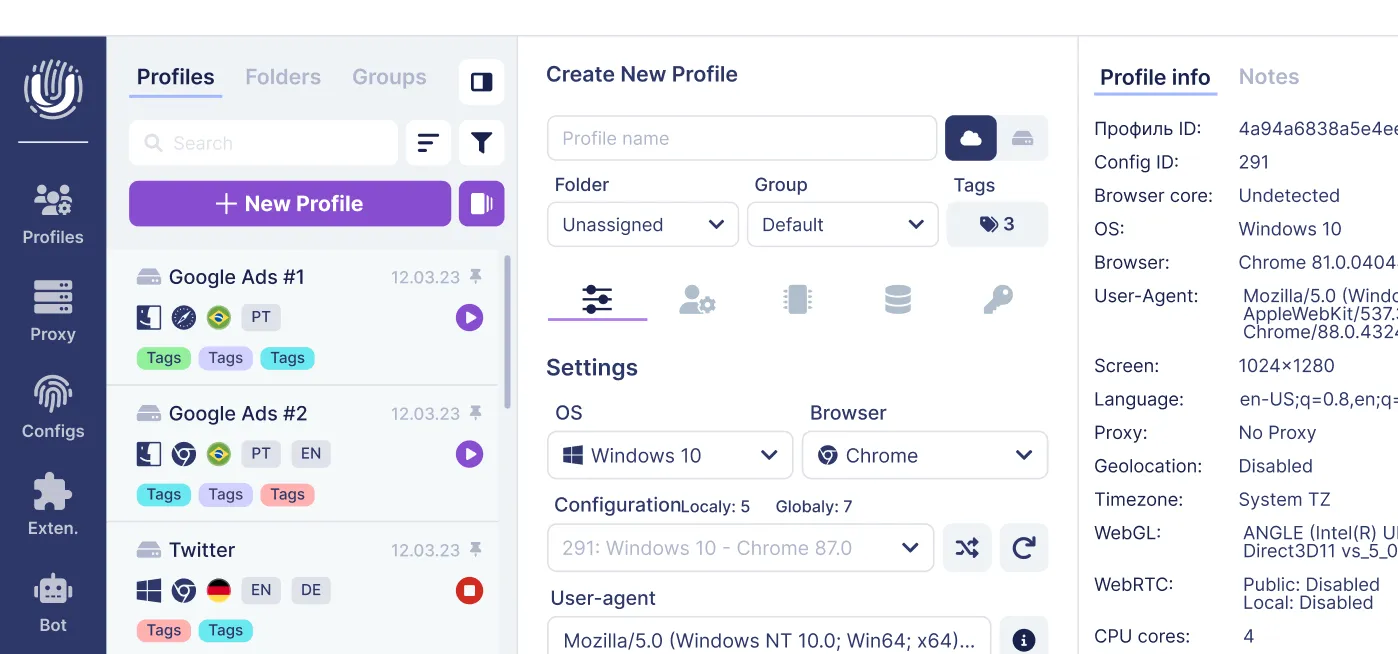
Undetectable.io is built around the idea that each profile in an antidetect browser has a unique fingerprint, fully isolated from every other profile. Here's what the feature set looks like in practice:
Multi-profile architecture:
- Creation of hundreds or thousands of browser profiles with unique fingerprints through batch profile creation. Mass create profiles in seconds using template lists.
- Tagging, notes, and grouping for organization. Group profiles by campaign, client, or platform.
- Drag-and-drop import of account data including cookies, proxies, and notes.
Fingerprint control:
- Antidetect browsers spoof browser parameters like user agent and screen resolution, but Undetectable.io goes further-controlling OS, memory, WebGL, WebRTC, geolocation, languages, fonts, and audio fingerprints.
- Choose between auto-generated realistic profiles or manual fine-tuning for advanced users who want control over every browser parameter.
- Profiles in antidetect browsers are isolated to avoid cross-contamination-separate cookies, storage, and extensions per profile.
Profile warmup:
- Built-in cookies bot (cookies robot) that simulates real browsing: opens popular websites, scrolls, builds cookie history, and ages new fingerprints before you use them for monetization. Antidetect browsers simulate user behavior to bypass detection, and the warmup process is a critical part of that.
- Antidetect browsers manage cookies to enhance anonymity online, and the cookies bot automates this at scale.
All of this is designed for large-scale affiliate marketing, SMM panels, marketplaces, and airdrop farming.
Local vs cloud profiles in Undetectable.io
Local profiles:
- Stored only on your machine. Your data never touches external servers.
- Unlimited in count on paid plans-ideal for solo users focused on maximum control and privacy.
- Performance depends on your hardware (CPU, RAM, disk space).
Cloud profiles:
- Stored on Undetectable.io servers with encryption.
- Sync across multiple devices-Windows laptop and macOS desktop-and share with team members.
- Essential for agencies coordinating work on dozens or hundreds of accounts.
When to use each:
- Local is best for maximum privacy, when one person works from one PC, or when handling sensitive account data you don't want on any server.
- Cloud is best for agencies and teams where multiple people need access to the same profiles, or when you work from multiple machines. You can learn how to set up profile synchronization between devices.
Even in cloud mode, the fingerprint logic remains identical. Only the storage and sync location changes.
Proxy and IP management with an anti detect browser
A perfect fingerprint paired with a flagged or mismatched IP address is useless. Proxies are essential for effective antidetect browser operation-they're half of the equation.
Proxy types:
- Residential and mobile proxies are best for affiliate marketing and social media platforms. They use IP addresses assigned to real devices by ISPs, making them harder for platforms to flag. Using residential proxies improves the effectiveness of antidetect browsers significantly.
- Datacenter proxies are useful for web scraping and testing but riskier for ad networks and social platforms that maintain datacenter IP blocklists.
How Undetectable.io handles proxy management: You can pair it with top-rated proxy service providers for marketing and OSINT depending on your GEO and budget.
- Add HTTP(S)/SOCKS proxies to each browser profile individually or in bulk, including step-by-step setups like connecting ABCProxy residential proxies to Undetectable.
- Test connection quality and geo-location before launching a profile.
- Save proxy configuration as templates for mass assignment across profiles. See how to set up proxy solutions in Undetectable.
Antidetect browsers use proxies to mask IP addresses for each profile, ensuring no two profiles share the same network fingerprint.
Practical example: Binding 100 Facebook profiles to 100 separate residential proxies from specific GEOs for a 2026 campaign. Each profile gets a US, UK, or German proxy that matches the profile's timezone, language, and locale settings. Mismatches between proxy geo and profile locale are one of the most common causes of account flags.
You can use your own proxies or purchase from third-party providers. The key is quality-clean IPs from real ISPs, not recycled datacenter addresses on every blocklist.
Automation and API: scaling with Undetectable.io
Manually clicking through 200 to 1,000 profiles is not viable in 2026. Automation support is essential for any serious multi-accounting operation, whether you're running robotic process automation scripts or custom workflows.
Automation options in Undetectable.io:
- Local REST API and cloud APIs for managing profiles-start, stop, create, edit, delete-programmatically.
- Integration with Playwright, Puppeteer, and Selenium for scripted workflows using Chrome DevTools Protocol.
- No code automation is also possible through AI and MCP integration for users focused on workflows without writing scripts.
Concrete automation tasks and scenarios:
- Bulk account registration and warmup across platforms.
- Automated logins and cookie refreshing before ad launches-keeping profiles "warm" so they don't appear abandoned.
- Data collection and competitor monitoring without triggering bot detection systems.
- Scheduling the cookies bot as part of larger scripts for affiliate campaigns and airdrops.
One caveat: antidetect browsers can consume substantial CPU and memory resources due to profile isolation. Each profile runs as a separate browser instance. Running 50 profiles concurrently on a mid-range laptop will strain resources. Plan hardware accordingly-16GB RAM minimum for moderate workloads, 32GB+ for heavy concurrent use.
Undetectable.io vs other popular antidetect browsers
The best antidetect browsers market is crowded, with tools spanning premium enterprise solutions to bare-bones budget options. Here's how the landscape breaks down:
Pricing across the market (as of mid-2026):
| Tool | Base Paid Plan | Profiles Included |
| Multilogin | $11/month | 10 profiles |
| Dolphin Anty | $10/month | 20 profiles |
| Hidemium | $15/month | 30 profiles |
| GeeLark | $19/month | 20 profiles |
| GoLogin | $39.5/month | 100 profiles |
| Undetectable.io | $34/month | 50 cloud profiles and Unlimited local profiles |
The key differentiators that separate Undetectable.io:
- Unlimited local profiles on paid plans vs artificial profile caps elsewhere. If you need 500 profiles, you don't need to upgrade to a premium tier-you need disk space.
- Local storage by default for sensitive data, vs forced cloud dependency in many competitors. Your profile data stays on your machine unless you choose to sync.
- Balance of ease-of-use for marketers with enough manual control for technical users. Auto-generated fingerprints for quick setup, full parameter control for power users.
Tools like Octo Browser and Ghost Browser target different segments. Some competitors focus on mobile emulation or cloud phones. Others emphasize enterprise team management. For a detailed comparison of alternatives, see the reviews of GoLogin alternatives and AdsPower alternatives.
Undetectable.io sits at the midpoint between ultra-premium enterprise tools and bare-bones budget browsers-ideal for serious affiliate marketing teams, agencies, and individual power users who need scale without enterprise pricing.
Choose an antidetect browser based on your specific use case: profile volume, team size, automation needs, and budget.
Cloud phones, mobile fingerprints, and when browsers aren't enough
Cloud phones are remote real or emulated Android devices (sometimes iOS) rented per session. They provide real android devices running actual mobile operating systems, complete with genuine mobile fingerprints, app stores, and sensor data. Some providers offer a dedicated android app or virtual phone interface for managing mobile accounts.
When mobile environments are required:
- TikTok campaigns that distrust desktop browsers and flag desktop user agents at higher rates.
- Mobile-only airdrops and app install offers that require native mobile interaction, not browser emulation.
- Browsers can expose and emulate some sensor-related signals, including orientation, accelerometer, and gyroscope data. However, reproducing a complete and physically realistic sensor stream may still be difficult and platform-dependent.
The trade-off:
- Cloud phones provide real mobile fingerprints but are significantly more expensive per profile and harder to automate at scale. They're best for mobile versions of workflows that genuinely require native app interaction.
- Antidetect browsers like Undetectable.io focus on desktop and mobile browser emulation for web-based workflows. For most advertising, marketplace, and social media management tasks that happen in a browser, an emulated browser profile with proper mobile emulation is sufficient.
The practical advice: use Undetectable.io for web advertising, marketplaces, and browser-based social media management. Reserve cloud phone solutions only where native mobile app interaction is mandatory-like running actual TikTok or Instagram apps that don't have web equivalents for certain features.
Best practices for safe multi-accounting and anti detection
Tools alone don't guarantee safety. Behavioral patterns matter just as much as technical fingerprint spoofing. Using an antidetect browser does not exempt users from complying with platform rules, and antidetect browsers are not guaranteed to provide complete anonymity.
Practical rules for managing multiple profiles:
-
Always match IP GEO, time zone, and language to the target region. A US residential proxy needs a US timezone, English locale, and US-appropriate fonts.
-
Avoid logging into the same account from multiple profiles or IPs. Pick one profile per account and stick with it.
-
Warm up new profiles gradually. Don't launch high-spend Facebook campaigns on day one. Build browsing history, accumulate cookies, visit popular websites first.
-
Use separate payment methods and email addresses per profile. Shared billing details are one of the fastest ways platforms link accounts.
-
Maintain consistent daily routines per profile. Vary login times, browsing patterns, and interaction types across profiles to mimic real users.
-
Monitor for account warnings. If a platform sends verification requests or restricts functionality, investigate before continuing.
Undetectable.io handles the technical side-fingerprints, proxies, cookies, profile isolation-but users must still respect platform risk thresholds and avoid patterns that link accounts behaviorally.
Legal, ethical, and platform policy considerations
Antidetect browsers are legal tools, similar to VPNs or privacy browsers. Antidetect browsers are essential for privacy-conscious users who want control over their digital footprint. There is no law in the US or EU that prohibits using software to manage browser parameters.
However, using them for fraud, spam, identity theft, or other illegal activities can violate laws in the EU, US, and many other jurisdictions. Platform terms of service for Meta, Google, TikTok, and Amazon typically prohibit operating multiple accounts for manipulation or misrepresentation.
Many legitimate uses exist:
- Privacy protection and separating personal from professional browsing
- Ad verification and QA testing across multiple regions
- Managing multiple advertising accounts for agency clients
- Research and competitive intelligence
If you're planning large-scale operations, review the terms of service of every platform you'll use and consider consulting legal counsel. Undetectable.io is designed for legitimate privacy and business cases, not for cybercrime.
How to choose the best anti detect browser for your workflow
The best anti detect browsers aren't one-size-fits-all. A freelancer running 10 profiles has different needs than an agency managing 1,000+. Antidetect browsers create unique profiles with different fingerprints, and they help manage multiple online accounts without detection-but which one fits you depends on context.
Key criteria to evaluate:
- Fingerprint quality and stability. Does the tool consistently pass PixelScan and IPhey after browser version updates? A standard antidetect browser should handle this without manual fixes.
- Profile limits. Unlimited profiles on paid plans (like Undetectable.io) vs capped tiers that force upgrades as you scale.
- Automation and api access. Does it expose local api or cloud API endpoints? Can you integrate with Playwright, Puppeteer, or Selenium for automation features?
- Team features and cloud sync. Can multiple team members access shared profiles? Is there role-based access control?
- OS support and update cadence. Windows and macOS coverage, and how quickly the tool updates its browser engines when new Chromium versions ship. Running outdated browser version strings is a detection risk.
Examples by scale:
- Small affiliate team (50–100 profiles): The free plan is suitable for limited testing and includes 5 cloud profiles, up to 50 profile creations per month, 1 session, and 10 browser configurations. Ongoing operation of 50–100 profiles requires a paid setup or additional capacity.
- Large arbitrage agency (1,000+ profiles): You need unlimited profiles, batch profile creation, api access for automation tasks, team management with group profiles, and cloud sync. Undetectable.io's paid plans with unlimited local profiles and advanced features cover this without per-profile pricing that balloons costs.
Undetectable.io is a strong starting point for both scenarios: free plan for testing, unlimited local profiles on paid plans for scaling, and a balanced feature set that serves both beginners and advanced users.
Getting started with Undetectable.io in under 30 minutes
Here's a practical quick-start to get your first profile running:
- Go to Undetectable.io, create an account, confirm your email, and select the free plan. No credit card needed.
- Download and install the client on Windows 10+ or macOS 12+. Installation takes under 5 minutes.
- Create your first browser profile: choose a template (e.g., Windows + Google Chrome), assign a residential or mobile proxy, and set language and time zone to match the proxy's GEO.
- Launch the profile and visit PixelScan or IPhey. Confirm that all core parameters show green-no timezone mismatches, no WebGL anomalies, no WebRTC leaks.
- Import cookies or use the built-in cookies bot to warm up the profile. The popular websites generator helps simulate realistic browsing before logging into Facebook, TikTok, Google, or marketplaces.
- Once warmed up, log into your target platform and begin working.
That's it. Your first separate browsing environment is live, with a realistic fingerprint and isolated storage.
Frequently asked questions about anti detect browsers
Are antidetect browsers legal in the EU/US in 2026? Yes. Antidetect browsers are legal privacy tools in both jurisdictions. They become problematic only when used for fraud, identity theft, or violating specific laws. The tool itself is no different legally from a VPN or privacy-focused browser.
Do I always need proxies with an anti detect browser? For multi-accounting, yes. Without proxies, all your profiles share the same IP address, which is the first thing platforms check. Free proxies exist but are unreliable and often blacklisted. Invest in quality residential or mobile proxy traffic for serious work.
What is the best free antidetect browser option today? Several tools offer free tiers. Undetectable.io's free plan includes 10 browser configurations and basic functionality sufficient to test fingerprint quality. Some competitors offer similar free trial options-Dolphin Anty and others have limited free tiers. The best free anti detect browser is the one that passes PixelScan consistently on the free plan.
Can I use Undetectable.io for Amazon, Facebook Ads, TikTok, and Google accounts? Undetectable.io supports creating profiles optimized for all major social media platforms and marketplaces. Each profile maintains separate cookies, fingerprints, and proxy connections. Whether you're running multiple social media accounts or marketplace stores, the isolation prevents cross-linking.
Can I use an anti detect browser for web scraping or SERP analysis? Yes. Many users use antidetect browsers for web scraping, SERP monitoring, and competitive intelligence. The advantage over plain headless tools is that antidetect browser profiles look like real users to bot detection systems, reducing blocks and CAPTCHAs. For heavy scraping, pair profiles with automation via the local REST API.
How many profiles can I run concurrently? This depends on your hardware. Each profile is a separate browser instance. On 16GB RAM, expect to run 10–20 profiles concurrently. On 32GB+, you can push higher. Undetectable.io doesn't impose artificial concurrent limits on paid plans.
Do I need a separate device for mobile accounts? Not necessarily. Antidetect browsers with mobile emulation can simulate mobile browser fingerprints for web-based workflows. For native app interactions (like posting TikTok videos via the app), you'll need cloud phones or real android devices.
Conclusion: building a resilient anti detection stack with Undetectable.io
In 2026, managing multiple accounts without a proper anti-detection stack is a matter of when-not if-you'll face bans. Antidetect browsers create unique profiles with distinct fingerprints, and that capability is now table stakes for affiliate marketing, social media management, marketplace selling, crypto operations, and data collection.
Undetectable.io delivers realistic fingerprint spoofing sourced from real devices, unlimited local profiles on paid plans, local data storage by default, a powerful automation API with local api and cloud endpoints, a built-in cookies bot for profile warmup, and a free entry tier that lets you test before committing.
Before your next campaign, test your setup: create profiles in Undetectable.io, attach quality residential or mobile proxies, and run them through PixelScan and IPhey. Fix any inconsistencies before going live.
Ready to start? Download Undetectable.io, sign up for free, and set up your first multi-account workspace in under 30 minutes. No credit card required.
Related posts
View all articlesJoin 450,000+ users who chose Undetectable
- Advanced anti-detection technology
- Unlimited local profiles from $49
- The perfect solution for multi-accounting